



The apex domain is known by varying names, such as:
- Domain apex.
- Zone apex.
- Base domain.
- Naked domain.
- Root domain.
An apex domain is essentially the main identity of a website. Understanding the apex domain is important for anyone who is involved in managing domains, websites, DNS, SEO or redirects.
In short, anyone who touches domains or redirect logic benefits from understanding how the apex behaves differently from subdomains.
What is an apex domain?
A domain apex is the root of a registrable domain and does not contain a subdomain prefix. Because it sits at the top of a domain’s hierarchy, the apex domain plays a special role in Domain Name System (DNS) configuration and how traffic resolves. In DNS terms, it’s the root of your DNS zone.
Example:
- Apex domain: example.com
- Not apex: www.example.com, blog.example.com
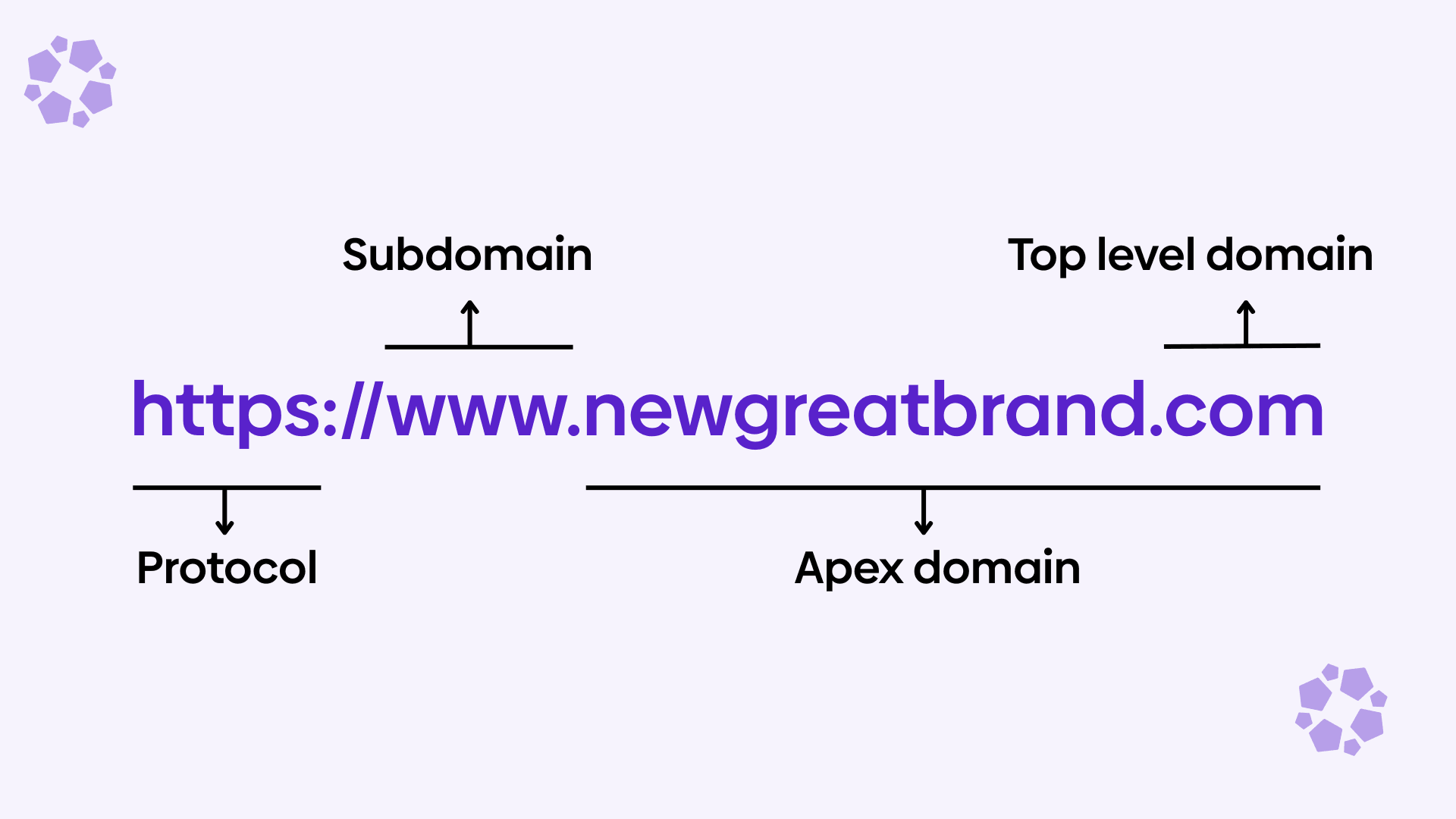
Apex domains vs. subdomains
While the apex domain represents the root of your DNS zone, subdomains sit beneath it and serve more specialized purposes. Understanding how these two levels differ helps clarify why they behave differently in DNS and why they require different approaches when configuring redirects or infrastructure.
What is an apex domain (example.com)
- The base domain without a prefix.
- Represents your core brand identity.
- Common destination for type-in traffic and external links.
- Often used as the starting point for canonicalization (e.g., deciding between hosting your website on the apex vs. www).
The apex domain name is often redirected to the www subdomain. Many companies will choose to host their website on the www subdomain and redirect the apex to the www subdomain.
If you want to confirm how your apex domain and www version behave, run both URLs through a redirect checker. This lets you see whether one version redirects to the other, which status code is used and what the final destination is.
Apex domains carry important, mandatory DNS records, such as the:
- SOA (start of authority) record - defines the administrative starting point for a DNS zone. It tells DNS resolvers which server is authoritative for the domain and how DNS information should be managed. Every DNS zone must have exactly one SOA record and it always lives at the apex domain.
- NS (name server) record - identifies the authoritative DNS servers for a domain. A domain typically has multiple NS records for redundancy and reliability, and these records also live at the apex domain.
What is a subdomain?
- Prefixes that come before the apex.
- Used to organize content, services or routing.
- Ideal for specific functions such as:
- www. for primary website hosting.
- blog. for content hubs.
- app. or dashboard. for applications.
- go. or link. for branded shortlinks or redirects
Subdomains are far more flexible than the apex because they don’t carry the mandatory DNS records (SOA, NS). Subdomains can freely use other types of records that make subdomains easier to integrate with SaaS platforms, CDNs and redirect services, including:
- CNAME record - acts as an alias pointing one hostname to another and are commonly used to point subdomains to SaaS platforms or CDNs.
- A/AAAA record - maps a domain to an IPv4 or IPv6 address, telling browsers where to connect.
Where each fits in DNS architecture
DNS (Domain Name System) is the system that translates human-readable domain names (like example.com) into IP addresses that computers use to find and connect to websites and services. It acts like the internet’s phonebook, directing traffic to the correct destination.
In DNS architecture:
- The apex domain is the root of your DNS zone.
- It must contain authoritative DNS records like NS and SOA.
- Because of this, the apex must follow stricter DNS rules.
- Notably, it cannot have a CNAME record.
- Subdomains inherit from the apex and sit lower in the hierarchy.
- They do not contain zone-defining records.
- They can freely use CNAMEs, A/AAAA or other record types.
- This flexibility makes them ideal for routing traffic to external services or redirect platforms.
In practice, this means:
- If you need to point www.example.com to a redirect platform or CDN, a CNAME record works perfectly.
- If you need to point example.com (the apex domain) to that same service, you must use A/AAAA records ALIAS/ANAME or DNS CNAME flattening, because a CNAME at the apex isn’t allowed.
This distinction is why apex and subdomains often follow different patterns during migrations or DNS cutovers.
What is a CNAME record?
A CNAME record (canonical name record) points a domain or subdomain to another domain. Instead of pointing directly to an IP address, a CNAME tells resolvers: ‘This domain is an alias of that domain, go look up the target’s DNS records instead.’
CNAMEs are commonly used to:
- Point your website to a CMS (such as wordpress).
- Integrate with SaaS tools, CDNs and edge networks.
- Keep DNS flexible as infrastructure changes, since updates to servers, regions or IP addresses can be handled by the provider without requiring manual DNS changes on your side.
However, CNAMEs cannot be used at the apex domain. This is because the apex must contain mandatory records (NS, SOA and often MX/TXT)
What is an A record?
An A record (Address Record) is one of the core DNS record types. It maps a domain name to an IPv4 address, the numerical address that identifies a server on the Internet. Putting it simply, an A record points to a specific IP address.
- example.com → A 192.0.2.123.
When someone enters your domain in a browser, DNS uses the A record to determine which server to connect to. A records matter for apex domains because:
- They are allowed at the apex (unlike CNAMEs).
- They provide a direct and standards-compliant way to route example.com to a specific service or infrastructure.
- Any changes to the server or redirect provider’s IP require updating this record.
What is an A record vs. A/AAAA record?
An A record maps a domain name to an IPv4 address, while an AAAA record maps a domain name to an IPv6 address.
When you see A/AAAA records referenced together, it means a domain is configured to support both IPv4 and IPv6 traffic, ensuring broader compatibility and better future-proofing.
Other DNS records
Throughout this guide, you’ll see references to several common DNS record types that play different roles in how a domain functions:
- MX (mail exchange) record - specifies which mail servers are responsible for receiving email for a domain and in what priority order.
- TXT (text) record - stores arbitrary text data associated with a domain and is commonly used for verification and security purposes.
Why apex domains matter for modern websites
The apex domain plays a central role in how users, search engines and services interact with your brand online. While subdomains offer flexibility, the apex remains the anchor point of your digital presence and handling it correctly is essential for performance, SEO and long-term scalability.
Branding for apex domains
Your apex domain is often the simplest, most recognizable version of your brand. It’s what people type instinctively (example.com), what appears on packaging, emails, offline materials and what users share verbally with others.
The apex domain is often the primary entry point for users to access your website. Many companies redirect their apex to their canonical host (often www.example.com) to maintain a polished and predictable experience.
Today, users expect that typing a company’s base domain “just works,” so a poorly configured apex can lead to broken journeys, inconsistent behavior or unnecessary redirect chains, all of which directly impact brand perception.
SEO for apex domains
Search engines treat the apex domain as a core identity signal. Ensuring it resolves correctly is essential for:
- Consolidating link equity.
- Avoiding duplicate versions of your site.
- Maintaining consistent canonicalization.
- Preserving rankings during migrations or domain changes.
Google recommends choosing one preferred host (www or non-www) and consistently redirecting other variants to it to avoid splitting crawl activity and authority.
A misconfigured apex domain can accidentally create redirect chains, loops or inconsistent indexing, all of which can dilute SEO performance.
Technical infrastructure for apex domains
The apex domain has unique responsibilities in DNS, which affects how traffic can be routed. It must contain essential DNS records such as SOA and NS, and often MX/TXT. Because of this, it cannot use a CNAME record, a constraint documented across DNS standards and vendor guidance.
This affects several infrastructure decisions:
- Whether you host your website/apps on your apex domain or www subdomain.
- How easily you can integrate global load balancing.
- How you provision SSL/TLS certificates.
- How reliably your domain behaves during cutovers.
This makes the apex more operationally sensitive, but also more important to configure correctly.
Compatibility with SaaS platforms and CDNs
Modern web stacks often rely on third-party SaaS platforms, CDNs, CMSs and edge networks to serve content. Subdomains integrate easily with these platforms via CNAME records, the standard method providers use to accept traffic.
But because apex domains cannot use CNAMEs, SaaS and CDN integrations depend on alternative DNS mechanisms:
- A/AAAA records: pointing to provider IPs.
- ALIAS/ANAME: for apex-compatible CNAME-like behavior.
- CNAME flattening: available through DNS providers like Cloudflare.
These exist because SaaS and CDN providers overwhelmingly use hostnames (not IPs) to expose their services. A standard integration pattern (www → CNAME → service.example.net) simply isn’t available at the apex.
Common use cases for apex domains
While apex domains come with some DNS constraints, understanding when to use the apex and when not to, helps teams make better decisions around branding, SEO and infrastructure.
Primary website hosting
One of the most common uses of an apex domain is as the primary entry point to a company’s website.
In practice, companies must choose between one of two ways to host their website:
- Apex as the canonical host of the website.
- example.com serves the main site.
- www.example.com redirects to the apex.
- www subdomain as the canonical host of the website.
- www.example.com serves the main site.
- example.com redirects to the www.
Both approaches are valid from an SEO perspective, as long as one version is clearly preferred and all others redirect consistently.
Many organizations choose to redirect the apex to www because subdomains allow simpler DNS integrations (via CNAMEs) with hosting platforms, CDNs and SaaS providers. The apex still plays a critical role by acting as a stable, branded entry point that funnels traffic to the canonical destination.
When to use a subdomain instead
Using the apex domain isn’t always the best choice.
Subdomains are often a better fit when:
- Integrating with third-party SaaS platforms or CDNs that expect a CNAME.
- Hosting applications, dashboards or APIs.
- Creating short links or branded link hubs (e.g., go.example.com).
- Isolating infrastructure for performance or security reasons.
Because subdomains don’t carry mandatory DNS records like SOA or NS, they’re significantly more flexible. They can freely use CNAME records, making them easier to connect to external services.
This is why many teams choose to host their websites and apps on a subdomain. Oftentimes, companies will use subdomains to host multiple services:
- www.example.com - host marketing website.
- app.example.com - host saas tool.
- help.example.com - host help articles and knowledge base.
- status.example.com - host status page.
Most teams will redirect the apex to a subdomain rather than hosting complex logic directly at the root.
SEO and performance implications
How you configure and route your apex domain has a direct impact on SEO performance, crawl efficiency and page load reliability. While apex domains and www domains can both rank equally well, consistency and technical execution are what ultimately determine success.
When to use the apex domain vs. www for SEO
From a search engine perspective, there is no inherent ranking advantage to using an apex domain (example.com) over a www subdomain (www.example.com) or vice versa. What matters is that you choose one version and stick to it consistently.
However, there are practical differences that influence SEO execution:
- www as canonical
- Easier integration with CDNs, SaaS platforms and hosting providers via CNAME.
- Often simpler to scale and migrate.
- Apex can cleanly redirect to www.
- Apex as canonical
- Shorter, cleaner URLs.
- Requires A/AAAA records or ALIAS/ANAME instead of CNAME.
- Slightly more DNS complexity to manage correctly.
Because of these constraints, many organizations choose www as the canonical host and treat the apex as a redirect entry point. This approach minimizes technical risk while preserving SEO equity.
Canonicalization and redirect best practices
To avoid duplicate content and diluted rankings, search engines recommend clearly defining a single canonical version of your site and redirecting all other variants to it.
Best practices include:
- Use 301 (permanent) redirects when consolidating apex and www domains.
- Ensure HTTP → HTTPS redirects occur in a single hop.
- Avoid multi-step redirect chains (e.g., apex → http www → https www).
- Keep redirect logic consistent across all paths.
Poorly implemented apex redirects can result in:
- Redirect loops.
- Crawl inefficiencies.
- Split indexing between www and non-www versions.
- Lost link equity.
Performance considerations with DNS providers
DNS resolution plays a critical role in performance, especially at the apex, where options are more limited.
Key performance considerations include:
- A/AAAA records.
- Resolve directly to IP addresses.
- Fast and predictable.
- Require maintenance if IPs change.
- ALIAS / ANAME / CNAME flattening.
- Add a resolution step at the DNS provider
- Typically cached efficiently
- Slightly more complex to debug
While the latency difference is usually minimal, a misconfigured DNS can cause:
- Slow resolution times.
- Stale IP responses.
- Inconsistent routing across regions.
For high-traffic or global sites, choosing a DNS provider with strong performance, low TTL control and reliable apex support is essential.
Technical considerations for apex domains
Because apex domains sit at the root of a DNS zone, they come with technical constraints that don’t apply to subdomains. Understanding these constraints is essential when connecting apex domains to redirect platforms, CDNs or cloud infrastructure.
Why CNAME records can’t be used at the apex
Under DNS standards, a CNAME record cannot coexist with other record types at the same name. Since the apex domain must contain SOA and NS records (and often MX and TXT records as well), placing a CNAME at the apex would violate the DNS specification.
That’s why configurations like this are invalid:
- example.com → CNAME target.service.com.
Subdomains don’t have this restriction, which is why www.example.com or go.example.com can safely use CNAME records while the apex cannot.
This limitation is one of the most common sources of confusion when teams attempt to connect apex domains to SaaS platforms, redirect services or CDNs.
ALIAS, ANAME and CNAME-flattening explained
To work around the CNAME restriction at the apex, many DNS providers support CNAME-like alternatives that remain compliant with DNS standards.
ALIAS and ANAME records allow you to point the apex domain to a hostname instead of a fixed IP. The DNS provider resolves the hostname internally and returns A/AAAA records to resolvers.
Similarly, some providers offer CNAME flattening, which automatically resolves a CNAME at the apex and publishes the resulting IPs to the DNS response.
These approaches provide:
- Greater flexibility when integrating with SaaS platforms.
- Automatic handling of IP changes.
- DNS-standard compliance.
However, they are provider-specific, meaning behavior and availability vary depending on where your DNS is hosted.
Connecting apex domains to CDNs and cloud platforms
Most CDNs and cloud platforms expect customers to point a hostname to them using a CNAME record. This works seamlessly for subdomains but requires additional consideration at the apex.
To connect an apex domain to a CDN or cloud service, teams typically use one of the following approaches:
- A/AAAA records pointing directly to the provider’s edge IPs.
- ALIAS/ANAME or CNAME flattening to map the apex to the provider’s hostname.
- Redirect apex → www, with the CDN handling traffic on the www subdomain.
Cloud providers like AWS explicitly recommend ALIAS records for apex domains when integrating with services such as CloudFront or load balancers.
Routing, failover and HTTPS at the apex
Because the apex domain often serves as a primary entry point, routing and reliability considerations are especially important.
Key factors include:
- Failover and redundancy.
- Using multiple A/AAAA records or provider-managed routing.
- Ensuring fallback behavior if a target endpoint becomes unavailable.
- HTTPS and certificate coverage.
- Apex domains require valid TLS certificates just like subdomains.
- Certificate provisioning can be more complex when the apex points to third-party infrastructure.
- Global routing consistency.
- DNS TTL values affect how quickly changes propagate.
- DNS-based routing must be coordinated carefully during migrations or incident response.
Because DNS changes propagate more slowly than application-level updates, many teams prefer to manage routing logic at the redirect or edge layer instead of repeatedly modifying apex DNS records. This approach reduces risk while maintaining flexibility.
Best practices for managing apex domains
Given the technical constraints and SEO implications of apex domains, a small set of best practices can help teams avoid common pitfalls and manage their domains more confidently, especially during migrations, rebrands or large-scale changes.
Pick a canonical version early (www or apex)
One of the most important decisions you can make is whether your canonical domain should be the apex domain (example.com) or a subdomain (www.example.com).
From an operational standpoint:
- Using www as canonical often simplifies DNS and SaaS/CDN integrations because CNAME records are allowed.
- Using the apex as canonical can offer cleaner branding but requires stricter DNS planning and infrastructure coordination.
Whichever approach you choose, decide early. Changing the canonical strategy later can introduce unnecessary risk.
Select a DNS provider with ALIAS/ANAME support
Because apex domains can’t use standard CNAME records, DNS provider capabilities matter more than many teams realize.
Providers that support ALIAS, ANAME or CNAME flattening make it significantly easier to:
- Point apex domains to SaaS platforms or CDNs.
- Handle infrastructure changes without updating IP addresses.
- Reduce DNS-related operational overhead.
Not all DNS providers offer these features and behavior can vary between vendors.
For teams managing multiple domains or frequent changes, choosing a DNS provider with strong apex support is a foundational decision.
Use 301 redirects to consolidate authority
When routing traffic between the apex and www (or during domain changes), 301 (permanent) redirects should be your default.
301 redirects signal to search engines that a URL has permanently moved, allowing link equity and ranking signals to transfer to the destination.
Best practices include:
- Redirect all non-canonical versions to the canonical domain.
- Keep redirect logic centralized and auditable.
Centralized redirect management, rather than scattering rules across DNS, servers and CDNs, reduces the chance of inconsistencies and makes future changes safer.
Test HTTPS and certificate coverage
Apex domains require the same level of HTTPS coverage as subdomains, but certificate provisioning can be more sensitive, especially when the apex points to third-party infrastructure.
Before going live:
- Confirm valid TLS certificates exist for both apex and www (if applicable).
- Test HTTP → HTTPS redirects in a single hop.
- Verify certificate renewal processes (automated vs manual).
Modern certificate authorities support apex domains, but DNS-based validation and provider-specific requirements can introduce edge cases.
Testing certificate coverage early helps prevent browser warnings, SEO penalties and unexpected downtime.
Final thoughts
The apex domain sits at the very top of your DNS hierarchy and because of that, it behaves differently from any other hostname. It’s the version of your domain users type first, search engines treat as foundational and DNS require to hold essential system records.
Those DNS requirements mean apex domains can’t use CNAME records, which directly affects how they connect to SaaS platforms, CDNs and redirect services. As a result, teams typically rely on A/AAAA records, ALIAS/ANAME, CNAME flattening or redirecting the apex to a canonical subdomain.
Understanding these constraints is essential for avoiding redirect loops, SEO issues and operational surprises, especially during migrations, rebrands or domain consolidations.
Best practice recommendations
To manage apex domains effectively:
- Choose a canonical domain early (www or apex) and apply it consistently.
- Use 301 redirects to consolidate traffic and preserve SEO authority.
- Select a DNS provider that supports ALIAS/ANAME or CNAME flattening.
- Keep redirect logic centralized to avoid fragmentation and errors.
- Test HTTPS and certificate coverage for both apex and subdomains.
- Avoid unnecessary DNS changes once traffic is flowing reliably.
These practices help ensure your apex domain remains stable, secure and easy to manage, no matter how your website or infrastructure evolves.
Need to redirect your apex domain to www (or vice versa)?
urllo makes it easy to set up secure, SEO-friendly redirects for apex and subdomains, without complex DNS changes or downtime.
Frequently asked questions about apex domains (FAQ)
1. What is an apex domain?
An apex domain, also called a root domain or zone apex, is the highest level of a domain you control. It contains no subdomain prefix (e.g., example.com, not www.example.com).
2. How is an apex domain different from a subdomain?
A subdomain is a prefix added to the main domain (e.g., www.example.com, app.example.com). The apex domain is the base domain without any prefix and typically contains essential DNS records like SOA, NS and A/AAAA.
3. Should my website use the apex domain or “www” as the primary address?
Both options are valid. Many brands choose www for added technical flexibility with CDNs, traffic routing and failover. Others choose the apex domain for a shorter, cleaner URL. The key is to pick one canonical domain and redirect the other.
4. Why can’t I use a CNAME record at the apex domain?
DNS standards prohibit CNAME records at the zone apex because the apex must host essential records (SOA, NS, A/AAAA). Instead, DNS providers use ALIAS, ANAME or CNAME-flattening to emulate CNAME behavior at the root.
5. What is CNAME flattening?
CNAME flattening is a DNS technique that allows the apex domain to point to a hostname (such as a CDN) while still returning A/AAAA records, keeping it compliant with DNS requirements.
6. What are ALIAS or ANAME records?
ALIAS and ANAME records are proprietary DNS record types that mimic CNAME functionality at the root domain. They resolve dynamically to the target hostname and serve an IP address to clients.
7. Can I point my apex domain to a CDN?
Yes, if your DNS provider supports CNAME-flattening, ALIAS or ANAME records. Traditional CNAMEs cannot be used at the apex, so compatibility depends on DNS capabilities.
8. Does using the apex domain affect SEO?
No. Google treats the apex domain and www subdomain the same when redirects, canonical tags and sitemaps are set correctly. SEO impact comes from consistency, not the choice itself.
9. Should I redirect the apex domain to “www” or vice versa?
Yes. Choose one canonical version and set a 301 redirect from the other. This consolidates domain authority, prevents duplicate content and strengthens SEO signals.
10. What is an apex redirect?
An apex redirect is a DNS or server-level rule that automatically forwards traffic from the root domain (e.g., example.com) to another URL, typically www.example.com or another branded experience.
11. Can an apex domain support email services?
Yes. Apex domains support MX records normally. You can host email at the apex domain or on any subdomain.
12. Why do some SaaS or hosting platforms not support apex domains?
Some SaaS platforms require CNAME-based routing for SSL automation, load balancing or multi-region support. Because CNAMEs cannot exist at the apex, these platforms prefer or require www.
13. What is the “zone apex” in DNS?
The zone apex is the root of your DNS zone and is where core DNS records live, including SOA, NS and A/AAAA records. This is the technical foundation of your apex domain.
14. Can I host multiple services on an apex domain?
Not directly. The DNS can only point an apex domain to a single destination, so it can’t route traffic to multiple services on its own. To support multiple services, teams typically route the apex through a single entry point (like a CDN, reverse proxy or redirect layer) or use subdomains for each service.
15. How do I secure an apex domain with HTTPS?
Use a TLS certificate that covers the root domain. Most CDNs and hosting providers support apex-level HTTPS when the DNS provider supports appropriate root-domain routing methods (ALIAS/ANAME/flattening).
16. What happens if my DNS provider doesn’t support ALIAS, ANAME or CNAME flattening?
You may not be able to point the apex domain directly to a CDN or SaaS service. Options include switching DNS providers, using the www subdomain as primary or using a reverse proxy.
17. Can I use an apex domain for a URL shortener?
Yes, but many teams prefer subdomains (e.g., go.example.com) to avoid mixing redirect logic with primary website routing or email records.
18. Does using an apex domain affect website performance?
It can. Performance depends on DNS provider capabilities. Some advanced routing, failover and multi-CDN configurations work better on subdomains like www.
19. Is the apex domain better for branding?
Many brands use the apex domain because it looks clean and modern. Others stick with www for legacy support and advanced routing features. The decision depends on your technical and branding priorities.
20. Can I switch from www to the apex domain later?
Yes. With proper 301 redirects, updated canonical tags and a clean DNS setup, you can migrate either direction while preserving SEO equity.
21. Can you use urllo to redirect the apex domain to the www?
Yes. Urllo can be used to redirect traffic from the apex domain to the www domain (or vice versa), as long as your DNS is configured to route the apex domain to urllo first.

By Shannon Young
Customer Success Manager
Shannon is a seasoned professional in the customer success space. She has years of experience in a wide variety of customer-facing roles in various sectors.
Always ready to take on the next challenge, whether it be a new offensive cross stitch pattern or making her dogs sit still for another themed photo, she is prepared for anything.











.png&w=2560&q=88)
