A shortened link on someone else's domain can cost you trust and brand recognition. People hesitate before clicking a bit.ly address in an email or on social media, because the destination is invisible and the domain isn't yours. On a branded link, the domain is your own and the difference shows up in click-through rates. The tool you choose to create and manage those links decides whether they stay branded, measurable and provide useful analytics or turn into a sprawl of one-off URLs nobody can audit.
This guide compares the branded link tools worth considering in 2026, what each one is genuinely good at and where each one stops.
Things to consider when looking for a branded link tool
Every tool here creates a short link on a domain you control. What separates them is everything around that link: what it costs to switch branding on, how long your data survives, who can set it up and how much the tool does beyond the link itself. Weigh these before you commit.
Which plan unlocks a custom domain.
A custom domain is the whole point of a branded link, but not every tool includes one at the price you first see. Some gate it behind a higher tier, so your links stay on the provider's shared domain until you upgrade. Check the specific plan where your own domain becomes available, not just whether the feature exists somewhere in the lineup.
What the free plan really gives you.
"Free" covers a wide range in this category. One tool's free tier includes a custom domain but caps you at a handful of links and tracked clicks a month. Another gives generous link volume but keeps branding locked. A third offers a time-limited trial instead of a standing free plan. Read the caps, not the label.
Analytics depth and how long data lasts.
Counting clicks is the baseline. The real questions are how long each plan retains your data, whether detailed analytics carry a click cap and whether conversion or affiliate attribution is built in or sold as an add-on. On some tools retention narrows as you move down the tiers, so a cheaper plan forgets your campaign history sooner than you expect.
How pricing gates features.
Watch for tools that bundle unrelated features into the same tier, so reaching the one thing you want means paying for a whole plan you mostly don't need. Click caps that sit on every tier are the other trap: growth alone can push you into a more expensive plan for reasons that have nothing to do with the features you were after.
API and automation.
If a developer will touch these links, look for documented REST API access, webhooks and ideally SDKs. That is what lets you create and repoint links programmatically and feed click data into your own systems rather than working one screen at a time in a dashboard.
Security and compliance.
Regulated teams often can't buy without it. SOC 2 is common across the category. HIPAA is rarer. Governance controls like single sign-on, role-based access control and audit logs matter more than a couple of people manage links, and they aren't a given on every tool.
Who sets it up and who owns it day to day.
Some tools assume a custom domain and some comfort with DNS records, which suits developers and slows non-technical teams down. Others are built for marketers to launch and change links without an engineering ticket. Match the tool to the person who will actually run it.
Scope beyond the single link.
Decide whether you need a shortener or a link management layer. For a handful of personal links, a shortener is enough. For a brand running links across many domains, alongside redirects, migrations and a portfolio of URLs, the value is in managing all of it in one place rather than stitching separate tools together.
The best branded link tools in 2026 at a glance
- Bitly: the recognized all-in-one, if you want shortening and QR codes in one place.
- Rebrandly: the branded-link specialist, built for agencies juggling many brands and domains.
- Short.io: developer-friendly with a usable free tier, custom domains without the bill.
- Dub: open-source, with analytics and conversion attribution built in rather than bolted on.
- BL.INK: enterprise link management, chosen for its compliance certifications.
- urllo: branded links and QR codes plus redirect infrastructure and governance, for managing links across many domains at scale.
Comparison at a glance
Pricing below is approximate and reflects entry-level paid tiers as of August 2026. Providers change plans often, so confirm the current figure on each provider's own pricing page before you commit.
| Platform | Best for | Free plan | Custom / branded domain | Analytics | API | Security & compliance | Entry paid price |
|---|---|---|---|---|---|---|---|
| Bitly | All-in-one marketing | Not for branded links | From the Growth tier only | Yes; retention widens by tier | Yes | SOC 2 | Custom domain from ~$35/mo (Growth) |
| Rebrandly | Branded-link depth, agencies | Yes; 10 links/mo, 1 custom domain | Yes, including on free | Yes; with click caps on detailed analytics | Yes | SOC 2 Type 2, HIPAA | From ~$13/mo |
| Short.io | Developer-led, multi-domain | Yes, 5 custom domains | Yes | Yes | Yes; webhooks | SOC 2 | From ~$5/mo |
| Dub | Developers, conversion tracking | No | Yes | Yes, on free plan | Yes; SDKs, webhooks | SOC 2 | From ~$30/mo |
| BL.INK | Regulated enterprise | No | Yes | Yes | Yes | SOC 2, HIPAA | From ~$48/mo |
| urllo | Branded links + redirect governance at scale | 14-day trial, no card | Yes | Yes | Yes | SOC 2, SSO, RBAC, audit logs | From ~$49/mo |
What a branded link tool actually is
A branded link is a short link built on a domain you control, so go.yourbrand.com/spring replaces a generic bit.ly/3xYz9. It's the same underlying redirect, but the visible domain carries your name instead of the shortener's.
Three terms get used loosely and are worth separating.
A generic short link uses the provider's shared domain and gives you no brand presence.
A branded link swaps in your own domain.
A vanity URL is a branded link with a chosen, readable slug rather than a random string, so the whole address is legible: yourbrand.com/register rather than yourbrand.com/a1b2c3.
The gap between a shortener and a tool is what happens after the link exists. A basic shortener creates the link and counts clicks. A tool lets you organize links across campaigns and domains, edit or repoint them after they're live, measure them with retained analytics, control who on the team can do what and connect the whole thing to your other systems through an API. For a handful of personal links, a shortener is enough. For a brand running campaigns across channels, the management layer is the point.
Branded link tools, compared
Bitly
Bitly holds a strong position in the URL-shortening category and still carries the most name recognition, which is part of its value: recipients recognize the format and the brand. Beyond shortening, it bundles QR codes, a link-in-bio page and a UTM builder, so a marketing team can run most link tasks from one account.
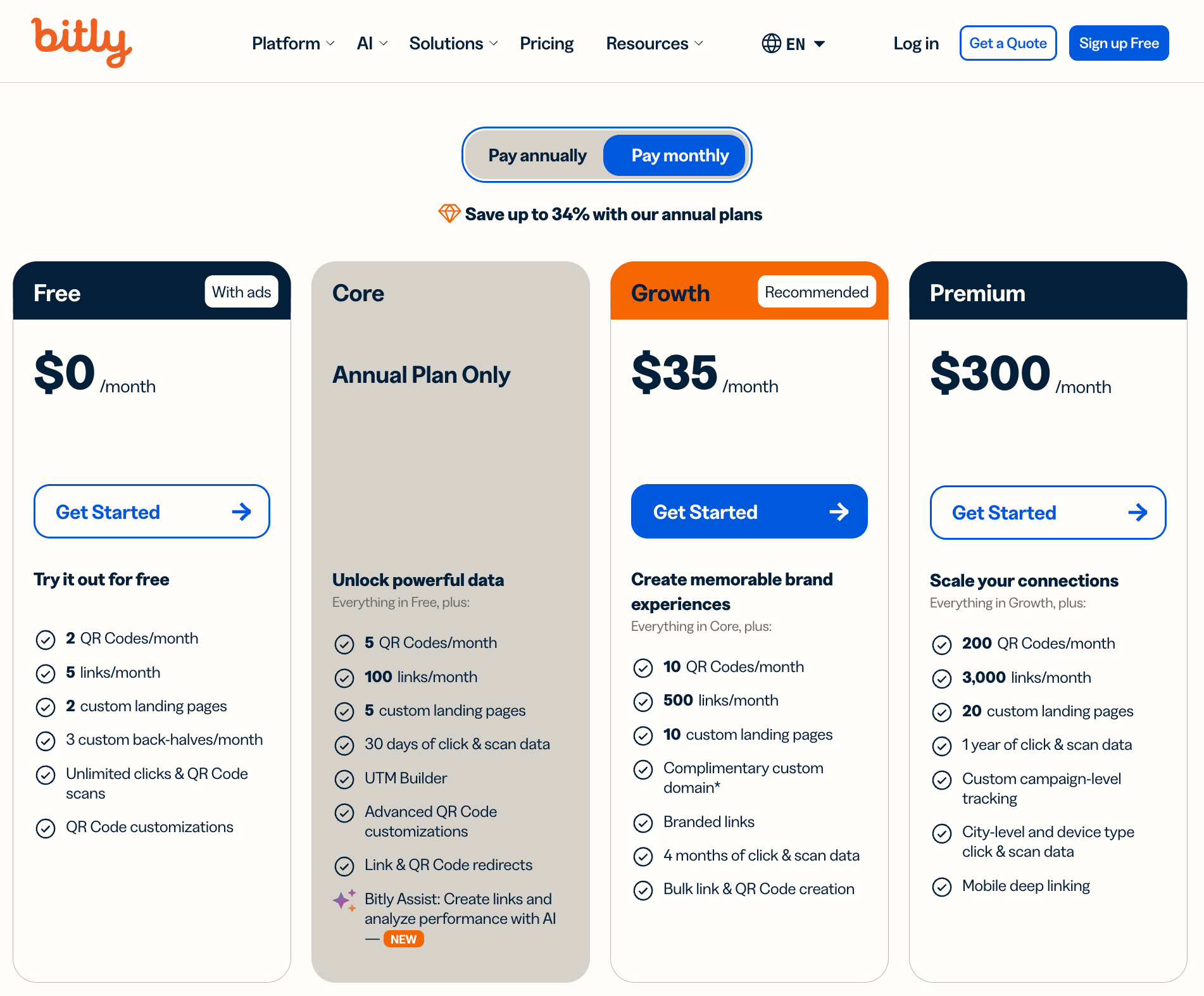
The catch is where branding lives in the plan structure. Bitly's free tier is thin and its entry paid tier doesn't include a custom domain, so your links stay on bit.ly until you reach the Growth plan. Analytics retention also widens as you move up the tiers, which means the cheaper plans forget your campaign data sooner than you might expect.
Best for:
Teams that want a recognized, all-in-one marketing tool and are prepared to pay for the tier where branded domains switch on.
Avoid if:
You need branded links on a budget. Branding doesn't switch on until the Growth tier, so on the cheaper plans your links stay on bit.ly and your older campaign data ages out sooner than you'd expect.
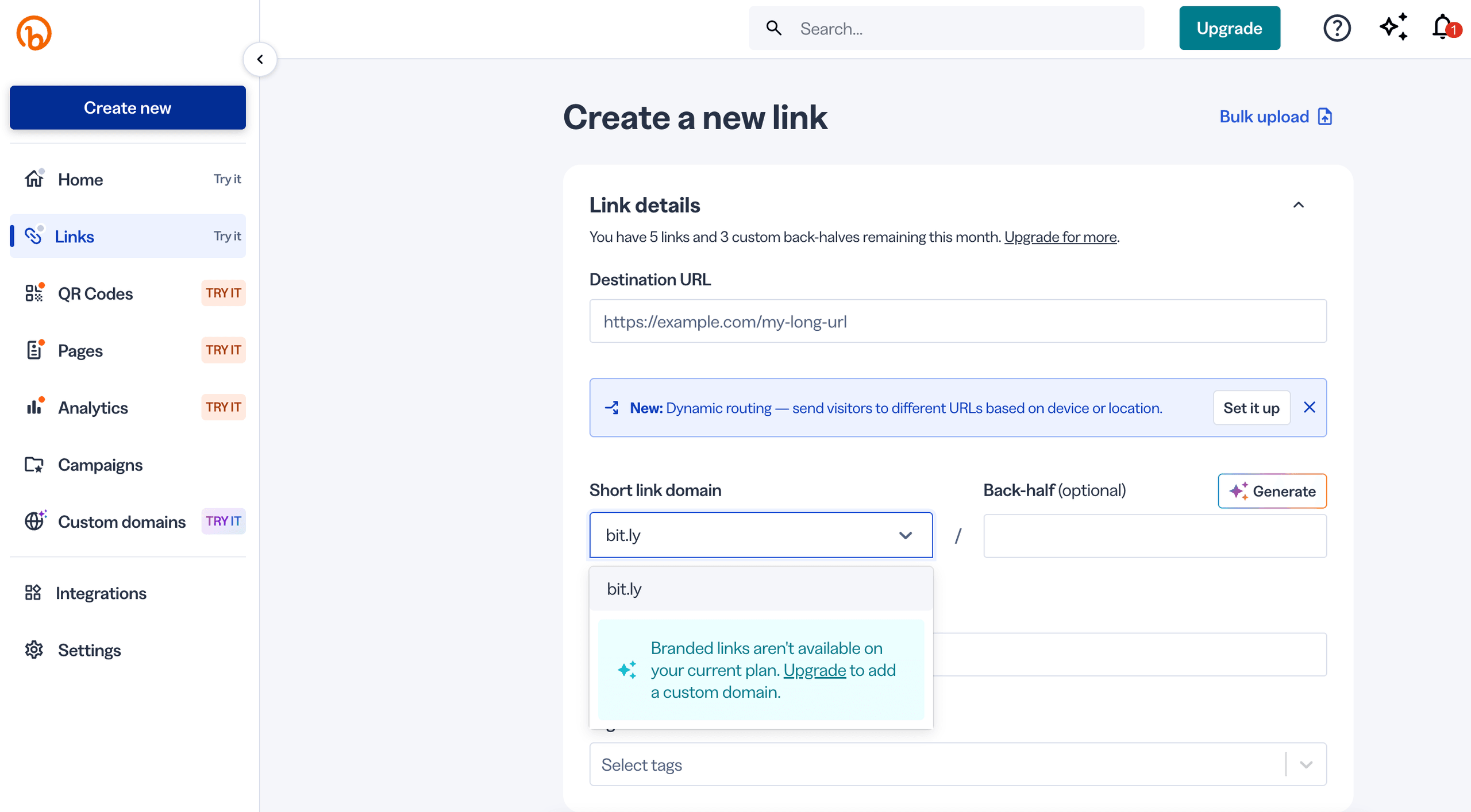
From the “Create a new link” tab, we can see that while we can easily create a short link, branded links are restricted to higher-tiered plans.
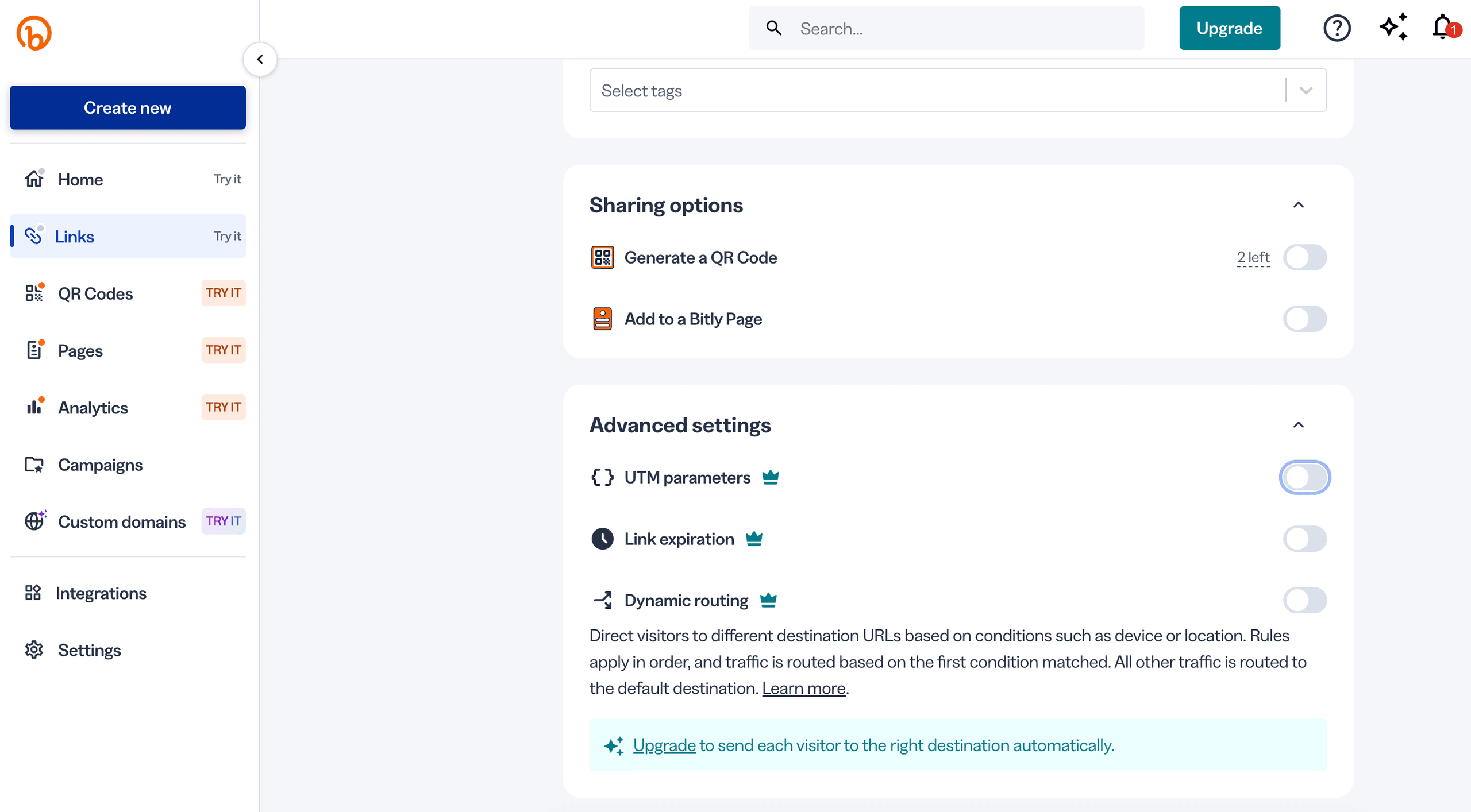
There are also additional options such as adding to a landing page or generating a QR code with the link. Advanced settings include UTM parameters, link expiration options and dynamic routing.
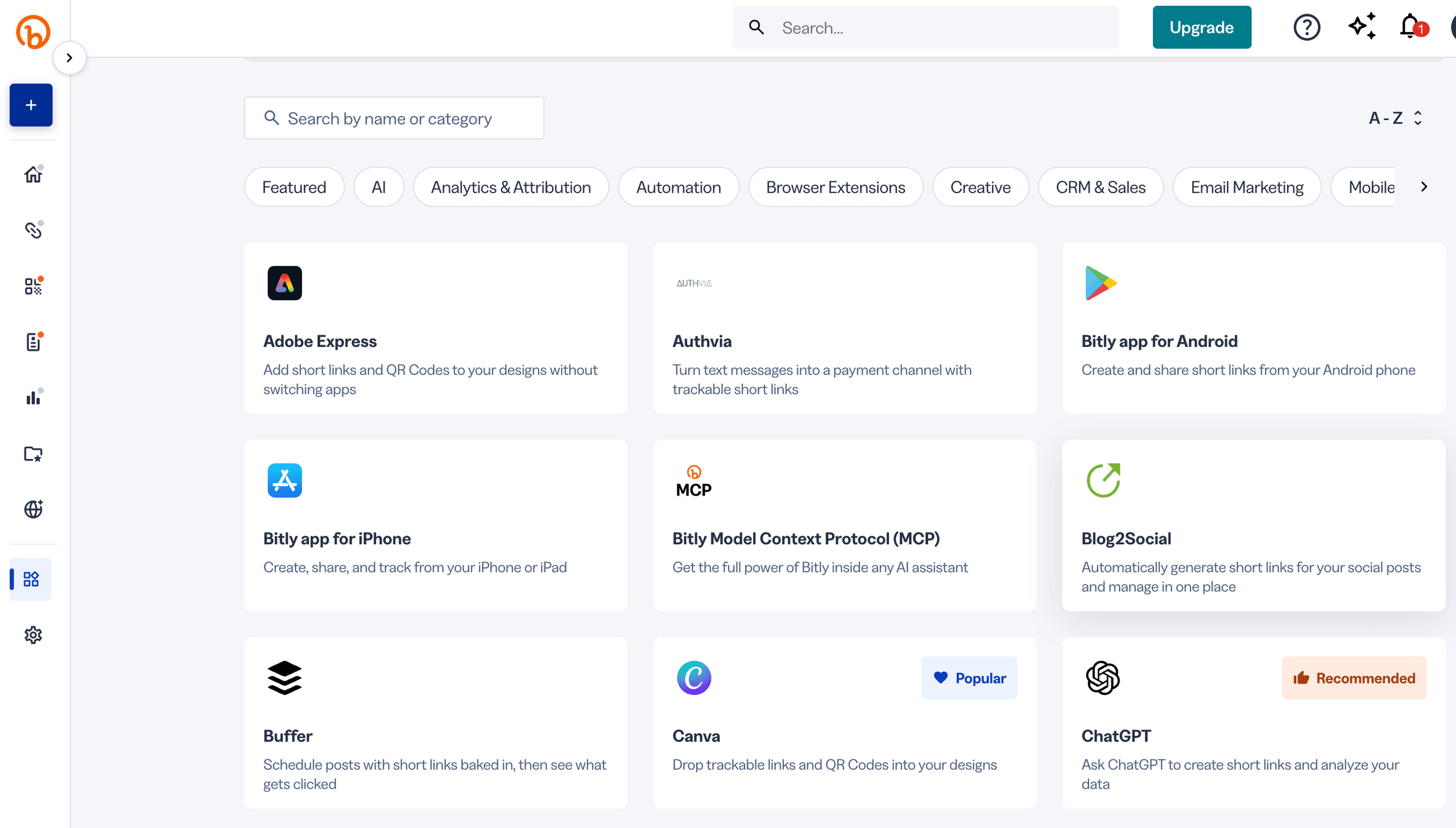
Notable features include the ability to integrate Bitly with other platforms for ease of use between tools.
Rebrandly
Rebrandly is a tool marketed to be a pure branded-link specialist. Its strength is domain depth: it's built around managing many custom domains and routing logic, which suits agencies and teams that juggle several brands.
Its free plan is more generous than most, since it includes a custom domain, though it caps you at a low number of new links and tracked clicks per month. It also carries SOC 2 Type 2 and HIPAA compliance, which matters for regulated work.
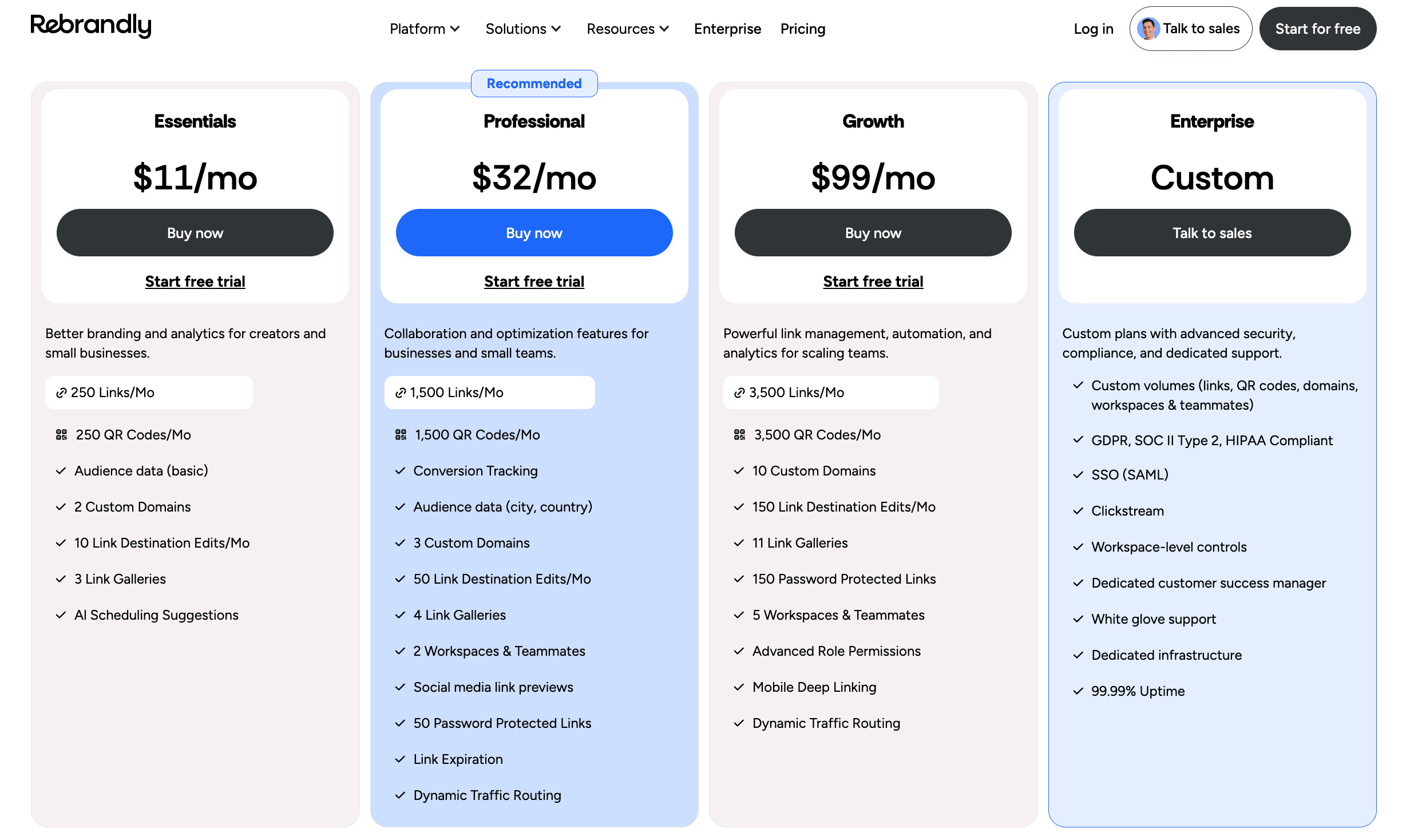
The limitations are the click caps that sit on every tier for detailed analytics and a feature layout that puts collaboration, password protection and advanced analytics behind the higher plans, so reaching one feature can mean paying for a whole tier.
Best for:
Agencies and marketing teams whose work centers on branded links across multiple domains.
Avoid if:
Your link volume is high and unpredictable. The analytics click caps sit on every tier, so growth can push you into a more expensive plan for reasons that have nothing to do with the features you actually wanted.

Here you can see a screenshot of what the setup menu looks like.

Next, we’re prompted to configure our DNS records to point to their services.
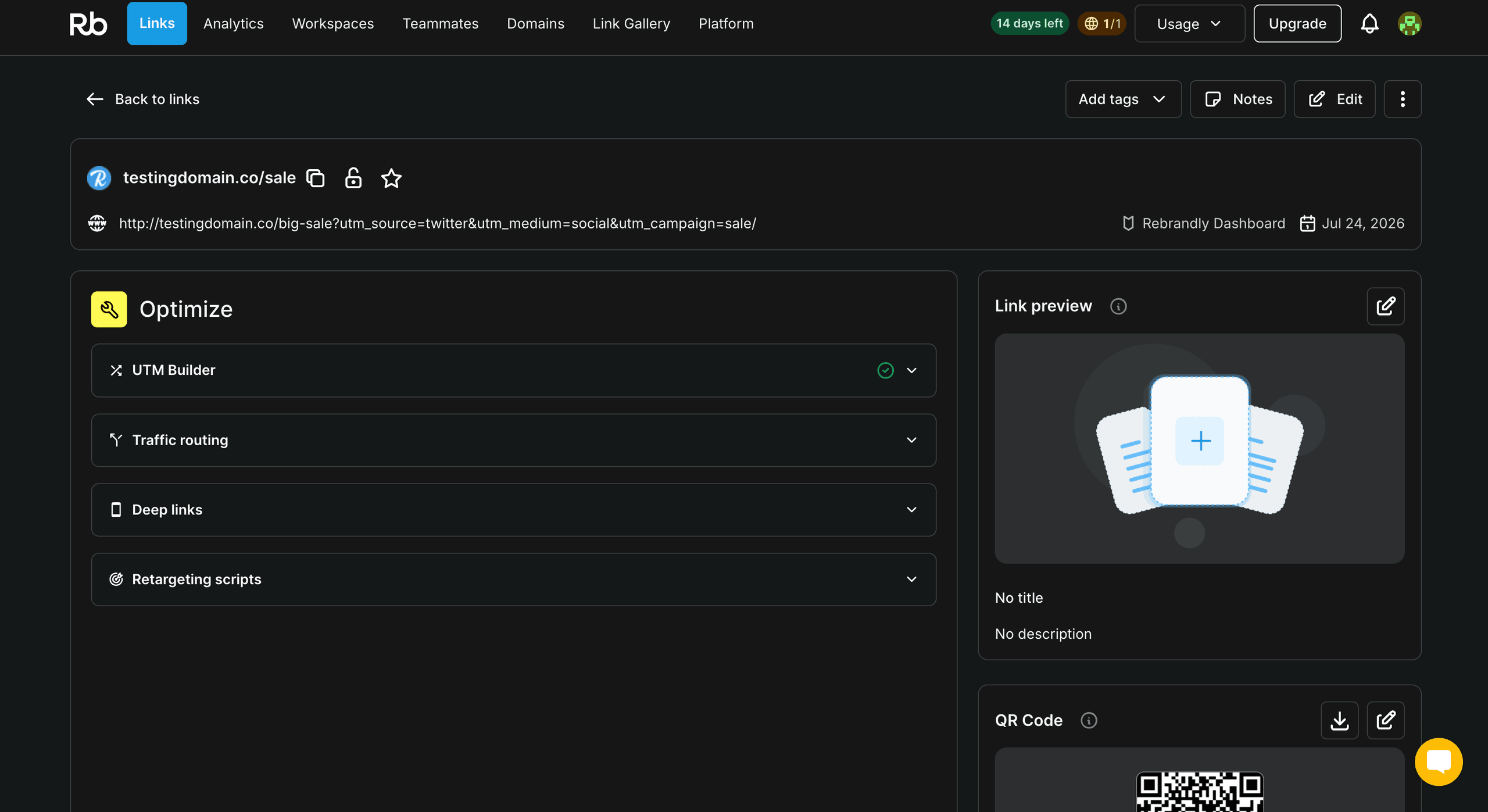
Once set up, you have a variety of configurable options.
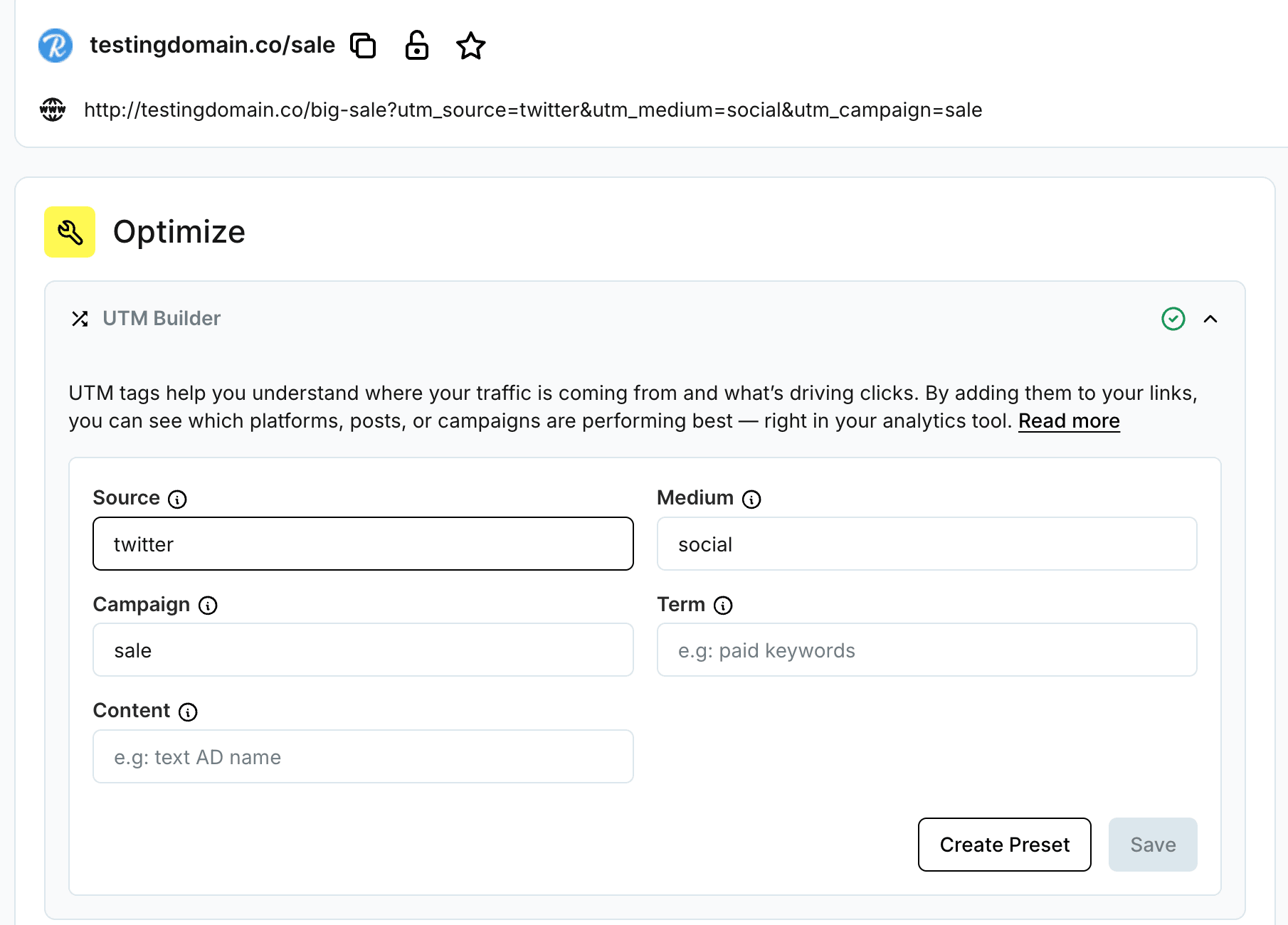
UTM tags tell you where a click came from and what prompted it. When someone follows your link, these tags travel with them into your analytics tool, so you can see which platform, post or campaign did the work.
The UTM Builder gives you five fields:
- Source: the platform or referrer, like Twitter or newsletter
- Medium: the channel type, like social, email or cpc
- Campaign: the promotion or initiative the link belongs to, like spring-sale
- Term: paid keywords, if you are running search ads
- Content: a label to tell near-identical links apart, like the specific ad or button
Fill in the fields that apply. Each one gets appended to the destination URL as a query parameter, so the address updates as you type. If you reuse the same set often, save it as a preset and pull it up next time instead of retyping it.
Keep the values lowercase and consistent. Analytics tools treat Sale and sale as two separate campaigns, which splits your reporting and makes the numbers harder to read.
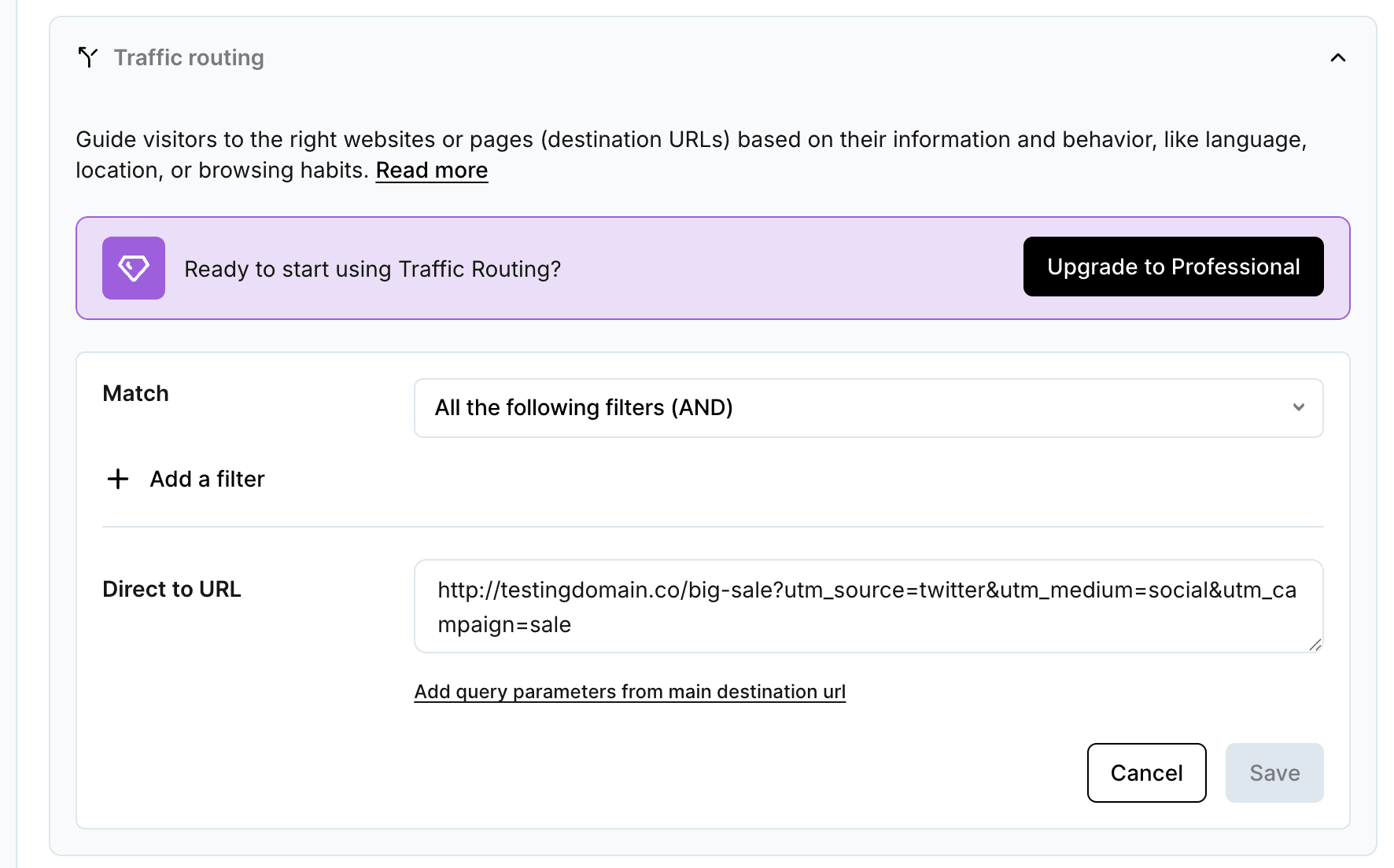
One link does not have to lead everyone to the same place. Traffic routing sends visitors to different destinations based on who they are and how they arrived, using signals like language, location and browsing habits.
Set a Match condition to decide how your filters combine. All the following filters (AND) means every condition has to be true before the rule fires. Add a filter, then point that group at its own destination in the Direct to URL field.
If you want the routed destination to carry the same tracking as your main link, use Add query parameters from main destination URL and the UTM tags come across automatically.
A common use is language. Route visitors from a French locale to your French landing page and everyone else to the default, all from the same link.
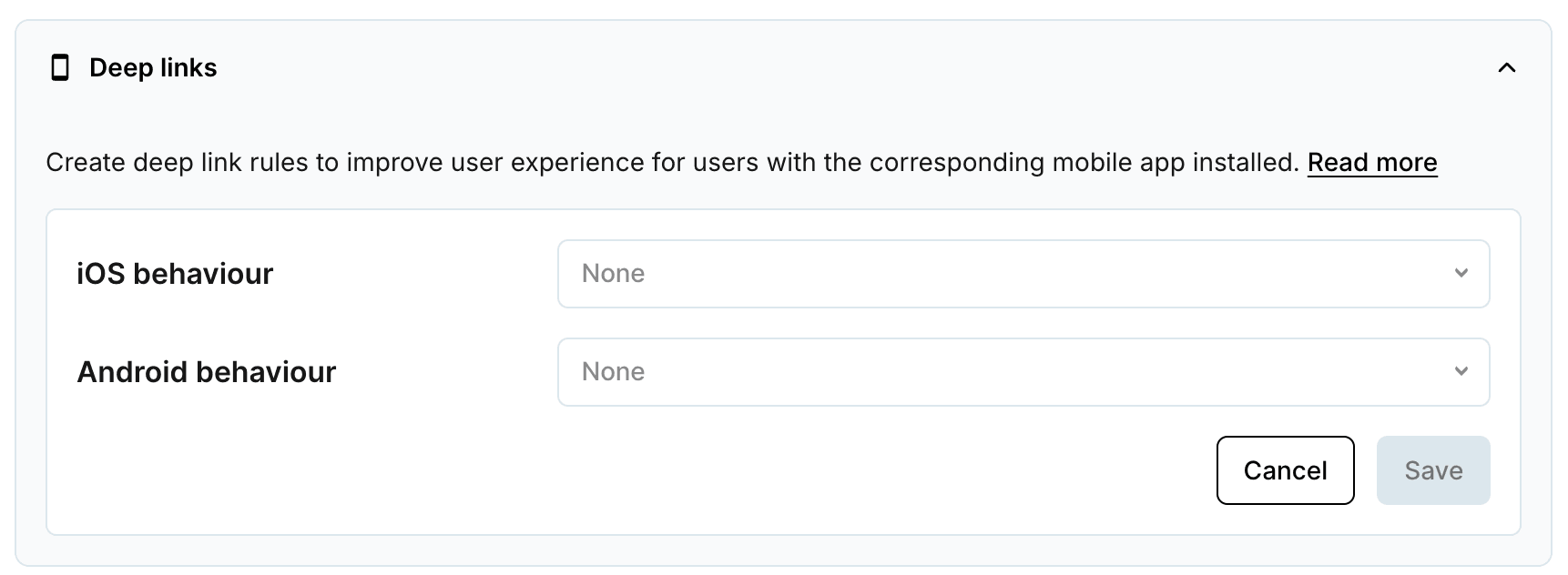
If your destination has a companion mobile app, a deep link can open the app straight to the right screen instead of dropping the person on a web page they then have to navigate.
Set the behaviour for each platform on its own. iOS behavior and Android behavior each get their own rule, since the two systems handle app links differently. Leave a platform on None to send those users to the standard web destination.
This only comes into play when the app is installed. Visitors without it fall back to the web URL, so there is no downside to turning it on.
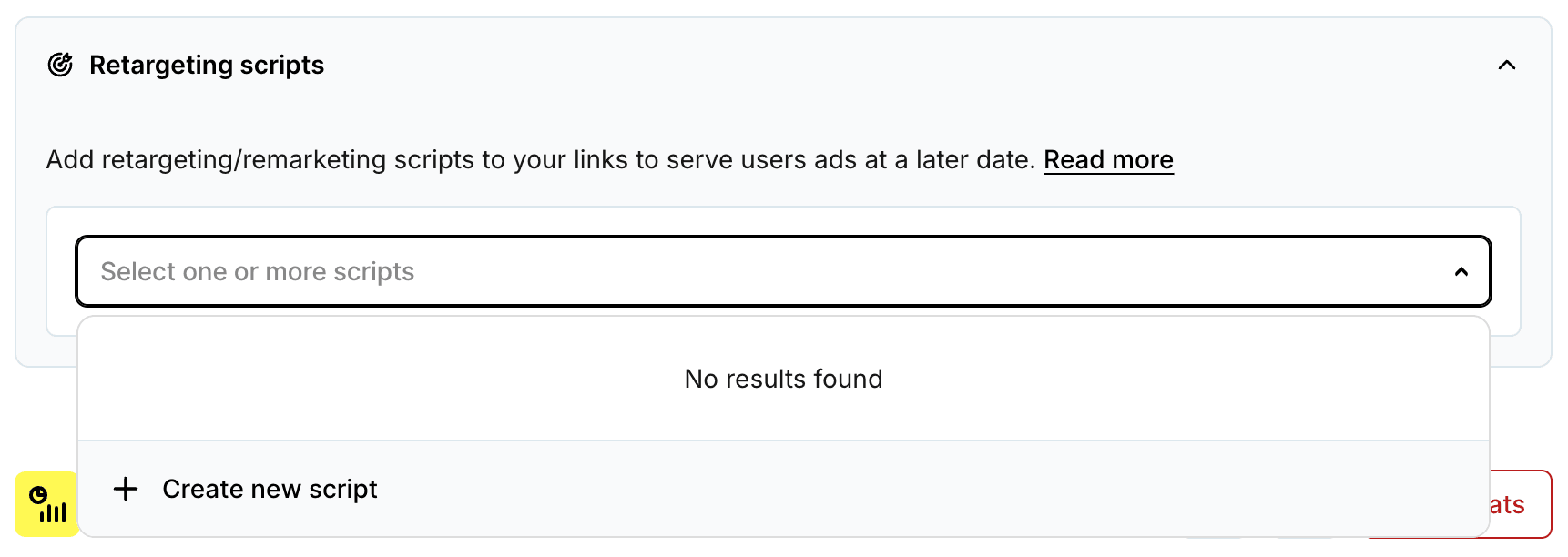
A retargeting script tags the people who click your link so you can show them ads afterward on the platforms you run. It is how a visitor who clicked once keeps seeing your campaign across other sites.
Select one or more saved scripts to attach them to the link. If the list is empty, choose Create new script, paste the snippet from your ad platform and it becomes available to select here and on future links.
Add a script only when you plan to run paid retargeting for that audience. There is no reason to tag traffic you will not advertise to.
Short.io
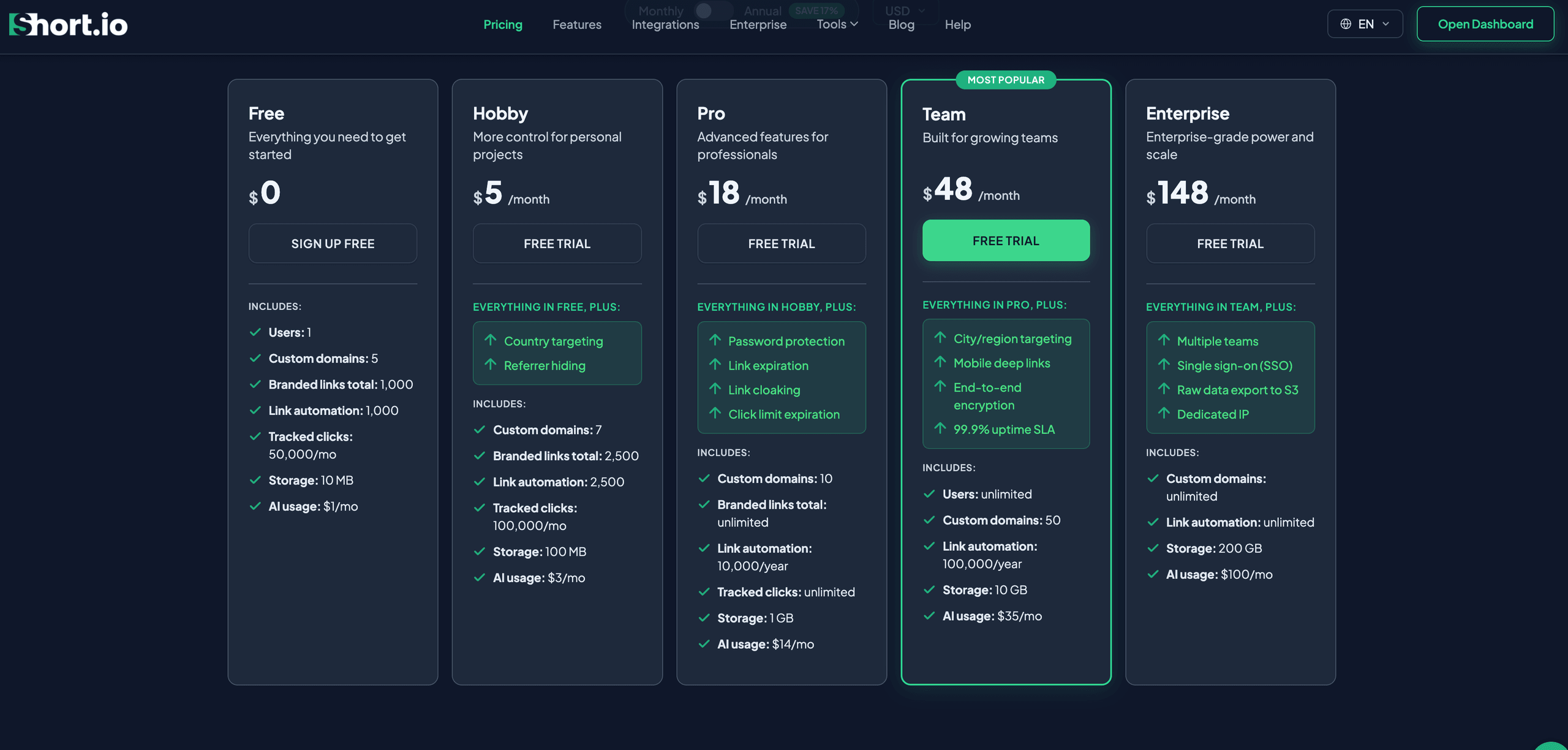
Short.io appeals to technical teams that want flexibility without a large bill. It supports custom domains, offers solid API documentation and webhook support and its free tier is among the more generous in the category on link volume for their short links. The interface is straightforward once it's set up.
The trade-offs are that setup leans on a custom domain and some technical comfort, which slows non-technical teams down and its analytics are lighter than a specialist like Rebrandly. Team access sits on a higher-priced tier.
Best for:
Developers and technically comfortable teams that want custom domains and automation at a reasonable price.
Avoid if:
Your team isn't technical. Setup assumes a custom domain and some comfort under the hood and the analytics are lighter than a specialist's, so a non-technical marketing team will run into challenges before it feels the benefits of this tool.
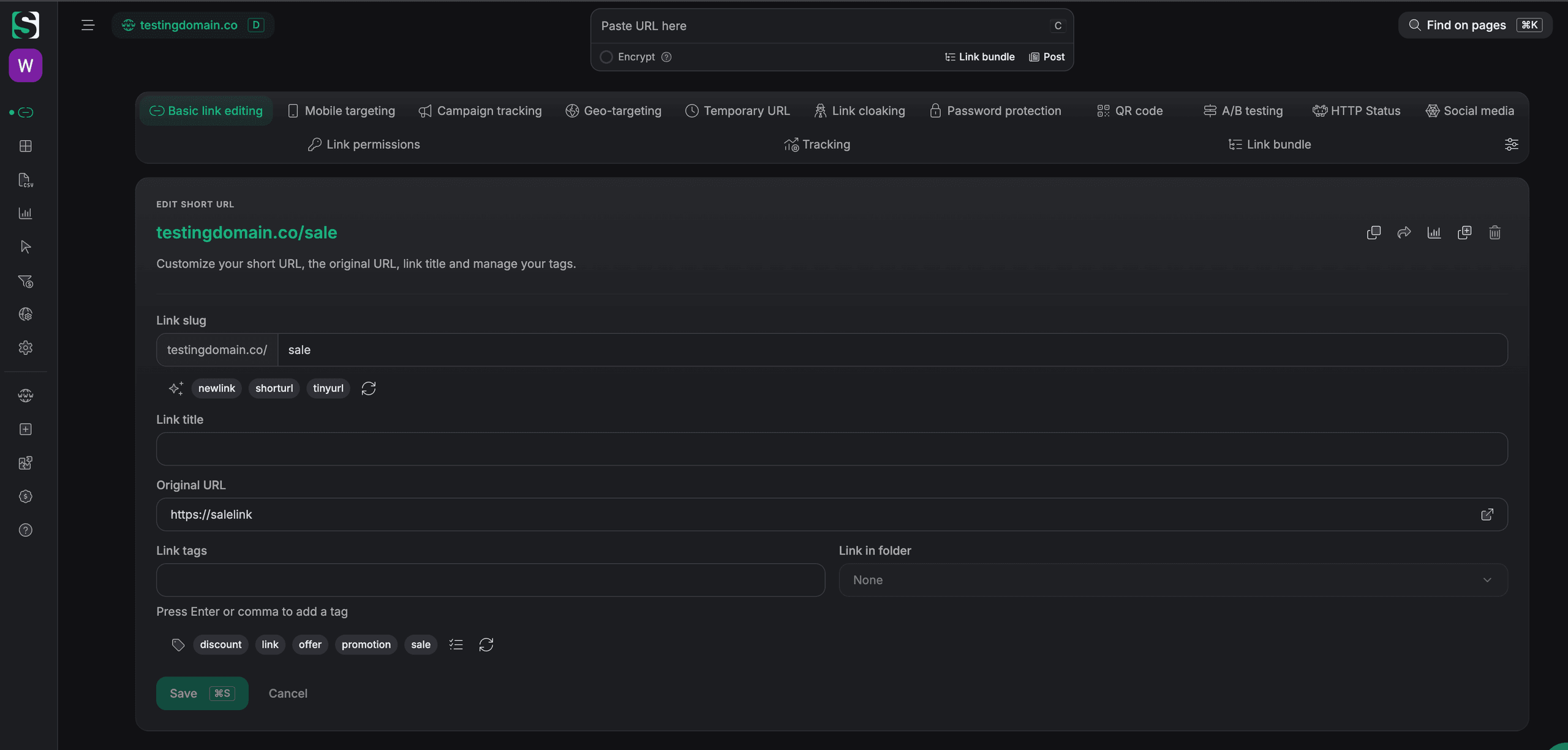
During our test, we were able to create a branded link. Although analytics were not available and the rest of the features were relatively restricted compared to other tools we tested.
Dub
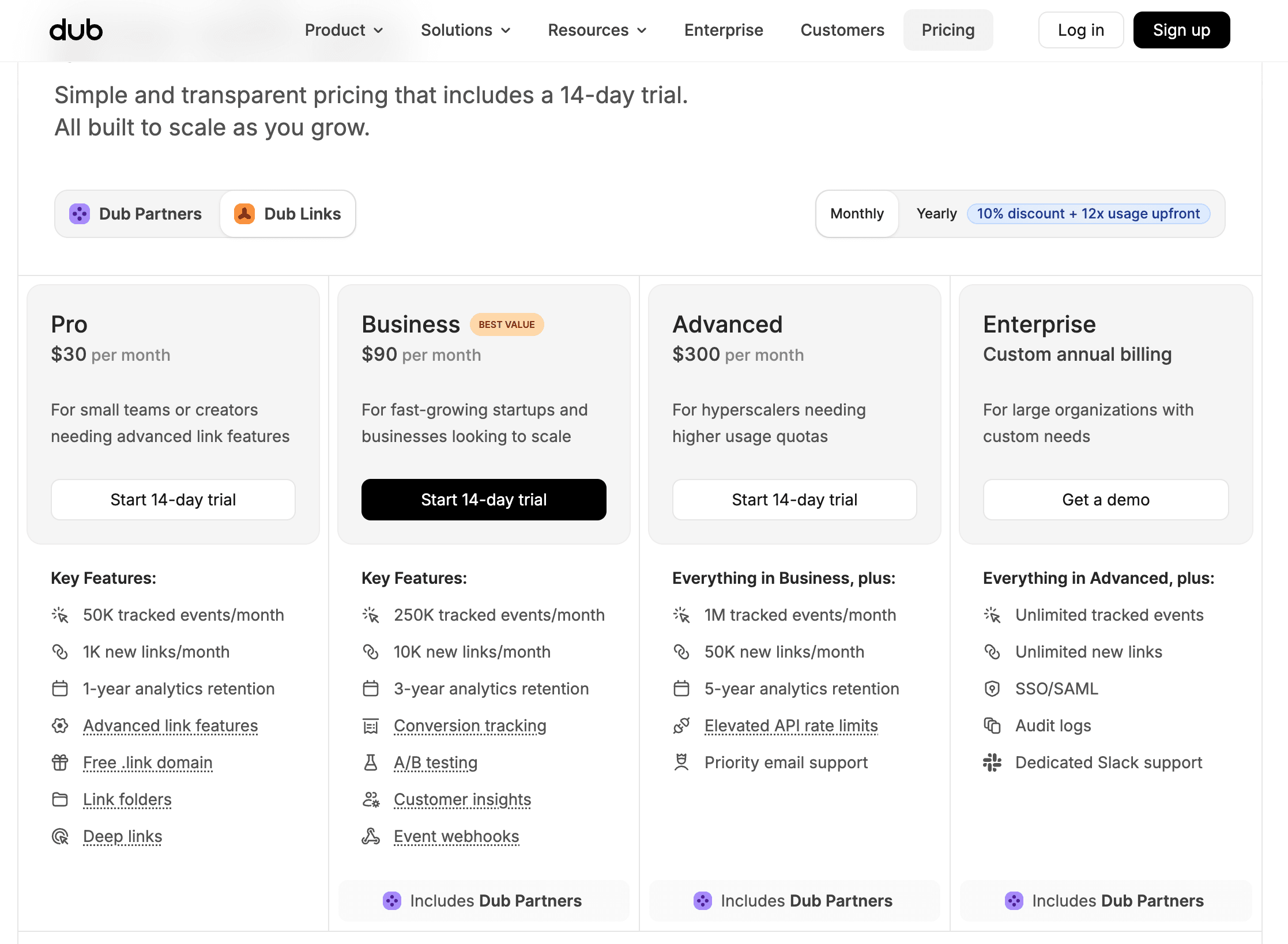
Dub is the developer-oriented, open-source option. It builds conversion and affiliate attribution into the product rather than leaving it as a bolt-on. It ships a REST API, webhooks and SDKs and connects to tools like Segment and Google Tag Manager. Because it's open source, self-hosting is an option for teams that want it.
Its orientation is the limitation as much as the appeal: it leans on custom domains and a developer mindset, so a non-technical marketer will find it less approachable than a tool built for them.
Best for:
Developers and startups that want analytics depth and conversion tracking without paying extra for either.
Avoid if:
A non-technical marketer owns your links day to day. It's built around a developer mindset and custom domains, so the people who'd benefit most from the analytics are the ones least likely to find it approachable.
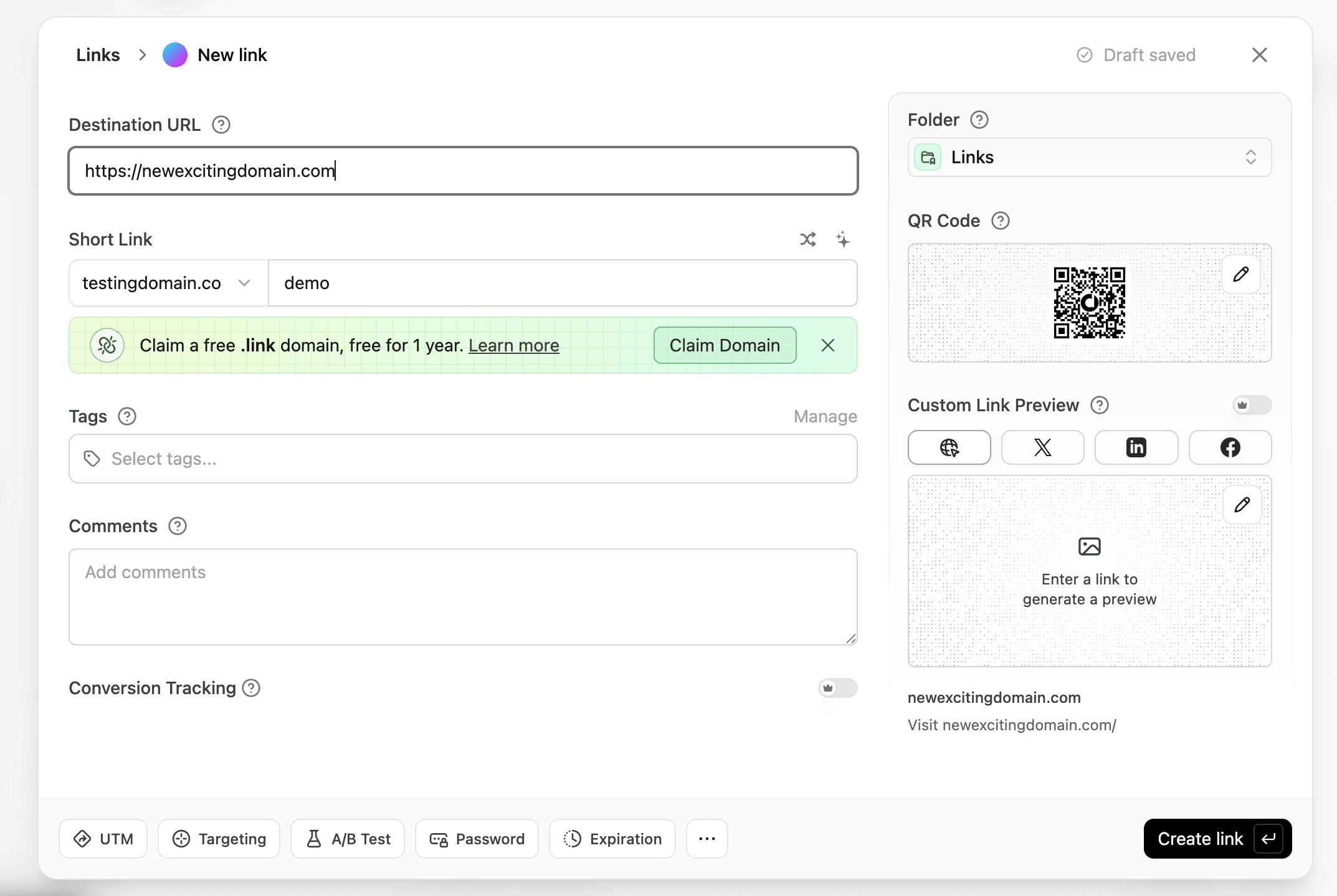
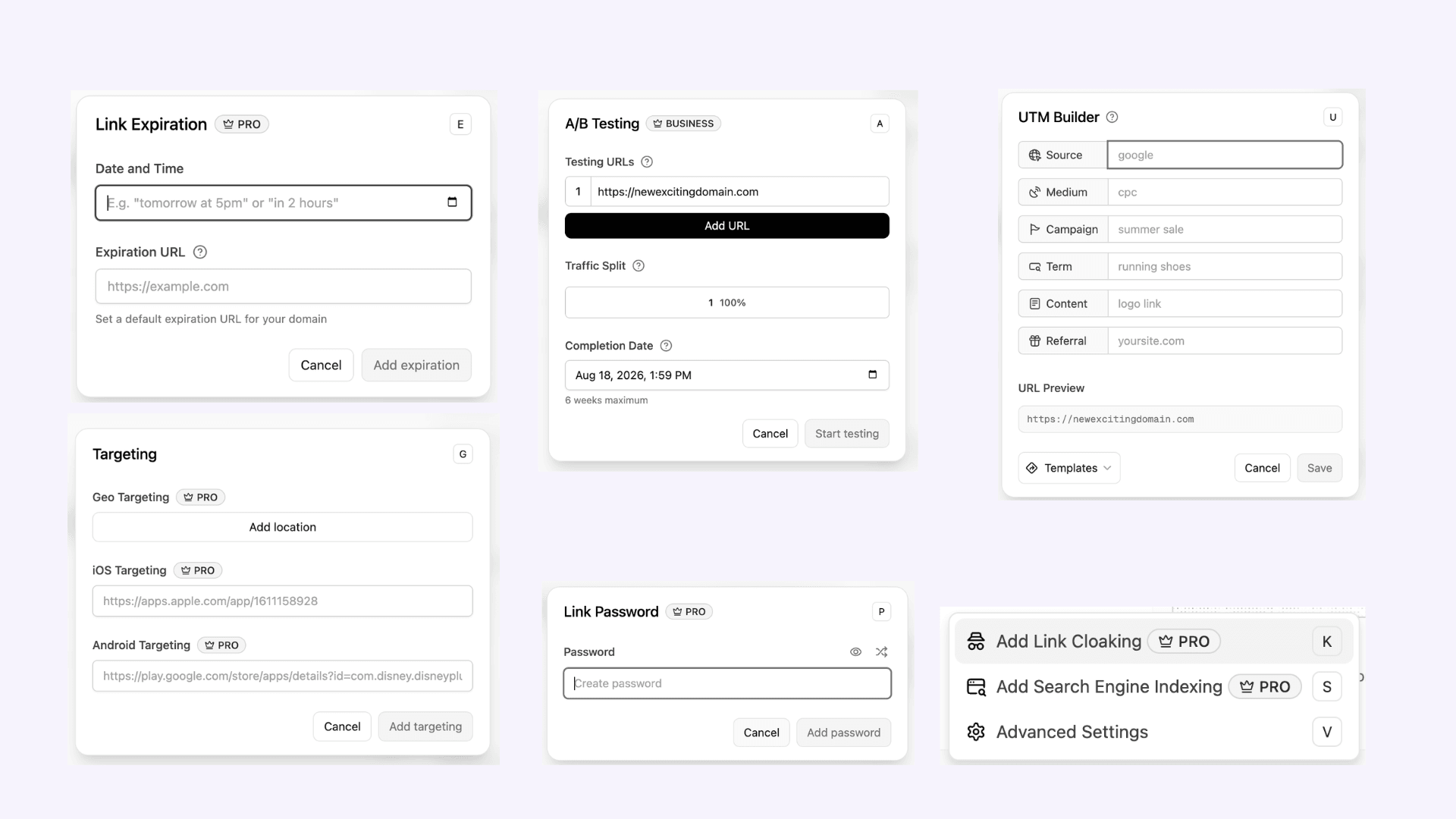
While in the tool, we can see we’re offered many of the same features as the above tools. The screenshots below show that you have the same options for a UTM builder, targeting, A/B testing, link password and expiring and more.
BL.INK
In our test, BL.INK was the most complex platform to use. BL.INK’s signup and product navigation were confusing and took more steps to understand than the other platforms we reviewed.
BL.INK targets the enterprise end and its distinguishing feature is compliance. It carries certifications including SOC 2 and HIPAA, which makes it a fit for healthcare, finance and other regulated environments where a security review is part of buying anything.
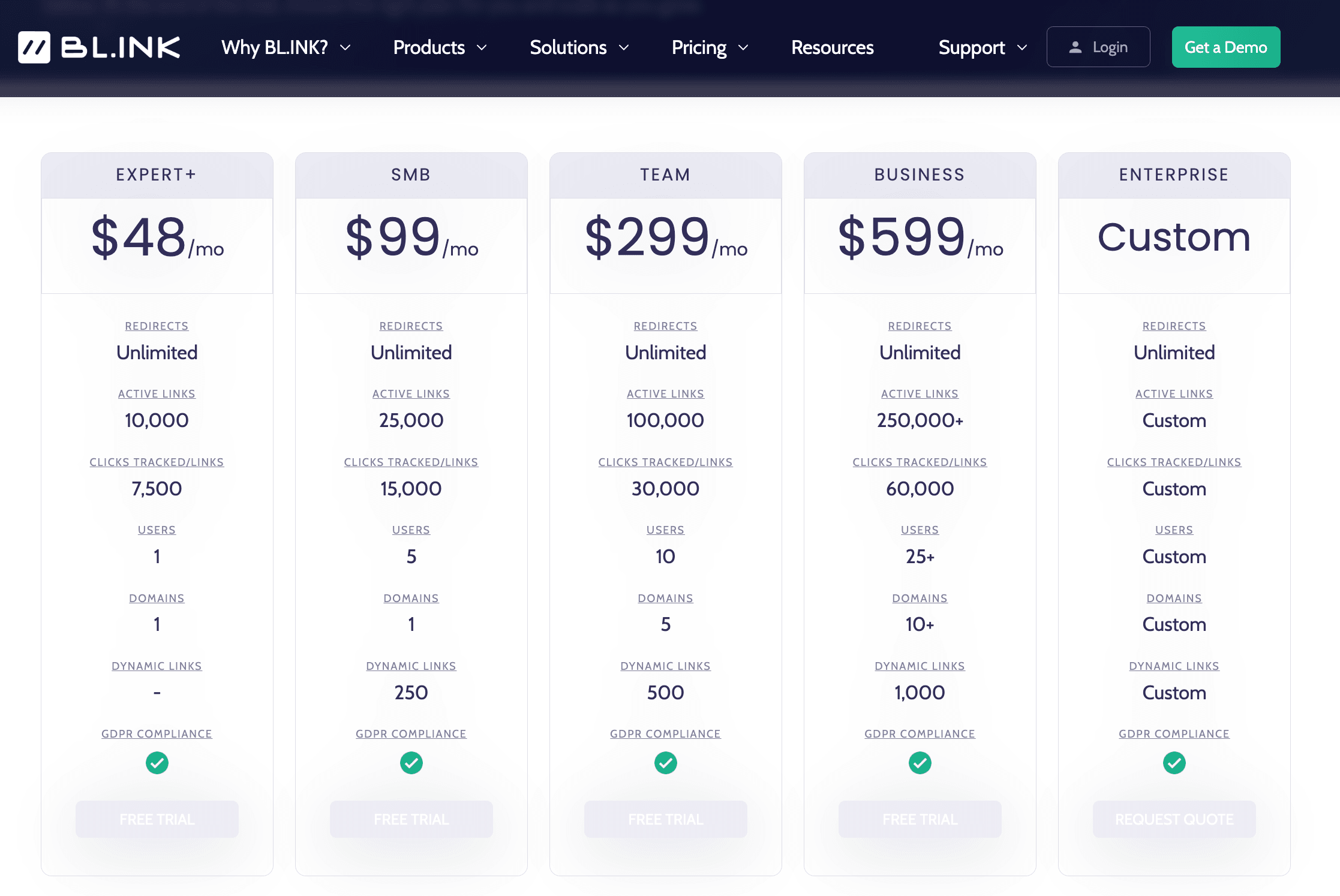
The trade-offs are that it has no free plan, its entry price is higher than the mid-market tools and click caps apply per link. It's priced and built for organizations that need the compliance posture, not for casual use.
Best for:
Regulated enterprises where compliance certifications are a purchasing requirement.
Avoid if:
Compliance isn't the reason you're buying. There's no free plan and the entry price sits above the mid-market tools. So unless certifications are a hard purchasing requirement, you're paying a premium relative to other services.
urllo
urllo approaches branded links from a different starting point than the shorteners above. Its core is redirect infrastructure and governance and branded links are one thing it manages within that. That framing is the reason to consider it: if your branded links live alongside domain redirects, migrations and a large portfolio of URLs, urllo manages all of it from one place rather than leaving branded links in one tool and redirects in another.
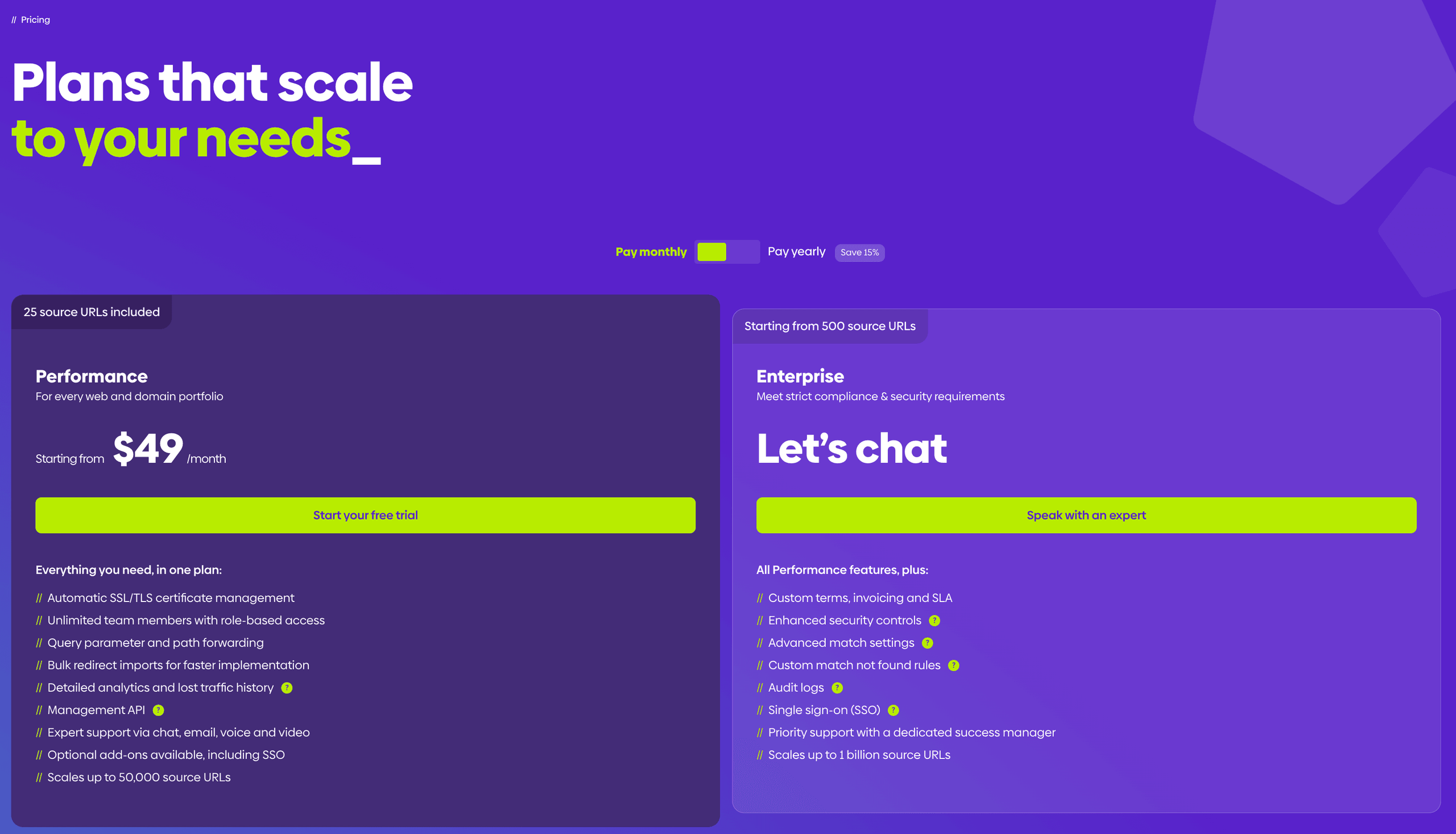
In practice, that means creating and repointing branded links and vanity URLs with unlimited edits, importing links in bulk rather than one screen at a time and getting automatic SSL on every link. It runs from a global edge network of 130+ points of presence and it adds the governance enterprise teams ask for: single sign-on, role-based access control and audit logs, on SOC 2 infrastructure.
urllo positions itself as removing the developer or IT bottleneck, so marketing and SEO teams can launch and change links without filing an engineering ticket. It's also aimed squarely at migrations and domain consolidations, where branded links and redirects have to be managed together to avoid leaking traffic.
Best for:
Marketing and IT or SEO teams managing branded links and redirects across many domains, especially through migrations and consolidations, with enterprise governance requirements.
Avoid if:
You want a free plan for a couple of branded links. There's no perpetual free tier for casual use and the redirect and governance depth is overkill when a single link is the whole job. The lighter tools fit better.
Creating a branded link in urllo
A branded link is a short link on your own domain that sends people to a longer destination. Under the hood, that is just a redirect, one address forwarding to another, which is why urllo uses redirect language throughout the setup. Creating a branded link and creating a redirect are the same task.
From your redirects list, select Create New Redirect to open the setup.
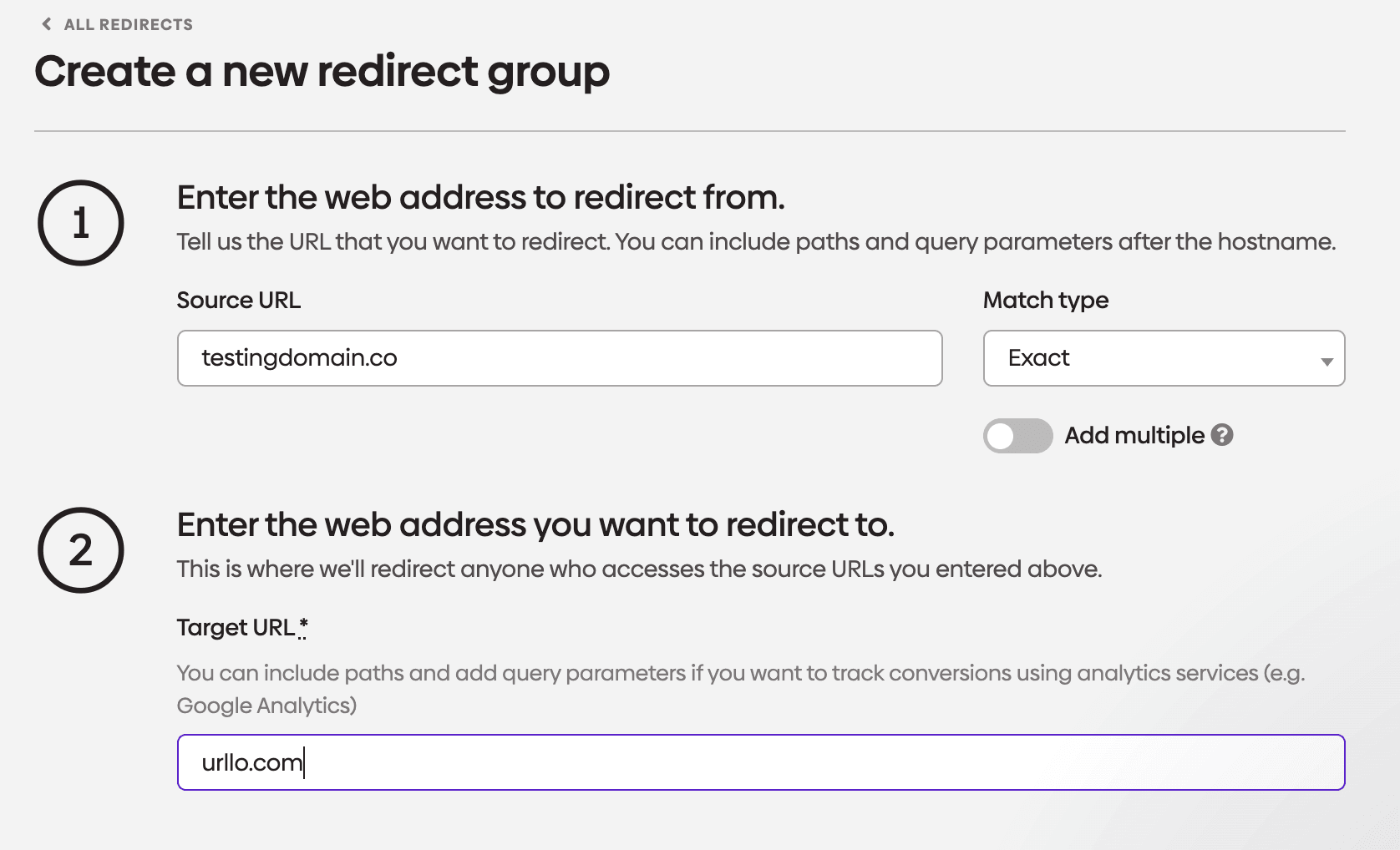
Enter the Source URL, the branded address people will visit, like testingdomain.co. Pick a Match type to decide how closely an incoming request has to match, with Exact being the strictest. Turn on Add multiple if you want several source URLs pointing at the same destination.
Then enter the Target URL, where visitors end up. You can include a path and query parameters here if you want to track the traffic in a tool like Google Analytics.
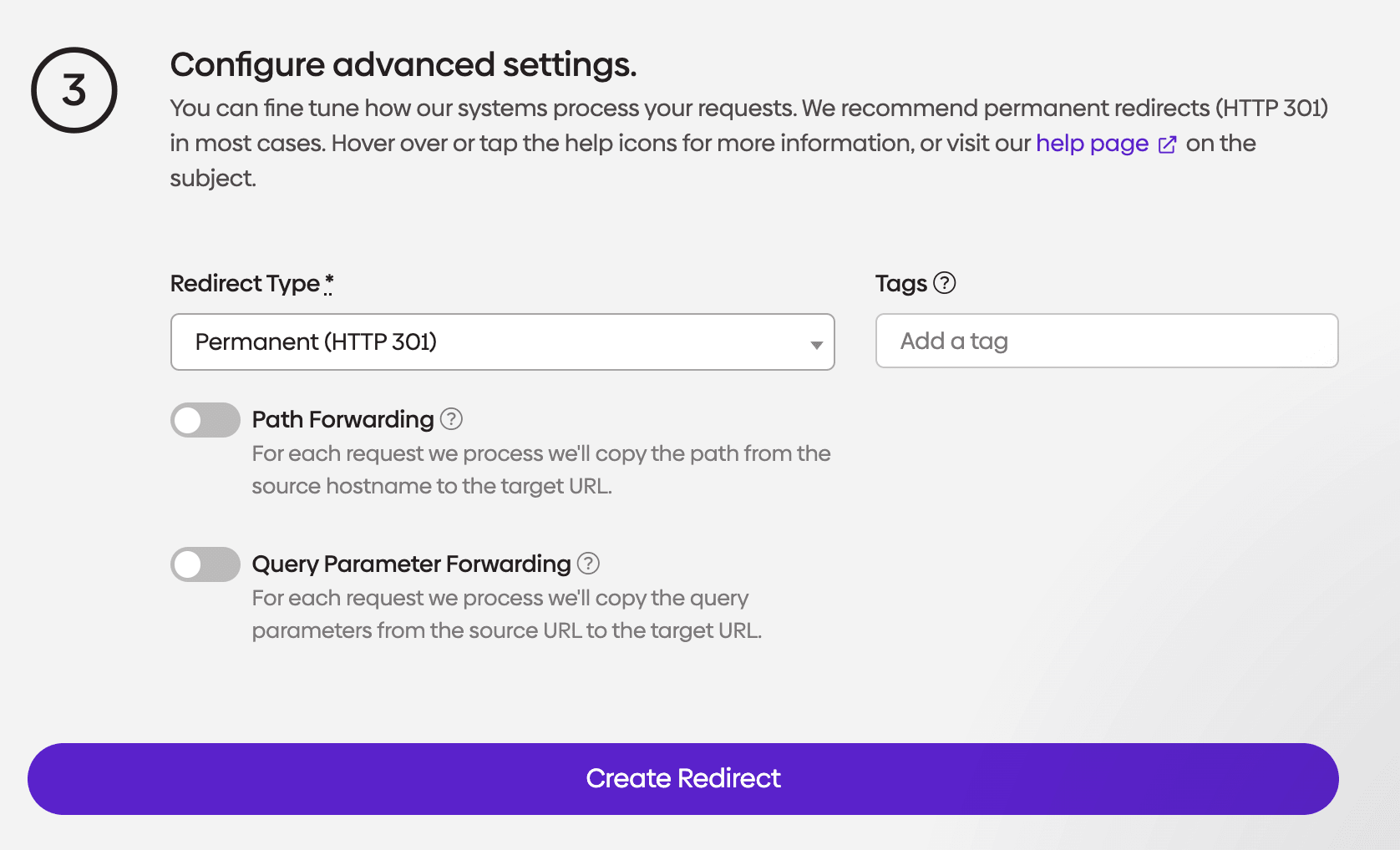
Choose a Redirect Type. Permanent (HTTP 301) is the right pick in most cases and tells search engines the move is permanent. Add any Tags you use to keep redirects organized.
Two optional toggles carry parts of the original request across to the target:
- Path Forwarding copies the path after the hostname, so testingdomain.co/pricing lands on the matching path at the target
- Query Parameter Forwarding copies the query string, useful for passing tracking parameters through
Select Create Redirect when you are done.
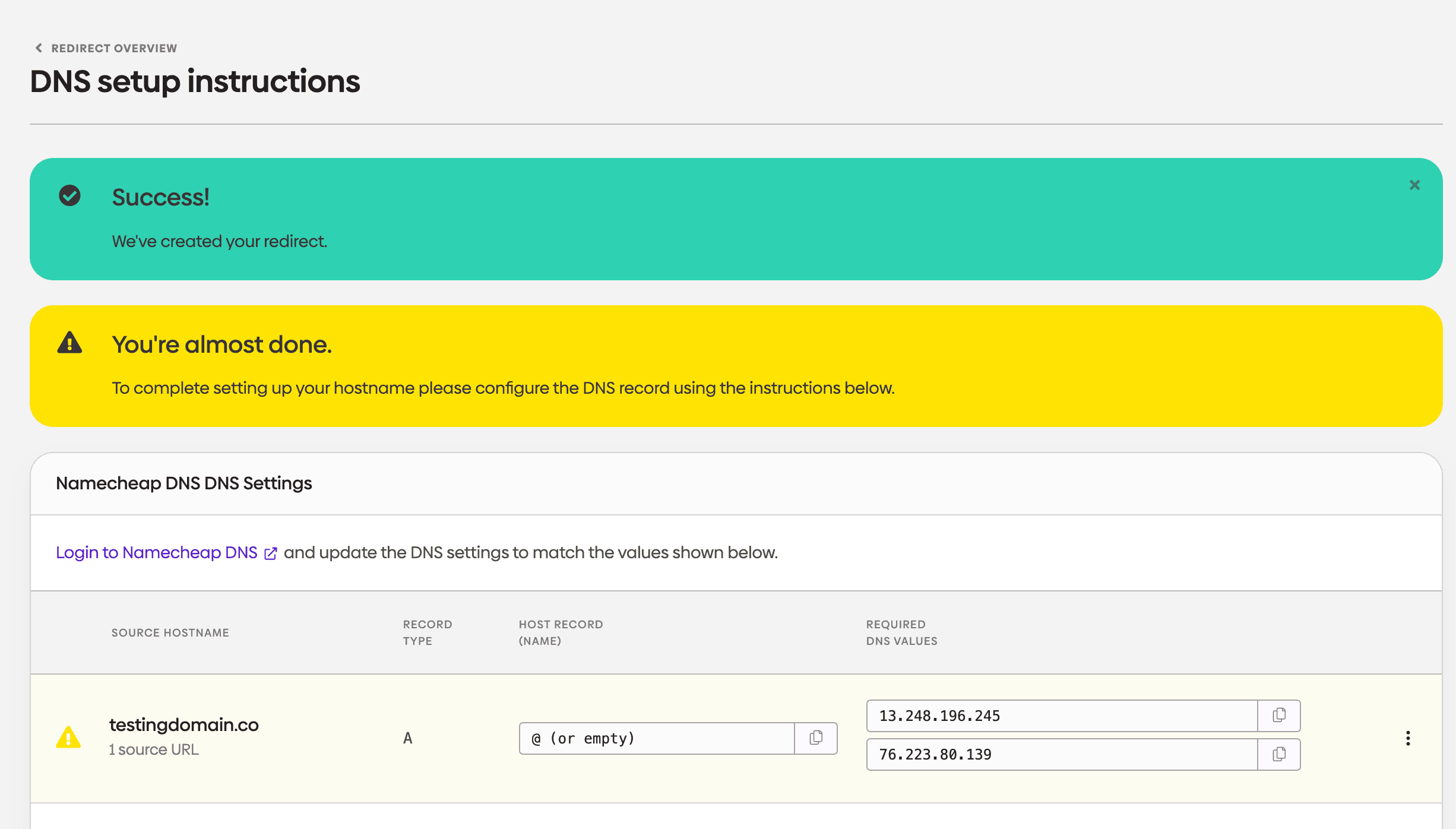
The redirect exists, but it will not run until your domain points to urllo. Log in to your DNS provider, Namecheap in this example and add the A record shown: the host set to @ (or left empty) and the IP values urllo lists. Copy the values straight from this screen so they match exactly.
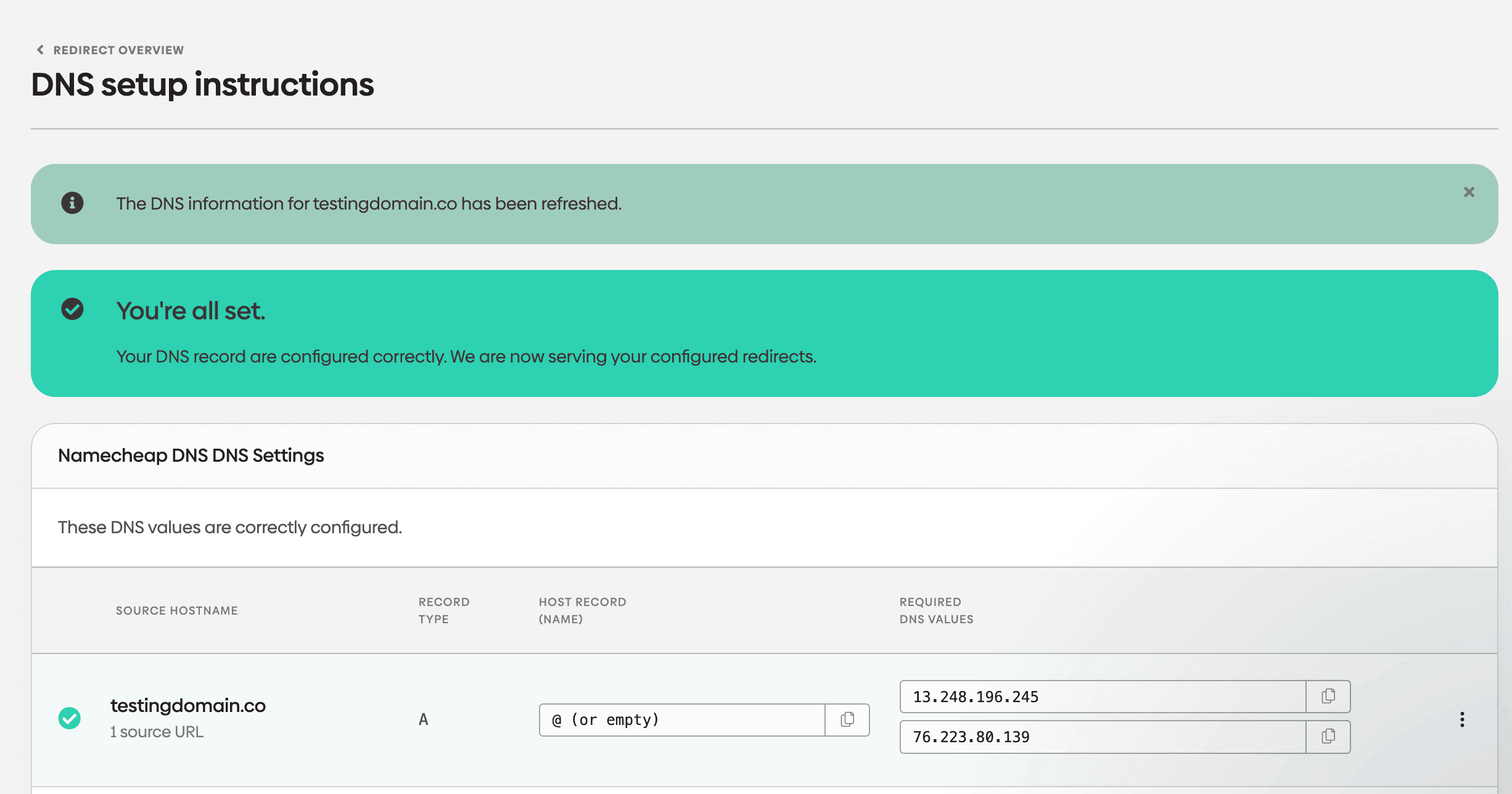
Once the record propagates, urllo rechecks and confirms. When you see You're all set, the DNS is correct and urllo is serving your redirect. Propagation can take a little while, so refresh if it is not immediate.
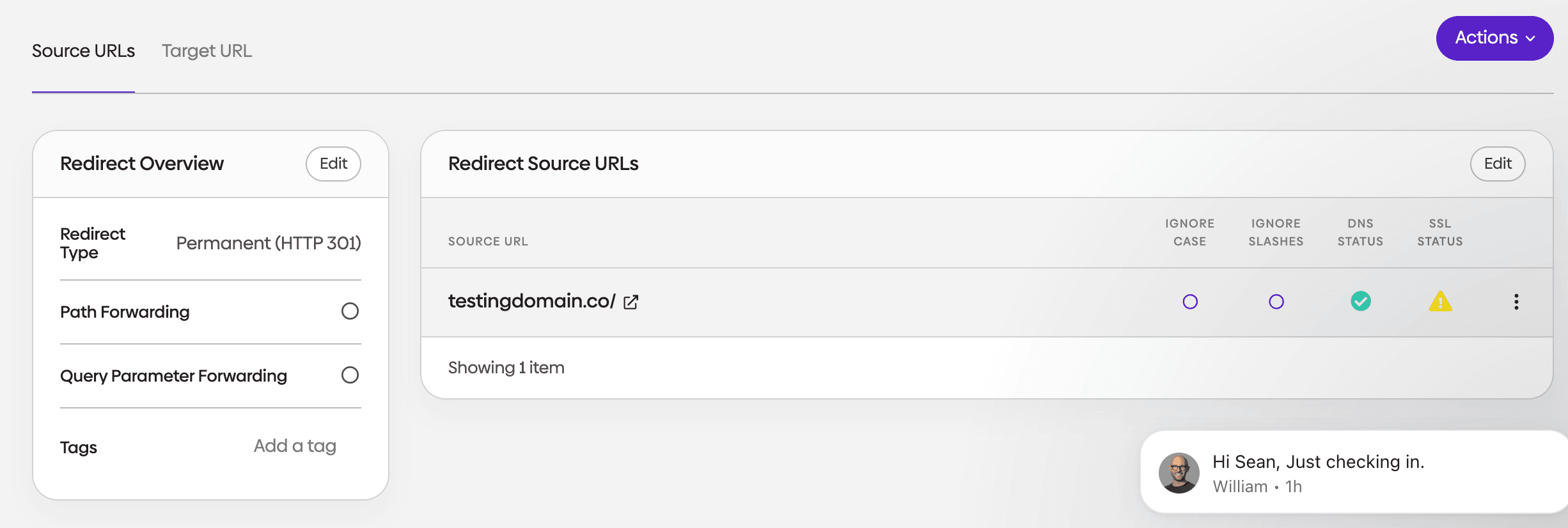
The overview is where you edit and monitor the link afterward. It shows the redirect type, the forwarding toggles and any tags, plus a row for each source URL with its DNS and SSL status alongside the Ignore Case and Ignore Slashes settings. Use Actions to make changes later.
How to choose the right branded link tool
Match the tool to the job rather than the longest feature list:
- A free personal or one-off link. Short.io and Rebrandly are the only really free platforms that offer true branded links. So if cost is a big constraint, these are the best options for your organization.
- The most generous free plan for real work. Short.io if link volume is the constraint or Rebrandly if getting a custom domain on the free tier matters more to you than volume.
- A recognized all-in-one marketing tool. Bitly, once you're on the tier where custom domains switch on.
- Branded links across many domains. Rebrandly for depth and multi-brand management, which is marketed towards agencies. Short.io is the cheaper pick when your team is technical and cost-sensitive.
- Developer-led work that needs analytics and attribution. Dub bundles both without a surcharge. Reach for Short.io instead if what you mainly want is a clean API.
- A regulated industry where compliance drives the decision. BL.INK for compliance-first buying or urllo when governance and redirects matter alongside the links.
- Branded links sitting alongside redirects, migrations and a large domain portfolio. urllo, because it manages branded links and redirect infrastructure together instead of splitting them across tools. It's the same reason it fits migrations and domain consolidations, where the two have to move as one.
Where urllo fits
If your branded links are part of a larger job, the value is in managing everything in one place. That larger job often means redirects, migrations and a portfolio of domains that both marketing and IT touch. Handling it all in one tool beats stitching a shortener to a separate redirect tool.
That's the gap urllo is built for. There’s a reason more than 1,000 companies such as Liquid Death, Porsche and Skullcandy, across 75+ countries, rely on it, from small teams through to enterprises. urllo handles over 25 billion requests a year across a network of 130+ points of presence.
You can try it against your own domain on a 14-day free trial with no credit card and see how branded links, redirects and analytics behave together before committing. Our dedicated customer support team is here to help and answer any questions along the way.
Frequently asked questions about branded link tools
What is the best branded link platform in 2026?
There isn't one answer, because the right platform depends on the job. Bitly leads for all-in-one marketing recognition, Rebrandly for branded-link depth, Short.io and Dub for developer-led teams, BL.INK for regulated enterprises and urllo for teams managing branded links and redirects across many domains when performance and reliability are essential.
What's the difference between a branded link and a vanity URL?
A branded link uses your own domain in place of a shortener's. A vanity URL is a branded link with a chosen, readable slug rather than a random string, so the entire address is legible.
Do I need a custom domain for branded links?
Yes. A branded link is defined by the domain it uses, so you need a domain you control. Most platforms let you connect one, though some, including Bitly, reserve custom domains for higher-priced tiers.
Which branded link tools have a free plan?
Rebrandly and Short.io offer free tiers, with very different limits on links, clicks, analytics and whether a custom domain is included. urllo offers a 14-day free trial rather than a free tier.
What's the best branded link platform for enterprise?
For compliance-driven buying, BL.INK and urllo both carry the certifications and controls enterprises expect. urllo is the stronger fit when branded links need to be managed alongside redirects and domain migrations under one governance model.

By Sarah Ellis
Director of Enterprise Accounts
Sarah is a passionate sales and management leader with over two decades of experience in the start-up, technology, real estate and music/advertising sectors. Sarah started her entrepreneurial journey years ago when she founded and ran her own bakery. Which is why she’s still the premier source of baked goods inside the urllo office.




.png&w=2560&q=88)