A rebrand changes your business’s name and usually your domain. The moment it goes live, every link that pointed at the old brand points at the wrong place. Backlinks, bookmarks, social profiles, email signatures, ad campaigns and the QR codes printed on your packaging all still send people to a name that no longer exists.
A rebrand handled properly means none of that matters and your visitors never notice the switch. Handled badly, you lose organic rankings, direct traffic, referral traffic and paid traffic lands on a 404. The new logo gets the attention in a rebrand. The redirects decide whether you keep the audience you already have.
This guide treats the rebrand as a project in three phases: what to do before launch, what to do at launch and what to watch after. Each phase gives you concrete steps to lift straight into your own plan, handling your redirect map, domain move, branded links and QR codes at the point each one comes up, with the mistakes that most often break a rebrand collected at the end.
Why companies rebrand
The common triggers:
Merger or acquisition.
Two companies become one or one absorbs another and the combined entity needs a single name and domain. This is the heaviest case, because it often means merging multiple websites onto one.
Outgrowing the original name.
A name that fits a small product or a narrow market stops fitting once the company expands into new lines or regions. The name starts to limit how the market sees you.
Legal or trademark pressure.
A dispute, a conflict with another brand or a market you cannot enter under the current name forces a change on a timeline you do not control.
Repositioning.
The audience, the pricing or the category shifts and the brand has to signal that it is a different company than it was.
Reputation reset.
A name carries associations the company wants to leave behind.
Finally landing the domain you wanted.
Companies that launched on a compromise domain, a country-code TLD or a modified spelling often rebrand the moment the clean version becomes available.
Splitting or spinning off.
One business becomes two and each half needs its own identity and domain.
What a rebrand actually affects
It helps to separate a rebrand into what customers see and what quietly holds the traffic together. The visible layer gets the budget and the launch-day attention. The connective layer is where traffic is kept or lost and it is almost all links.
The brand itself.
Name, logo and visual identity, messaging and tone and every template, deck and piece of collateral.
The digital footprint.
The domain name and often the whole URL structure, every page on the site, email addresses and domains, branded and short links in bios and campaigns and signatures, social handles and profile URLs and app store and product listings.
The traffic and search layer.
Organic rankings tied to the old URLs, backlinks from other sites and the ranking value they carry, direct traffic from bookmarks and typed URLs and referral traffic from every site linking to you.
The offline footprint.
Packaging, print, signage and merchandise, QR codes already in customers' hands and business cards, vehicles and event materials.
The operational layer:
Third-party integrations and API endpoints tied to the domain, directory and marketplace listings and analytics and ad accounts.
Phase 1: Before launch (plan and map)
Almost all of the work that protects your traffic happens here, before anything goes live.
| # | Step | What to do |
|---|---|---|
| 1 | Inventory every old URL from more than the crawl |
A crawler like Screaming Frog only finds what is internally linked, so it will miss orphaned and legacy URLs.
Build the master list from six sources and dedupe: the crawl, your XML sitemaps, 12-plus months of analytics (to catch seasonal pages), the Search Console pages export (anything getting impressions), server access logs (URLs actually requested, linked or not) and a backlink export from Ahrefs or Semrush (externally linked URLs). Include parameter, trailing-slash and case variants, since each resolves separately. |
| 2 | Prioritize by traffic and by backlinks, then tier the work |
Rank the list by organic sessions and by referring domains, then split it into tiers.
Tier one is high traffic and high backlinks: map these by hand and verify each individually. Tier two follows patterns: map by rule and spot-check. Tier three is low value: pattern or catch-all. Pages with strong backlinks but little traffic stay high priority, because they pass ranking value you do not want to strand. |
| 3 | Build the redirect map with the right method per page |
Map one-to-one for your top pages and for structural changes that follow no rule.
Map by pattern, using wildcard matching and/or partial path matching, wherever old to new follows a consistent transform. Record every entry in a sheet: old URL, new URL, redirect type, rule or manual, verified status. For a page with no real equivalent, redirect to the nearest parent category rather than the homepage or return 410 Gone if it is genuinely retired, since 410 states in HTTP terms that the removal is intentional, though Google treats 404 and 410 the same for indexing purposes. |
| 4 | Choose the domain strategy and keep the old domain forwarding at path level |
Keep the old domain registered and forwarding path by path to the matching new URLs, not in a blanket redirect to the homepage.
Treat email and DNS as a separate job, since they move on their own schedule and web redirects do not carry them. The full mechanics of the domain move, hostname variants, SSL, MX records and the Change of Address step are covered in our guide on renaming your domain. |
| 5 | Flag offline and printed touchpoints in planning, because you cannot recall them |
Audit every place the old URL appears offline: packaging, print ads, cards, signage, vehicle wraps, merchandise, event materials and direct mail.
For each QR or vanity URL, confirm it resolves through a redirect you control so it can be repointed later. Standardize future print runs on managed links. This is the irreversible category, so it belongs before launch, not after. |
Phase 2: At launch (flip it safely)
Launch day is execution, not decision-making. If Phase 1 is done, this is mostly turning things on in the right order.
| # | Step | What to do |
|---|---|---|
| 6 | Set 301s and validate them on staging before DNS cutover |
Apply the redirect rules against a staging environment and test with curl, Screaming Frog list mode and the browser network tab.
Confirm four things per sampled URL: the status code is 301 and not 302, 200 or 404; it resolves in a single hop with no chain; it lands on the intended live page; and query strings survive where campaigns depend on them. Check case and trailing-slash variants and confirm HTTPS and any HSTS rules do not add an extra hop. |
| 7 | Repoint branded and short links without deleting them |
Update every branded and vanity short link to resolve to the new destinations and leave the links themselves live so existing ones keep working.
Update link-in-bio, email signature and footer templates, scheduled social posts and any UTM-tagged campaign links. |
| 8 | Update dynamic QR destinations in one place and scan-test them |
For QR codes that resolve through a managed redirect, change the destination once and confirm it propagates, then scan the rendered or printed code to verify.
Static codes with a hard-coded old-domain URL cannot be edited, but if you still control that old domain the path-level forward from the domain step will cover them. List any that will need a reprint. |
| 9 | Update paid campaign final URLs, not just the redirects |
Change final URLs and tracking templates in Google Ads, Microsoft Ads, Meta, LinkedIn and any DSP.
Point ads straight at the new URLs rather than through a redirect, since some networks flag redirect-heavy destinations in policy review and every hop adds latency to a click you paid for. Confirm UTM parameters still parse after the swap. |
Phase 3: After launch (protect what you moved)
The switch is live. The job now is confirming nothing slipped through and that search engines follow you to the new brand.
| # | Step | What to do |
|---|---|---|
| 10 | Submit the move correctly in Search Console and keep old URLs crawlable |
Tell Search Console the site moved and submit the new sitemap.
Keep the old URLs crawlable, so do not block them in robots.txt too early or the redirects never get crawled and equity transfer stalls. Give every new page a self-referencing canonical, since the old URLs now return a 301 and have no HTML for a canonical to live in. The Change of Address mechanics, verifying both properties and all hostname variants, are in our guide on renaming your domain. |
| 11 | Monitor 404s and traffic for weeks and read the pattern |
Watch the Search Console pages report for Not Found spikes and crawl anomalies and watch analytics for drops on specific templates.
Pull 404 and log reports weekly and add redirects as missed URLs surface. Google's own guidance is that most pages on a small to medium site take a few weeks or more to move across, larger sites take longer and rankings fluctuate during that period before settling. A sustained drop concentrated on one template is not that normal settling. It signals a mapping gap. |
| 12 | Collapse redirect chains and break loops in the live state |
After launch, recrawl and audit for chains, where A redirects to B redirects to C and rewrite them to a single hop from A to C.
Watch for chains created by the interaction of the old-domain forward, www normalization, the trailing-slash rule and http to https, which can stack three or four hops when each is a separate rule. Fix loops, where A sends to B and B sends back to A, since they make pages unreachable. Recrawl to confirm. |
Mistakes to avoid
The steps above prevent most rebrand failures. These three are the ones a step list does not naturally state and each one quietly undoes work you have already done.
Redirecting everything to the homepage.
A blanket redirect to the homepage feels efficient and quietly destroys the migration. Search engines read a redirect to an unrelated page as a soft 404 and drop the old page rather than transfer its value and users who wanted a specific page land nowhere useful and leave. Map each URL to its closest equivalent and reserve the homepage for the rare page with no logical target.
Not updating internal links.
Redirects are a safety net for external and offline links, not a substitute for fixing your own. If internal navigation still points at old URLs, every internal click and every crawl of those links fires an extra redirect, adding latency for users and crawl waste across the site. Update internal links to point straight at the new URLs so the redirect map only ever handles traffic you cannot edit.
Redirecting to a target that is not a clean 200.
A redirect that lands on another redirect, a soft 404 or an error page passes nothing and frustrates the user. It is the difference between a URL that technically redirects and one that actually arrives. Confirm every destination in the map returns a 200 and is the canonical version of the page.
We ran this playbook on our own rebrand
urllo used to be EasyRedir. As the platform grew past redirects into branded links, QR codes and vanity URLs, the name no longer fit what it had become, so easyredir.com became urllo.com. We moved it on our own platform.
The risk was the one you are facing: losing the SEO value, backlinks and search visibility built up on the old domain. So we built a complete redirect map before cutover, matched every EasyRedir URL one-to-one to its closest urllo destination rather than dumping them on the homepage and aligned the supporting signals of canonicals, internal links, metadata and sitemaps on urllo.com as the new domain.
Old-domain traffic fell as urllo climbed in parallel and after the expected migration dip, organic traffic recovered within two weeks. The identical URL structure and one-to-one redirects are why it settled quickly.
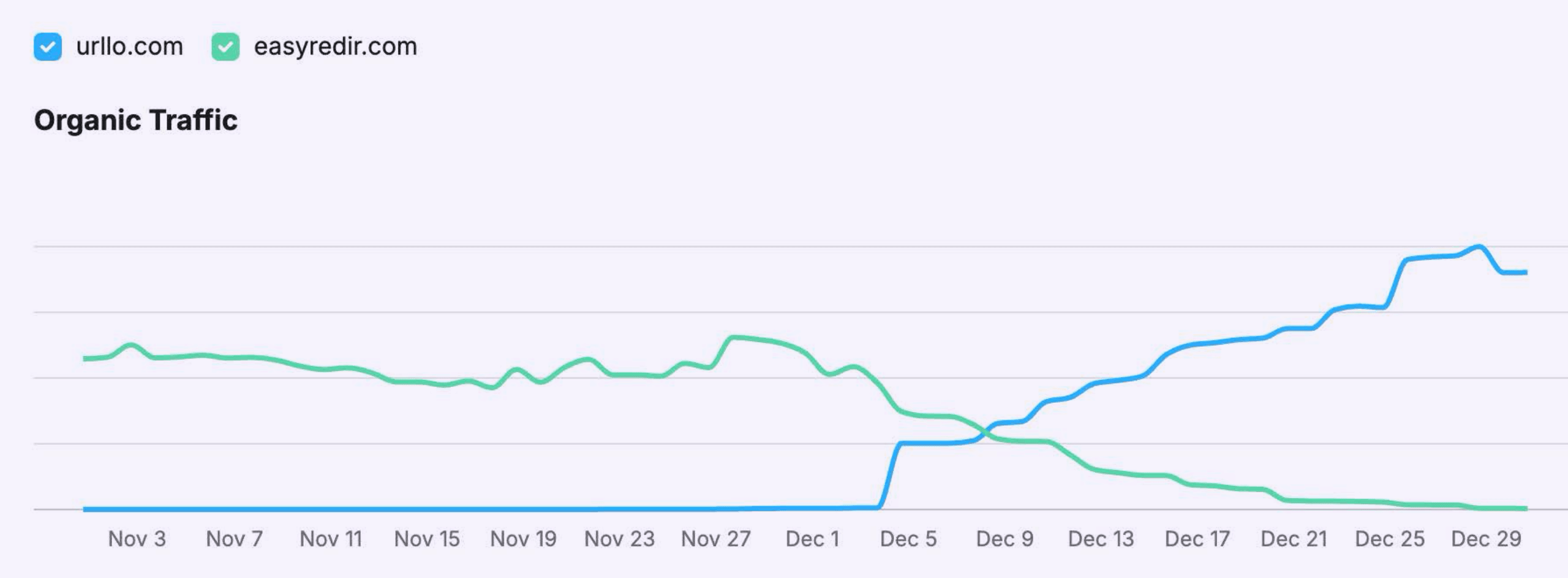
Every step in this guide is one we took ourselves.
How urllo fits a rebrand
A rebrand is the exact moment redirects stop being a background detail and become the thing standing between you and your traffic. urllo is a managed redirect and link management platform built for that job, handling more than 25 billion requests a year for over 1,000 companies across 75-plus countries since 2014.
For a rebrand specifically:
- Partial path matching, with path and query forwarding, maps large sites by pattern instead of by hand.
- Managed 301s move ranking value cleanly and reliably at launch scale.
- Branded links carry the new domain and keep old short links working.
- A central place to change destinations is what makes dynamic QR codes and long-tail old links safe to update at any time.
Use urllo for redirect reliability and performance you can count on during your rebrand migration.
Frequently asked questions about rebranding
How long should we keep the old domain and redirects live?
Years, not months. Old links keep sending traffic long after launch, so keep the old domain registered and forwarding indefinitely where you can.
Will a rebrand hurt our SEO?
Not if the move is handled with 301s and a complete redirect map. Ranking value passes to the new URLs. Damage comes from missed URLs, homepage-only redirects and broken chains, not from rebranding itself.
301 or 302 for a rebrand?
301. The move is permanent and only a permanent redirect tells search engines to treat the new URL as canonical, which is what moves the old URL's ranking signals onto it.
Do we need to redirect every single old URL?
Every URL that has traffic or backlinks, yes. Pattern-based rules like wildcards let you cover large groups at once rather than mapping each one manually.
Can we fix QR codes that are already printed?
Only if they resolve through a redirect you control. A dynamic QR code can be repointed to the new destination. A static code with a hard-coded old URL cannot be changed once printed.
What happens to our existing branded short links?
They should keep working and simply land on the new destinations, provided they are managed through a service where you can update where they point.

By Sean Pasemko
SEO & Growth Marketing Specialist
Sean Pasemko is an SEO and growth marketer at urllo, where he works closely with SEO, IT and WebOps teams on redirect management, domain changes and site migrations.
His writing draws on practical experience analyzing redirect behavior, crawl efficiency and long-term site maintenance to help teams avoid common routing and performance issues.





.png&w=2560&q=88)

.png&w=2560&q=88)


.png&w=2560&q=88)