If you've ever wondered what a domain is and how these digital addresses make the internet work, you're in the right place. A domain is essentially your website's address on the internet, much like how your home has a physical street address that people use to find you.
Understanding domains is crucial for anyone looking to establish an online presence, whether for personal use or business purposes.
Think of the internet as a massive city with billions of buildings (websites). Just as each building needs a unique address so people can locate it, every website needs a domain name to help visitors find it among the countless other sites online. Without domains, we'd have to remember complex strings of numbers (IP addresses) to visit our favorite websites, which would make the internet nearly impossible to navigate.
At urllo, we know domains well because they’re part of the web infrastructure work our customers do every day and which we help support. We’ve seen how domains and DNS affect websites, redirects and the way people connect with a business online, so this is a topic we have real hands-on experience with.
Understanding domain definition and structure
A domain name is a human-readable address that translates to a specific location on the Internet. When you type a domain into your browser, it's like giving directions to a specific digital destination. The domain definition encompasses both the technical and practical aspects of how these addresses function in our daily internet use.
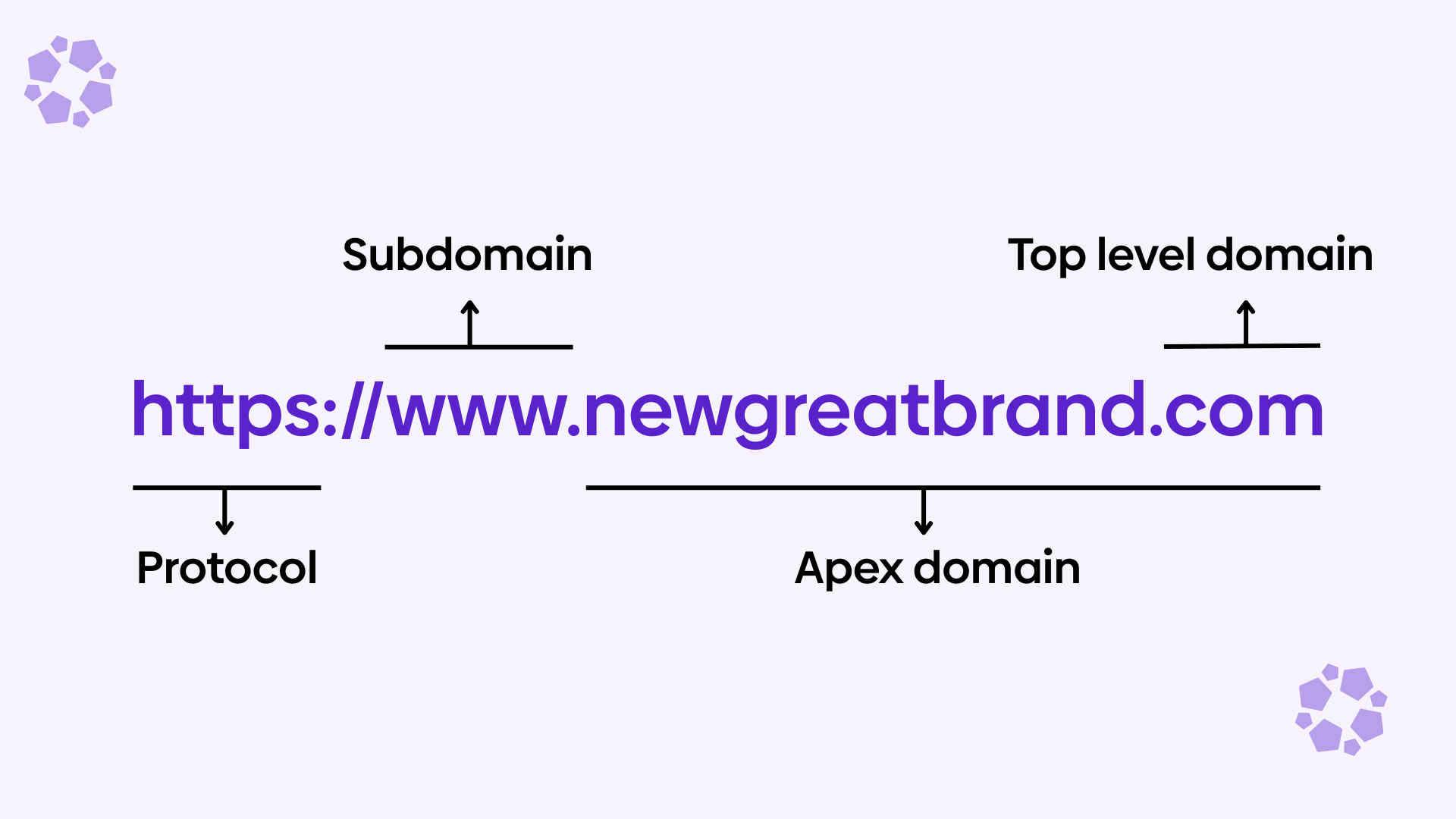
Every domain follows a hierarchical structure that reads from right to left. Take "newgreatbrand.com" as an illustration. The ".com" part is called the top-level domain (TLD), while "newgreatbrand" is the second-level domain that identifies the specific website. This structure allows for millions of unique combinations while maintaining an organized system that computers can easily process.
The beauty of this system lies in its simplicity for users and complexity for computers. When you understand what a domain is in simple terms, you realize it's just a memorable name that masks the complicated technical processes happening behind the scenes. Your browser uses this friendly name to locate the correct server and retrieve the website you want to visit.
Apex domains vs. www subdomains
When setting up a website, you will often see two versions of the same address: the apex domain and the www subdomain. Understanding the difference helps with DNS setup, redirects and consistency across your site.
The apex domain is the root version of your domain, such as urllo.com. It does not include any subdomain prefix. This is sometimes also called the root domain or naked domain.
The www version is a subdomain of the apex domain, written as www.urllo.com. Even though many people think of it as just part of a website address, www is technically a subdomain like help.urllo.com.
In practice, both versions can be used to reach the same website. For example, a business might want both urllo.com and www.urllo.com to load the homepage. To make that work, website owners usually choose one as the preferred version and redirect the other to it. This avoids duplicate content issues and creates a more consistent experience for users and search engines.
From a DNS perspective, the two versions are handled differently. The apex domain often uses A or AAAA records to point directly to an IP address, because the root domain usually cannot be a true CNAME in standard DNS. The www version, on the other hand, is often connected using a CNAME record that points to the apex domain or to another hostname managed by a hosting provider.
For example:
- urllo.com → A record to 203.0.113.10
- www.urllo.com → CNAME to urllo.com
Many website owners prefer using www because it offers slightly more flexibility in DNS configuration and can make it easier to integrate with certain hosting or CDN providers. Others prefer the shorter apex domain for branding and simplicity. Neither is inherently better for SEO as long as you use redirects properly and keep your preferred version consistent.
The most important thing is to decide which version you want to use publicly, then make sure the other one redirects to it. That way, visitors can reach your site either way, but search engines and users see one consistent domain.
How domains work: The technical process explained
Understanding how domains work requires a basic grasp of the Domain Name System (DNS), which acts like the Internet's phone book. When you type a domain name into your browser, your computer doesn't immediately know where to find that website. Instead, it reaches out to DNS servers to translate that friendly domain name into an IP address, which is the actual numerical location of the website's server.
This translation process happens in milliseconds and involves multiple steps. First, your computer checks its local cache to see if it recently visited that domain. If not, it contacts your internet service provider's DNS server, which may forward the request to other DNS servers until it finds the authoritative server that knows exactly where that domain points.
The DNS system is distributed across thousands of servers worldwide, ensuring reliability and speed. This distributed nature means that even if one server goes down, others can handle the requests. The system also uses caching to improve performance, storing frequently requested domain-to-IP translations so future requests can be resolved more quickly.
Once your browser receives the IP address, it can connect directly to the web server hosting the website. The server then sends back all the files, images, content and code that make up the webpage you requested. This entire process typically takes less than a second, making the internet feel instantaneous despite the complex technical choreography happening behind the scenes.
Domain vs website: understanding the key differences
One of the most common questions beginners ask us is the difference between a domain and a website. These terms are often used interchangeably, but they represent different aspects of your online presence. A domain is simply the address, while a website is the actual content and functionality that visitors experience when they arrive at that address.
Common mistake: treating your domain, website and hosting as the same thing.
A domain is your website’s address, not the website itself. Many beginners register a domain and assume their site will be live right away, but a domain still needs DNS records, hosting and website files behind it to work properly. Understanding the difference early makes it much easier to set up your site correctly and troubleshoot problems later.
Think of it this way: if your domain is like a street address, your website is like the house that sits at that address. You can own a domain without having a website, just like you can own an empty lot without a house. You can have a website without your own custom domain, but a domain makes it much easier for people to find, remember and trust your site.
Many people purchase domains before they're ready to build their websites, essentially reserving their preferred address for future use. This practice is common among businesses that want to secure their brand name online, even if they're not ready to launch their website immediately.
Domain registration process and considerations
Domain registration is the process of reserving a domain name for your exclusive use during a specified period, typically one year at a time. When you register a domain, you're not actually buying it permanently. Instead, you're leasing the rights to use that specific domain name for the registration period.
The registration process involves choosing an available domain name and working with a domain registrar, which is a company authorized to sell domain names. Popular registrars include companies like GoDaddy or Namecheap. These companies act as intermediaries between you and the organizations that manage different domain extensions.
Before registering a domain, check whether your preferred name is available. If your preferred domain is taken, you might consider variations or different domain extensions. Many registrars also offer suggestions for similar available domains if your first choice isn't available.
Types of domain extensions and their purposes
Domain extensions, also known as top-level domains (TLDs), serve different purposes and carry different meanings. The most familiar extension is .com, which originally stood for "commercial" but has become the default choice for most websites regardless of their purpose. Understanding the various types of extensions can help you make an informed decision about which one suits your needs.
Traditional generic top-level domains include:
- .org for organizations
- .net for network-related sites
- .gov for government websites
- .edu for educational institutions
However, the internet has expanded to include hundreds of new extensions like .shop, .blog, .tech and even city-specific extensions like .nyc or .london. These newer options provide more creative possibilities for branding and can help describe what your website is about at a glance.
Another category to know is dotBrand domains, which are custom extensions owned and operated by a specific company, such as .google or .bmw. These domains give brands more control over their online presence and can make branded URLs more distinctive, secure and memorable.
Country-code top-level domains (ccTLDs) like .uk, .ca or .de can be valuable for businesses targeting specific geographic markets. These extensions can:
- Help with local search engine optimization
- Build trust with regional audiences who may prefer to do business with local companies
Some ccTLDs have also become popular for creative uses, such as:
- .ly (Libya) for shortened links
- .io (British Indian Ocean Territory) among tech companies
Newer generic top-level domains offer more specific branding opportunities. A photography business might choose .photography, while a restaurant could opt for .restaurant. While these newer extensions can be memorable and descriptive, .com remains the most trusted and widely recognized extension among internet users, making it the safest choice for most applications.
Choosing the right domain for your needs
Selecting the perfect domain name requires balancing several important factors. Your domain should be easy to remember, spell and pronounce, as people often share website addresses verbally or need to type them from memory. Avoid hyphens, numbers or unusual spellings that might confuse potential visitors. The best domains flow naturally and stick in people's minds after hearing them just once.
Brand consistency plays a crucial role in domain selection. If you already have an established business name or brand, using that same name for your domain creates a cohesive identity across all marketing materials and platforms. This consistency helps build trust and makes it easier for customers to find you online. However, if your business name is long or difficult to spell, consider a shortened version or an alternative that still connects to your brand.
Consider your long-term goals when choosing a domain. While it's possible to change domains later, doing so can be complicated and potentially harmful to your search engine rankings and brand recognition. Choose a domain that will serve your needs as your business or website grows and evolves over time. Think about whether you might expand into new markets, offer different products or services or rebrand in the future.
Search engine optimization should also influence your domain choice, though it's less critical than it once was. Having relevant keywords in your domain can provide a small SEO benefit, but user experience and brand considerations should take priority over keyword optimization. A memorable, brandable domain will typically serve you better in the long run than a keyword-stuffed domain that's difficult to remember or spell.
Domain management and maintenance
After registering a domain, ongoing management helps keep your website and email running smoothly. The most important task is renewal. Domains expire at the end of their registration period and if you do not renew on time, you could lose the domain.
To avoid that, enable auto-renew, keep your contact and payment details up to date and watch for renewal notices. Some registrars also offer multi-year registration for added peace of mind.
Privacy protection is another common feature. It helps keep your personal contact information out of public WHOIS records and can reduce spam.
You should also review your DNS settings when changing hosting providers, email services or other connected tools. Updating those records correctly ensures your domain continues pointing to the right services.
Conclusion
Understanding what a domain is forms the foundation of establishing any successful online presence. Domains serve as the essential bridge between complex internet infrastructure and user-friendly navigation, making the vast digital landscape accessible to everyone. Whether you're planning to start a blog, launch a business website or simply want to understand how the internet works, grasping domain concepts is invaluable.
The relationship between domains and websites creates the framework that powers the modern internet. While the technical processes behind domain resolution are complex, the practical aspects of choosing, registering and managing domains are straightforward once you understand the basics.
As you move forward with your online journey, remember that your domain choice will likely be one of the most enduring decisions you make about your web presence. Take time to consider your options carefully and don't hesitate to seek advice from hosting providers or web professionals if you need guidance on domain selection or management.
Frequently asked questions about domains
What is the difference between a domain and a website?
A domain is simply the address that people use to find your site on the internet, like a street address for a building. A website is the actual content, pages, images and functionality that visitors see and interact with when they arrive at that address. You can own a domain without having a website, but you cannot have a website that people can visit without a domain.
How much does a domain name cost?
Domain costs vary depending on the extension and registrar, but most .com domains cost between $10-15 per year. Newer or specialty extensions like .tech or .photography may cost more, sometimes $20-50 per year. Premium or highly desirable domain names can cost thousands or even millions of dollars if they're being resold by previous owners.
Can I change my domain name later?
Yes, you can change your domain name, but it requires careful planning to avoid losing search engine rankings and confusing your audience. The process involves registering a new domain, setting up proper redirects from your old domain to the new one and updating all your marketing materials. It's generally better to choose the right domain from the start to avoid complications.
What happens if I don't renew my domain?
If you don't renew your domain before it expires, it goes through several phases. First, there's typically a grace period where you can still renew at the regular price. Then it enters a redemption period where renewal costs significantly more. Finally, if still not renewed, the domain becomes available for anyone else to register and you'll lose all rights to it.
Do I need hosting if I have a domain?
A domain alone won't give you a functioning website. You need web hosting to store your website files and make them accessible to visitors. Think of the domain as your address and hosting as the land where your house (website) sits. Some companies offer both domain registration and hosting services together, which can simplify management.
What are the different types of domain extensions?
There are several categories of domain extensions. Generic top-level domains (gTLDs) include .com, .org and .net, plus newer options like .shop and .blog. Country-code top-level domains (ccTLDs) like .uk or .ca represent specific countries. There are also sponsored top-level domains like .edu for educational institutions and .gov for government entities.

By Shannon Young
Customer Success Manager
Shannon is a seasoned professional in the customer success space. She has years of experience in a wide variety of customer-facing roles in various sectors.
Always ready to take on the next challenge, whether it be a new offensive cross stitch pattern or making her dogs sit still for another themed photo, she is prepared for anything.