
A website redirector is a powerful system that automatically sends visitors from one URL on your website to another page. Unlike basic domain forwarding, a proper website redirector can manage page-level redirects for your website, preserve SEO value and support smooth user experiences during changes and site restructuring.
This comprehensive system handles everything from single-page moves to complete domain migrations. It serves as a critical component for businesses undergoing digital transformations. Whether you're changing your CMS platform or restructuring your site, understanding how website redirectors work can save you from losing valuable traffic and search rankings.
What is a website redirector?
A website redirector is a server-side tool that automatically forwards visitors and search engines from one URL on your website to another. When someone tries to access an old web address on your site, the redirector instantly sends them to the new location without requiring any action on their part.
You might need to use a website redirector in a variety of common scenarios, including:
- Deleting or consolidating content, such as resolving keyword cannibalization or removing outdated pages.
- Changing URL structures or slugs during site updates or redesigns.
- Redirecting non-canonical versions of a URL (e.g., trailing slashes, uppercase variations).
- Enforcing HTTPS by redirecting HTTP traffic to secure URLs.
- Standardizing domains, such as redirecting apex domains to www (or vice versa).
- Handling unexpected traffic, including redirecting URLs that don’t exist but are being accessed (for example, AI-generated or “hallucinated” URLs).
These use cases highlight how redirectors help maintain a consistent user experience, preserve SEO value and ensure all traffic reaches the correct destination.
This system operates at the server level, making it different from client-side solutions like JavaScript redirects or meta refresh tags. This server-side approach ensures that both users and search engine crawlers receive proper redirect signals. Search engines can then transfer the SEO value from the old pages to the new ones. This process preserves your hard-earned rankings.
Website redirectors work by intercepting HTTP requests to your old URLs and responding with special status codes. These codes tell browsers and search engines exactly what type of redirect is happening and where to find the new content. The entire process typically takes milliseconds. This creates a smooth transition that users barely notice.
Website redirects vs domain redirects
Website redirects and domain redirects are related, but they solve different problems. The main difference is whether there is content hosted at the source address.
A website redirect is used when an existing website, page or section has content that needs to move somewhere else.
For example, if example.com/blog/old-post has been replaced by example.com/resources/new-post, a website redirect sends users and search engines from the old content location to the most relevant new one. This is common during site migrations, URL restructures and content consolidation.
A domain redirect is used when the source domain does not host its own content and simply needs to forward visitors to another website.
For example, a business might own example.net, example.ca or a misspelled version of its brand domain and redirect those domains to example.com. In this case, the domain itself is being forwarded.
| Redirect type | Content hosted at source? | Best for |
|---|---|---|
| Website redirect | Yes | Moving pages, restructuring URLs, CMS/site migrations |
| Domain redirect | No | Forwarding unused, no-longer-used, sunsetted, alternate or brand-protection domains |
For SEO-sensitive migrations, website redirects need more care because old pages may already have rankings, backlinks and search visibility. Domain redirects are often more about traffic capture, brand protection and making sure users who type an alternate domain still reach the right website.
Types of website redirects
Most website redirectors support several redirect types, but for most sites, the main choice is between a permanent or temporary redirect.
A 301 redirect is used when a page or domain has moved permanently. It tells search engines to replace the old URL with the new one and transfer ranking signals to the destination. This is the right choice for domain changes, URL restructures and permanently moved pages.
A 302 redirect is used when the move is temporary. It tells search engines that the original URL should remain the primary URL because the redirect may be removed later. This is useful for short-term campaigns, testing or maintenance.
Some website redirectors also support 307 and 308 redirects, which preserve the original HTTP request method. These are mainly useful for forms, APIs or applications where a POST, PUT or DELETE request must stay unchanged during the redirect. For most standard page redirects, 301 and 302 are the main types you’ll use.
A 404 response indicates that a page cannot be found and no redirect is in place. This is appropriate when content has been removed and there is no relevant replacement.
A 410 response signals that a page has been permanently removed and will not return. It provides a stronger indication to search engines that the URL should be dropped from the index more quickly.
When to use a website redirector
Website redirectors become essential whenever URLs change but you still need to preserve traffic, user experience and search engine visibility. The following are the most common scenarios where a website redirector should be used.
Site restructuring
Website restructuring involves reorganizing how content is grouped and accessed across your site. This might include moving entire sections, consolidating categories or changing your navigation to improve usability and SEO.
A website redirector ensures that all existing URLs within those sections continue to work by sending users and search engines to the new structure. Without redirects, restructuring can lead to broken links, lost rankings and a fragmented user experience.
URL changes
URL changes often happen at the page level, such as updating slugs, improving keyword targeting or cleaning up long or inconsistent URLs.
Redirects ensure that any existing links, bookmarks or indexed pages continue to resolve correctly. This preserves SEO value and ensures users are seamlessly directed to the updated version of the page.
Moving or consolidating content
As your site evolves, you may combine similar pages, update outdated content or move articles into new sections. This is common when improving content quality or aligning pages with new keyword strategies.
Redirects allow you to preserve the value of existing pages by forwarding traffic from the old URLs to the most relevant updated versions. This helps maintain rankings and ensures users always land on the best available content.
CMS migrations and platform changes
Migrating to a new content management system or platform often results in changes to URL structure, page paths or file formats. Even small differences in how URLs are generated can break existing links.
A website redirector provides a controlled way to map old URLs to new ones at scale. This ensures a smooth transition, protects your SEO performance and prevents traffic loss during the migration.
It’s also important to account for any existing redirects that were set up in your previous CMS. If those rules are not migrated or recreated, previously redirected URLs can break, leading to lost traffic and crawl errors. Importing or rebuilding your redirect rules as part of the migration process ensures continuity and prevents regressions after launch.
Archiving or removing cannibalizing pages
Over time, websites often accumulate multiple pages targeting the same or similar keywords. This can lead to keyword cannibalization, where pages compete against each other in search results.
In these cases, weaker or redundant pages are often removed or consolidated into a single, stronger page. Redirecting the old URLs to the preferred page helps consolidate ranking signals and improves overall search performance.
How to use a website redirector
There are several ways to implement website redirects depending on your infrastructure, technical resources and the scale of changes you need to manage. Each approach has its own strengths and limitations.
Server-based redirects
Server-based redirects are implemented directly on your web server using configuration files such as .htaccess (Apache) or server blocks (Nginx). These redirects execute at the server level, making them fast and reliable.
This approach is commonly used for:
- Simple site-wide rules (e.g. HTTP to HTTPS).
- Permanent page moves.
- Basic redirect setups on smaller sites.
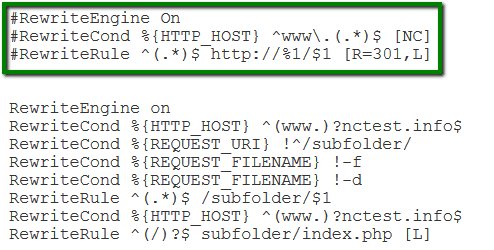
However, server-based redirects can become difficult to manage at scale. Large migrations may require hundreds or thousands of rules, and updating them often requires developer involvement and careful version control.
WordPress plugins
For WordPress sites, redirect plugins provide a more accessible way to manage redirects without editing server files. These tools typically offer a user interface where you can create, edit and monitor redirects.
They are useful for:
- Non-technical users managing content changes.
- Handling redirects during blog updates or page edits.
- Basic tracking and error monitoring.
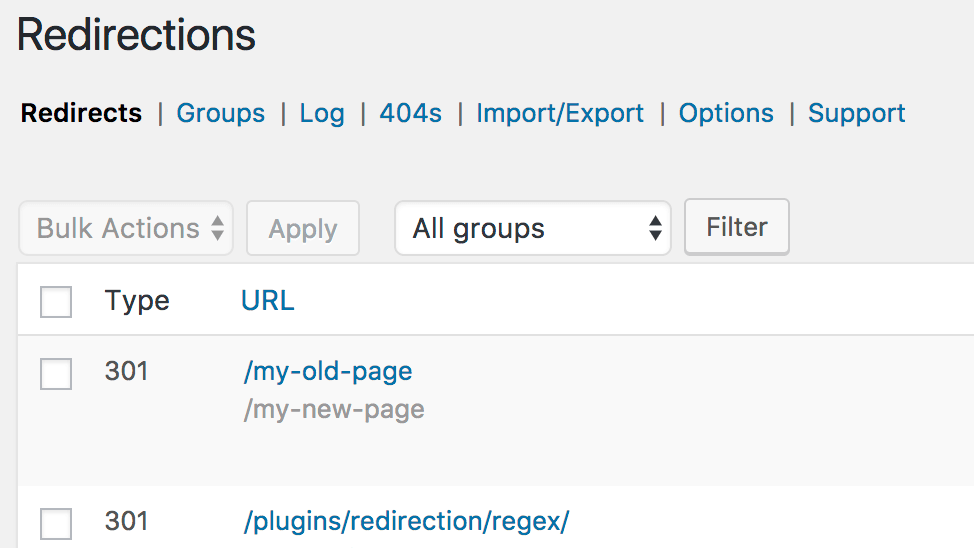
While convenient, plugins can have limitations. Performance may be affected if redirects are processed at the application level, and managing large volumes of redirects can become inefficient compared to more centralized solutions.
CDN or edge-based redirects
CDN (Content Delivery Network) or edge-based redirects are handled at the network layer, before requests reach your origin server. This allows redirects to execute closer to the user, improving speed and reducing server load.
This approach is ideal for:
- High-traffic websites.
- Global audiences requiring low-latency responses.
- Security-related redirects, such as enforcing HTTPS.
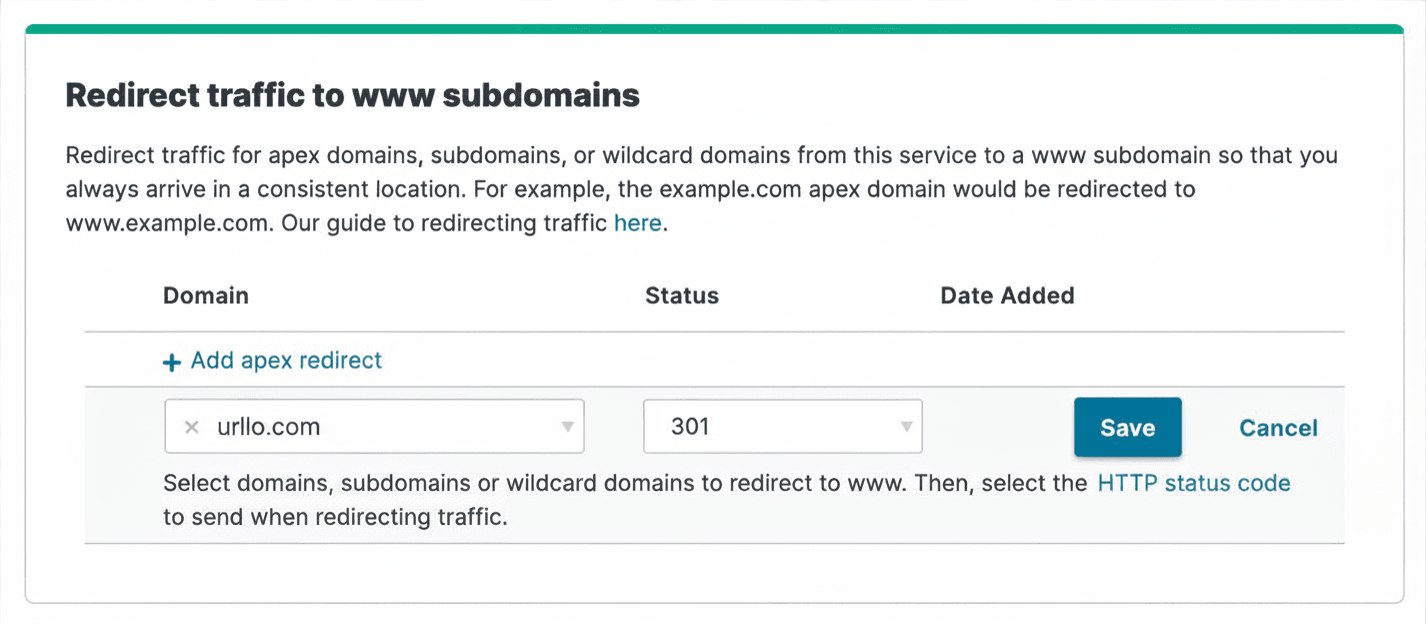
However, CDN-based setups can be complex to configure and maintain. Managing large sets of rules or coordinating changes across teams may require additional tooling or expertise.
Redirector tools (like urllo)
Dedicated redirector platforms provide a centralized way to manage redirects across your entire website or domain portfolio. Instead of relying on server files, plugins or CDN rules, you can control all redirect logic from a single interface.
These tools are best suited for:
- Large-scale site migrations and restructures.
- Managing thousands of redirects across multiple domains.
- Teams that need collaboration, audit logs and access control.
- Ongoing monitoring, analytics and performance optimization.
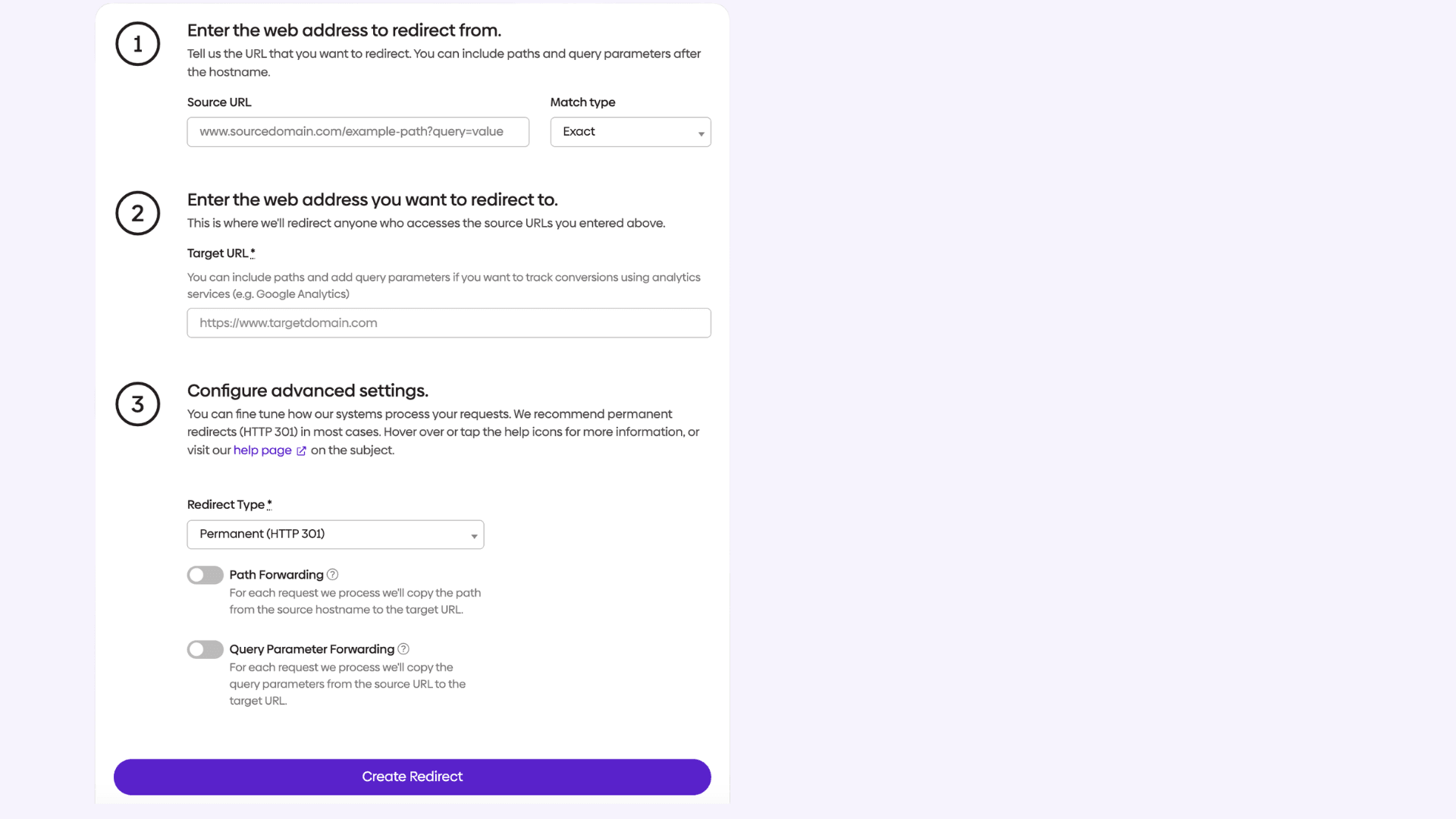
Platforms like urllo combine server-level performance with a user-friendly interface, allowing both technical and non-technical teams to manage redirects efficiently. They also reduce the risk of errors by supporting bulk operations, pattern matching and built-in validation tools.
Features that matter when choosing a website redirector
Not all website redirectors offer the same capabilities. The right tool can save you hours of manual work, protect your SEO rankings and give you the visibility you need to manage redirects at scale. Here are the key features to look for when evaluating your options.
Bulk redirect management
When migrating large sites, you may need to set up hundreds or thousands of redirects at once. Look for a tool that supports CSV import, bulk editing, pattern-based and fallback rules. These features dramatically reduce the time needed to handle large-scale URL changes and lower the risk of missing a redirect during a complex migration.
Analytics and traffic monitoring
Visibility into how your redirects are performing is essential. The best tools include click tracking, traffic volume reporting, lost traffic reports and the ability to identify which redirects are being hit most frequently. This data helps you prioritize maintenance, spot broken or underperforming redirects and make informed decisions about when a redirect can safely be retired.
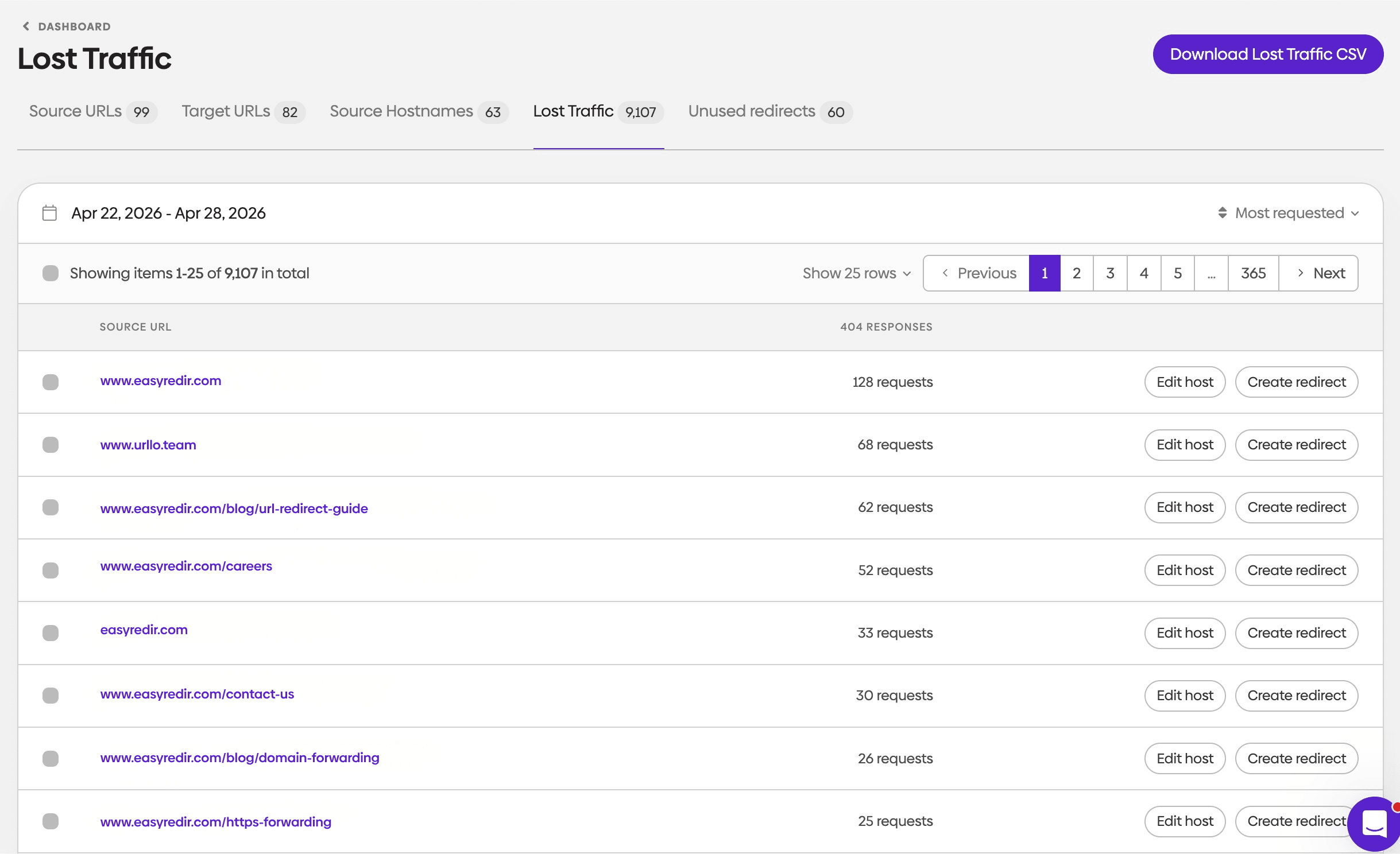
Server-side execution
Redirects that execute on the server side are faster and more reliable than those handled through JavaScript or meta tags, which are worse for SEO and AI visibility. Prioritize tools that process redirects at the infrastructure level, ideally with minimal added latency regardless of traffic volume.
Redirect speed
A slow redirect adds latency to every affected page visit and can harm both user experience and search engine crawl efficiency. Making sure your response time is under 200 ms will give your users the best experience and benefit your website’s performance and SEO rankings.

Ease of use and team collaboration
Redirects are often managed by a mix of developers, marketers and SEO specialists. A good tool should offer an intuitive interface that non-technical users can navigate without needing to touch server configuration files. Features like role-based access and audit logs make it easier for teams to collaborate safely and efficiently.
Common website redirector mistakes
Understanding common redirect mistakes helps you avoid issues that could harm your site's performance and search rankings. These problems often arise from poor planning or incorrect implementation.
One frequent mistake is redirecting all old URLs to the homepage instead of finding relevant new pages for each old URL. This approach is essentially a soft 404 error and creates a poor user experience and wastes the SEO value built up by individual pages. Take time to map old URLs to the most relevant new pages. This requires significant planning effort but provides better results.
Another common error is accidentally creating redirect loops where pages redirect to each other in an endless cycle. These loops are usually caused by configuration errors across multiple systems. These loops prevent pages from loading and can cause search engines to stop crawling affected sections of your site. Test all redirects thoroughly before implementation to identify and fix any loops.
Failing to update internal links after implementing redirects is also problematic. While redirects will work, internal links should point directly to new URLs to minimize redirect hops and improve page load speed. Update navigation menus, content links and other internal references to use the new URL structure.
Conclusion
Website redirectors are essential tools for maintaining your online presence during site restructuring, mass URL changes, CMS migrations and while moving content. They preserve SEO value, ensure smooth user experiences and help you avoid the traffic losses that can result from broken links and outdated URLs.
Success with website redirectors requires understanding the different redirect types, implementing them correctly and monitoring their performance over time. Whether you're using CDN redirects, server-level configurations, CMS plugins or a dedicated redirector like urllo, the key is planning carefully and following established best practices.
Remember that redirects are powerful tools that should be used strategically. Avoid unnecessary redirect chains. Monitor performance regularly. With proper implementation, website redirectors can help you navigate major site changes while protecting the SEO value you've worked hard to build.
Frequently asked questions about website redirectors
What is the difference between a website redirector and a URL redirector?
A website redirector manages redirects across pages, sections or entire domains, often for migrations, restructures and SEO-sensitive changes. A URL redirector usually focuses on individual URLs or links, often for forwarding, tracking or campaign management. Both can use true HTTP redirects, but website redirectors are usually broader in scope.
How do I redirect my entire website to a new domain?
The most reliable way to redirect an entire website is by using a dedicated redirect platform like urllo, which allows you to map and manage redirects at scale without relying on server-level configurations. Instead of writing rules manually, you can implement domain-wide redirects, preserve URL paths automatically and handle complex migrations through a centralized interface.
While it is possible to set up redirects using server configuration files like .htaccess (Apache) or through your hosting provider, these approaches can become difficult to manage as your site grows. Large migrations often require detailed page-level mapping, testing and ongoing monitoring, which is where a purpose-built solution provides more control and reduces the risk of errors.
Using a platform like urllo ensures your redirects are handled reliably across all traffic, helping preserve SEO value and maintain a consistent user experience during domain changes.
Will using a website redirector hurt my SEO rankings?
Properly implemented 301 redirects typically transfer 90-99% of the original page's SEO value to the new page. However, redirect chains, slow redirect responses or redirecting to irrelevant pages can cause ranking loss. The key is using the correct redirect type and ensuring fast, relevant redirects to maintain SEO performance.
How long should I keep website redirects in place?
Keep important redirects in place for at least one year to ensure all external links and search engine indexes have updated to the new URLs. For critical pages with many inbound links, consider keeping redirects indefinitely. Temporary redirects should be removed according to your planned timeline to avoid confusion about your site structure.

By Shannon Young
Customer Success Manager
Shannon is a seasoned professional in the customer success space. She has years of experience in a wide variety of customer-facing roles in various sectors.
Always ready to take on the next challenge, whether it be a new offensive cross stitch pattern or making her dogs sit still for another themed photo, she is prepared for anything.



.png&w=2560&q=88)




.png&w=2560&q=88)