



A website redirect is usually a server-side instruction that tells browsers and search engines that a webpage has permanently or temporarily moved to a different location. When someone tries to access the original URL, the server automatically forwards them to the new page without any action required from the visitor. This seamless process ensures users find the content they're looking for while preserving valuable SEO equity.
Website redirect vs URL redirect
A website redirect is a kind of URL redirect. A URL redirect is the general technical term for sending one URL to another. A website redirect refers to that same redirect behavior when it is used on a website, while a domain redirect refers to a URL redirect used for domain forwarding.
Website redirect vs domain forwarding
A website redirect and domain forwarding are related, but they are not the same thing.
A website redirect usually refers to redirecting one page, many pages or a section of a site from one URL to another. The focus is often on content movement, SEO continuity and site structure.
Domain forwarding is narrower. It usually refers to sending one entire domain or host to another destination.
Examples:
- For a domain-level rebrand: forward oldbrand.com to newbrand.com
- For HTTP to HTTPS: forward http://urllo.com to https://urllo.com
- For apex domains: forward urllo.com to www.urllo.com
- For parked domains: forward urllo.co to urllo.com
Types of website redirects
Different redirect types serve specific purposes and send different signals to search engines about the nature of your URL changes.
301 redirects (permanent)
The 301 redirect indicates a permanent move from one URL to another. This is the most commonly used redirect type and the gold standard for SEO purposes. When you implement a 301 redirect, you're telling search engines that the original page has permanently moved and they should transfer all ranking signals, link equity and indexing properties to the new URL.
Search engines typically pass 90-99% of the original page's ranking power to the destination URL with a 301 redirect. This makes it essential for situations like domain migrations, URL structure changes or when consolidating duplicate content. The redirect remains in place indefinitely, making it perfect for permanent site changes.
302 redirects (temporary)
A 302 redirect signals that the move is temporary and the original URL will eventually return. Search engines interpret this differently than a 301, typically maintaining the original URL in their index while still following the redirect for users. This means less SEO value transfers to the destination page.
Use 302 redirects for temporary situations like maintenance pages, seasonal campaigns and A/B testing scenarios. Since search engines expect the original page to return, they continue indexing it rather than replacing it with the destination URL in search results.
303, 307 and 308 redirects
These HTTP redirect types handle specific technical scenarios. A 303 redirect explicitly changes the request method to GET, commonly used after form submissions to prevent duplicate submissions when users refresh the page.
Meanwhile, a 307 redirect maintains the original request method and is used when you need to preserve POST requests during the redirect process.
A 308 redirect is the permanent equivalent of a 307 redirect. It signals that the move is permanent while also preserving the original request method, which makes it useful in cases where both permanence and method consistency matter.
Most website owners rarely encounter these redirect types, but understanding their existence helps when working with developers or troubleshooting specific technical issues.
Common reasons for implementing redirects
Website redirects serve numerous practical purposes in site management and user experience optimization.
URL structure updates
Website redesigns often involve changing URL structures for better organization or SEO optimization. When moving from URLs like "/products.php?id=123" to cleaner URLs like "/products/widget-name", redirects maintain accessibility for users who bookmarked the old URLs and preserve link equity from external websites pointing to your original pages.
This becomes particularly important for established websites with extensive external link profiles. Each incoming link represents trust and authority signals that you want to preserve through the URL structure transition.
Content consolidation
Sometimes multiple pages cover similar topics and would be more effective combined into a single comprehensive resource. This prevents cannibalization from happening and negatively impacting your website’s SEO. Redirecting the individual pages to the consolidated content prevents duplicate content issues while maintaining traffic from all the original pages.
This strategy works well when you have several thin pages that would create more value combined or when merging related product pages or blog posts into more comprehensive guides.
Fixing broken links
When pages are deleted or moved without proper planning, broken links result in poor user experience and lost SEO value. Implementing redirects to relevant alternative pages salvages the situation by sending users to helpful content instead of error pages.
The key is choosing appropriate destination pages that closely match the intent and topic of the original content. Redirecting a specific webpage to the homepage typically provides a poor user experience compared to topically relevant alternatives.
How to implement website redirects with urllo
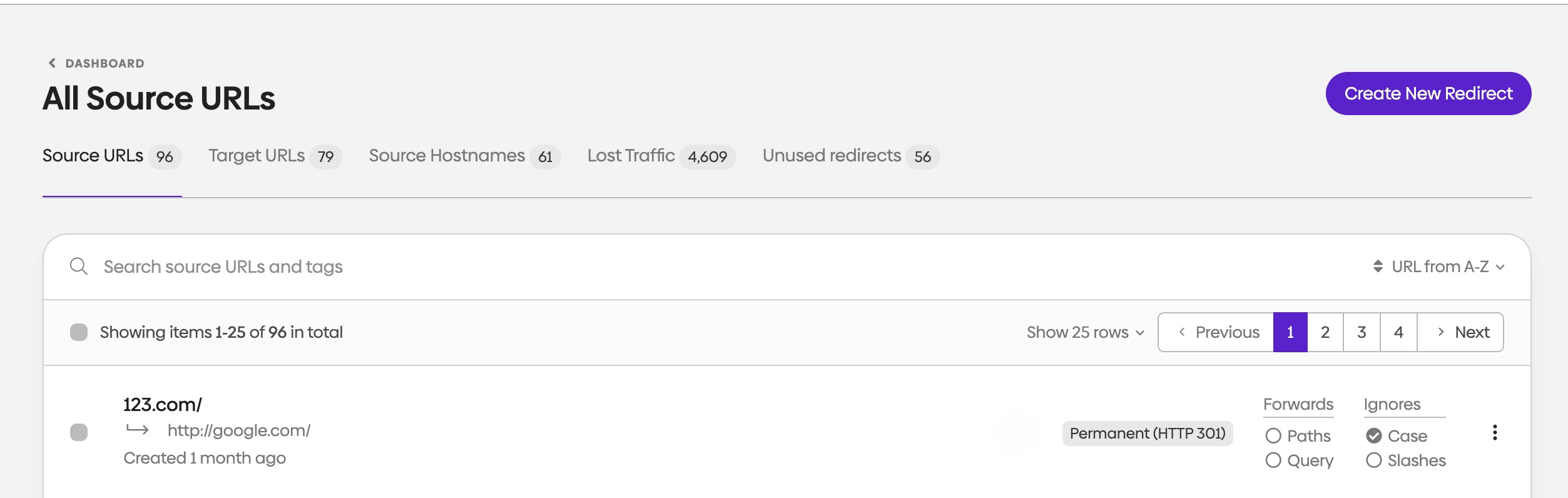
With urllo, creating and implementing website redirects is straightforward and can be done with a few clicks in our dashboard. You will need to configure a domain to complete this process.
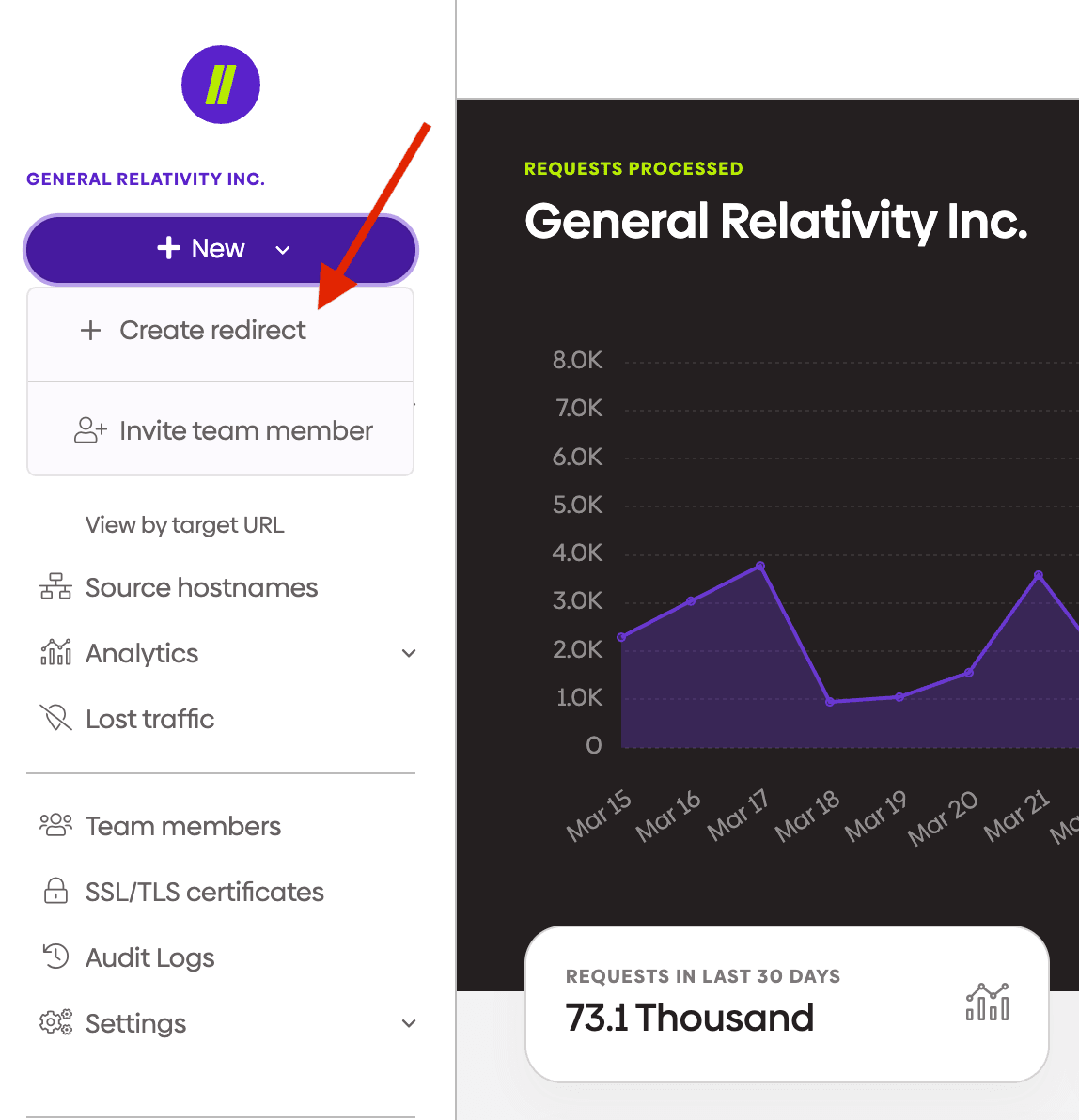
Click “Create redirect.”
Enter dashboard.easyredir.com and navigate to the top left of the screen and click “new”.
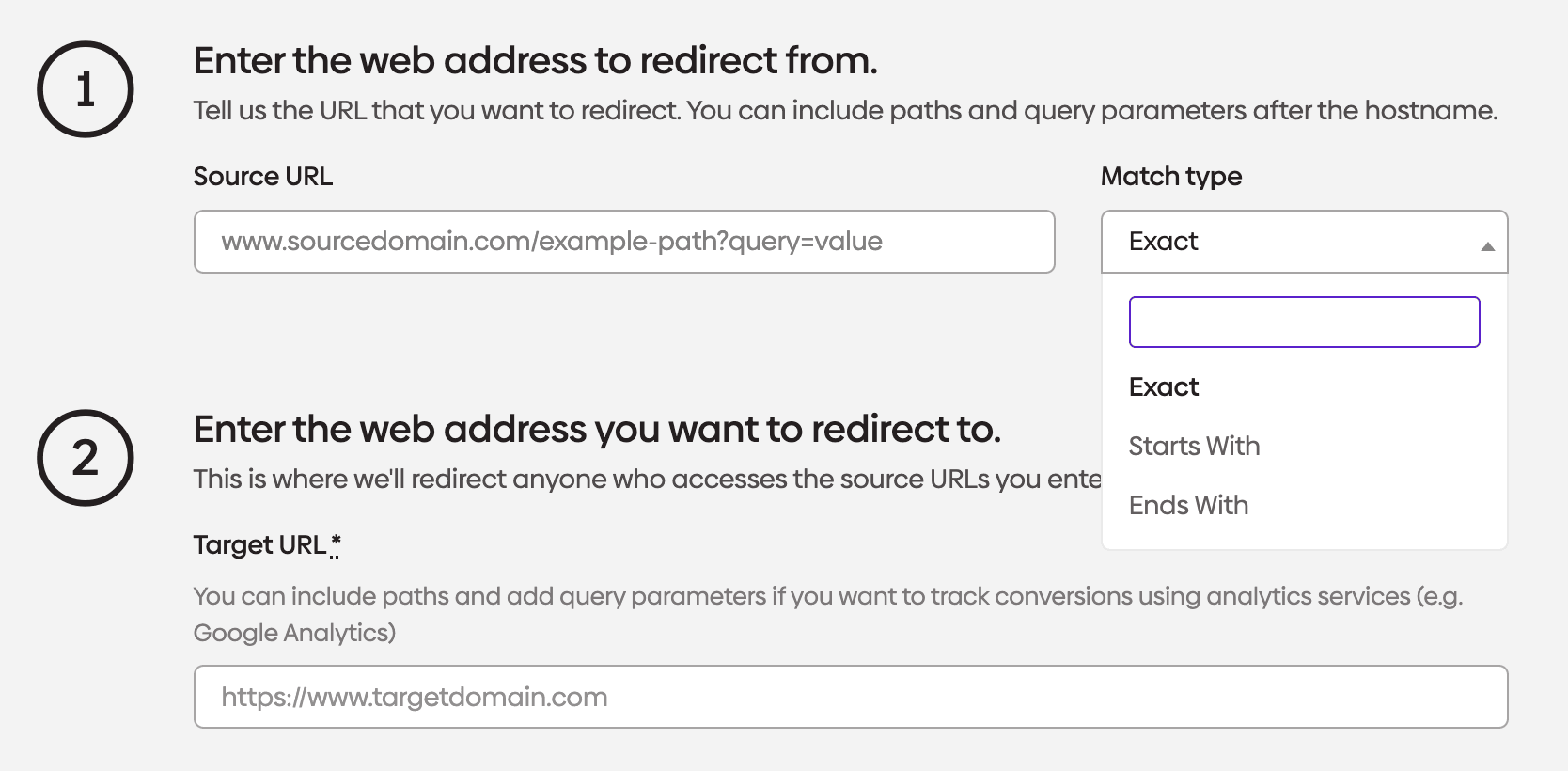
2. Enter the source URL and target URL
This is the step where you enter the web address you want to redirect and where you want people to be redirected.
You can select the match type from the following options:
- Exact
- Starts with
- Ends with
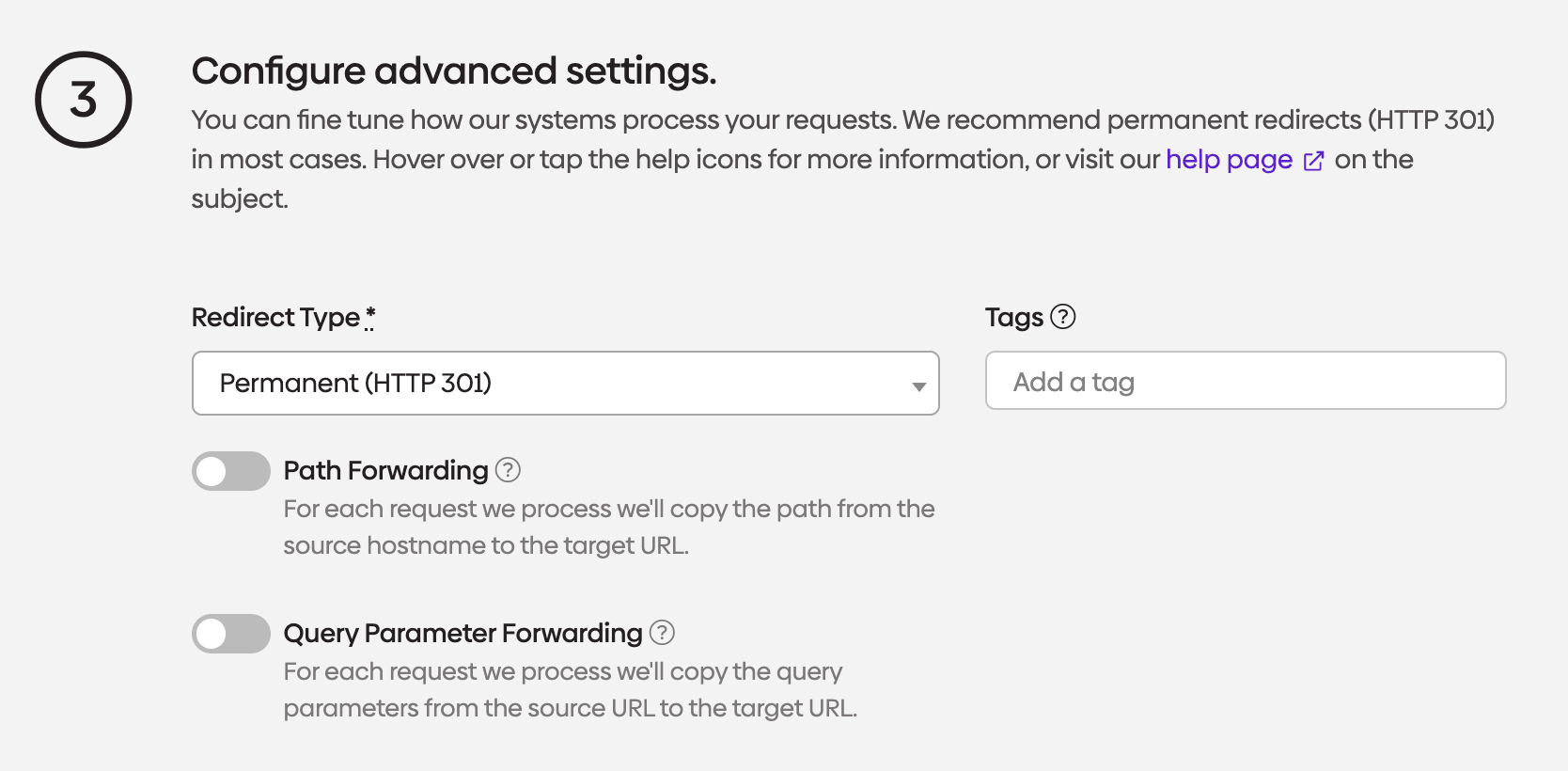
3. Configure advanced settings (optional)
You can enable path forwarding or query parameter forwarding in this step.
Path Forwarding - Sometimes referred to as a wildcard redirect, this will redirect all paths to the same paths at the destination (target URL). This will only work successfully when the path structure of the source and target domains exactly matches.
Parameter Forwarding - This forwards any request query parameters in the source URL to the destination. This allows for the use of UTM tags or other analytics tags.
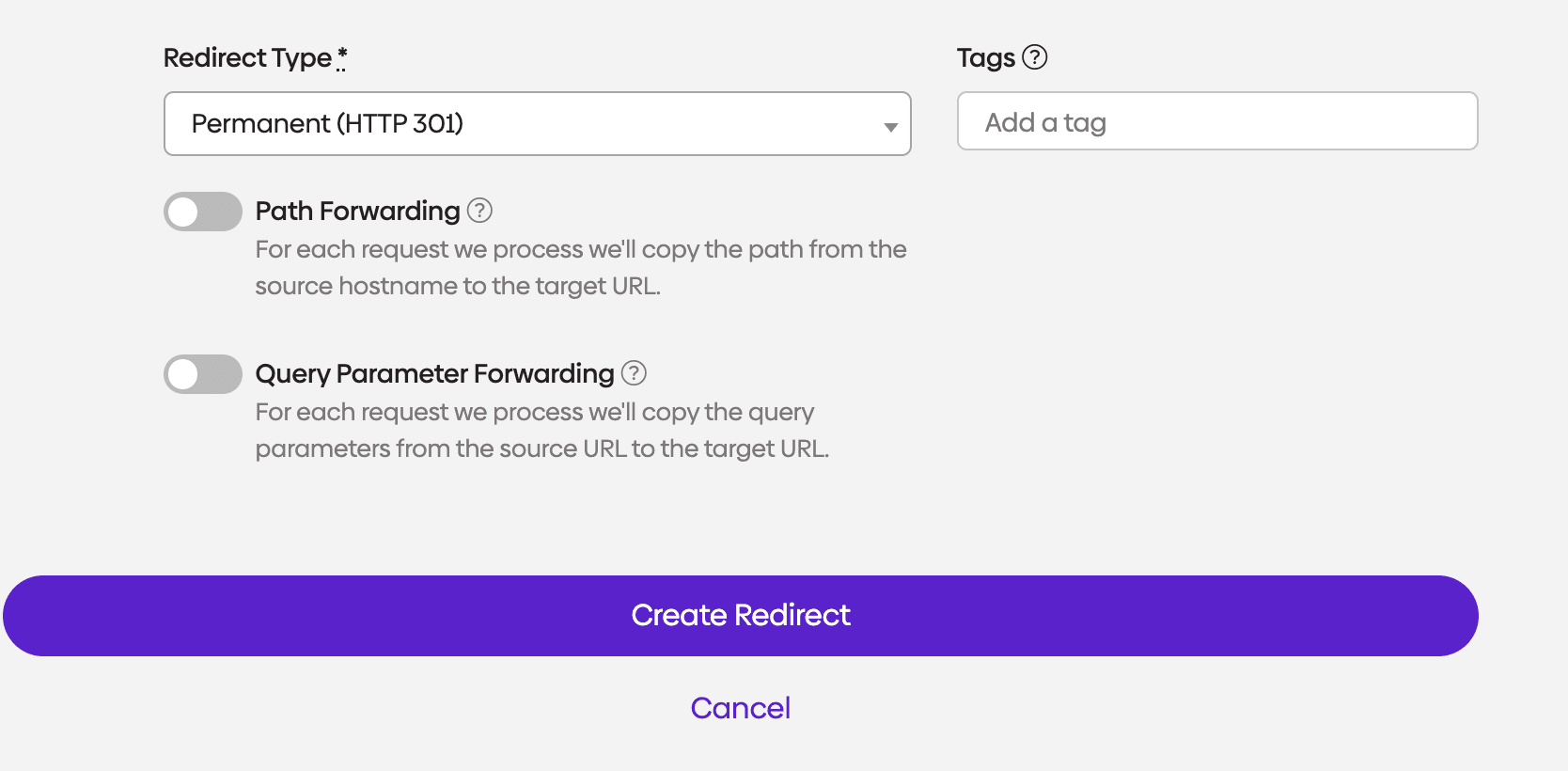
4. Click “create redirect”
Once you hit create, the redirect will start working instantly.
5. Check your redirect and make sure everything looks good
Ensure there are no errors showing.
How to create redirects in bulk
Before you begin, map out your redirect plan. Decide whether you want to send every URL to a single destination, such as a new homepage or redirect each old URL to its closest equivalent on the new site.Once you’ve mapped out your redirects, create a .csv file and then enter your redirects using our template format. You will need to indicate if you want to replace all existing redirects in your account or if these should be added. We will also need to know if you want us to REPLACE or IGNORE duplicates. Once received, our team will upload this list to your account.
SEO considerations for site redirects
Proper redirect implementation significantly impacts your website's search engine performance and user experience.
Maintaining link equity
Search engines view links as votes of confidence and redirects help preserve this valuable equity when URLs change. A properly implemented 301 redirect passes most of the original page's ranking signals to the destination URL, maintaining your hard-earned search rankings.
However, redirect chains diminish this effect. When Page A redirects to Page B, which redirects to Page C, each hop reduces the SEO value passed along. Keep redirect chains to a minimum and regularly audit your redirects to identify and fix chains that develop over time.
Page load speed impact
While individual redirects add minimal loading time, multiple redirects or redirect chains can noticeably slow page loading. Search engines consider page speed a ranking factor, making redirect optimization important for both user experience and SEO performance.
Monitor your site's redirect implementation through tools like Google Search Console and website speed testing tools. These platforms identify redirect issues and provide insights into how redirects affect your site's performance metrics.
Search engine crawling efficiency
Search engines allocate limited resources to crawling your website, known as crawl budget. Excessive redirects can waste this budget, potentially impacting how thoroughly search engines index your site. Efficient redirect implementation helps search engines discover and index your content more effectively.
Regular redirect auditing identifies unnecessary redirects, redirect chains and redirects pointing to non-existent pages. Cleaning up these issues improves crawling efficiency and ensures search engines focus on indexing your valuable content rather than following redirect loops.
Best practices for website redirects
Following proven redirect strategies helps avoid common pitfalls and maximizes the benefits of your redirect implementation.
Planning redirect strategies
Before implementing redirects, create a comprehensive mapping document that shows exactly where each old URL should point. This planning phase helps identify the most relevant destination pages and prevents hasty decisions that could harm user experience.
Consider user intent when selecting destination pages. If the original page was about blue widgets and you're discontinuing that product, redirecting to your general widgets category serves users better than redirecting to your homepage or an unrelated product page.
Testing and monitoring
After setting up a redirect, the next step is verifying that it works the way you expect. A redirect that points to the wrong destination, creates a chain or uses the wrong status code can cause problems for both users and search engines.
The simplest way to check a website redirect is to test the original URL and confirm three things:
- Where it sends users.
- Which status code it returns.
- Whether it redirects only once or through multiple hops.
You can do this in a browser for a quick visual check, but browser-only testing does not always show the full redirect path clearly. For more reliable validation, use an online redirect checker tool that shows the status code and final destination.
When checking a website redirect, look for these common issues:
- The redirect goes to an unrelated page.
- A temporary redirect is being used when the move is permanent.
- The URL passes through multiple redirects before reaching the final page.
- The redirect leads to a 404 or another broken destination.
- HTTP and HTTPS versions behave inconsistently.
This is especially important after site migrations, URL restructures, content consolidation and domain changes. A redirect that looks correct on the surface may still create crawl inefficiencies or weaken the user experience if it is not implemented cleanly.
Set up monitoring to track redirect performance over time. Google Search Console shows redirect errors and provides insights into how search engines interpret your redirects. Regular monitoring helps identify issues before they impact user experience or search rankings.
Documentation and maintenance
Maintain detailed records of all redirects, including implementation dates, reasons for the redirect and performance metrics. This documentation proves invaluable when troubleshooting issues or planning future site changes.
Regularly review your redirect list to identify redirects that may no longer be necessary. While permanent redirects can remain in place indefinitely, cleaning up obsolete redirects reduces server load and simplifies site maintenance.
Troubleshooting common website redirect issues
Understanding common redirect problems helps you quickly diagnose and resolve issues that could impact your site's performance.
Redirect loops
Redirect loops occur when Page A redirects to Page B, which redirects back to Page A, creating an endless cycle. Browsers typically display error messages when encountering redirect loops, preventing users from accessing any content.
These loops often develop accidentally when managing complex redirect strategies or during site migrations. Use redirect checking tools to identify loops in your redirect chain and break them by removing or modifying the problematic redirects.
Mixed redirect types
Inconsistent redirect implementation, such as using 302 redirects when 301 redirects are appropriate, can confuse search engines and dilute SEO benefits. Audit your redirects to ensure you're using the correct type for each situation.
Converting temporary redirects to permanent ones when the change becomes permanent helps search engines understand your intent and transfers full SEO value to the destination pages.
Implementing website redirects properly ensures smooth user experiences while preserving your site's search engine performance. Whether you're migrating domains, restructuring URLs or consolidating content, understanding redirect types and implementation methods helps you maintain your website's functionality and SEO value. Regular monitoring and maintenance of your redirect strategy prevents common issues and keeps your site running smoothly for both users and search engines.
Conclusion
Website redirects are a foundational part of keeping a site usable, maintainable and search-friendly as it changes over time. Whether you are updating URLs, migrating to a new domain, consolidating content or fixing broken links, the right redirect strategy helps users reach the correct destination while giving search engines clear signals about what has changed.
The key is choosing the right redirect type for the situation, keeping your redirect paths clean and making sure redirects are tested regularly. Small mistakes like redirect chains, mixed redirect types or poorly matched destinations can create bigger SEO and usability issues over time. A well-managed redirect strategy helps protect link equity, reduce crawl inefficiencies and keep site changes from creating unnecessary risk.
For smaller sites, manual rules and CMS tools may be enough. But as redirect needs grow across migrations, campaigns, rebrands and ongoing site updates, managing redirects becomes harder to do reliably by hand. That is where a more centralized approach can make a real difference.
urllo helps teams create, manage and monitor redirects in one place with our website redirector, making it easier to keep redirect rules organized, reduce operational risk and maintain a cleaner redirect strategy over time. If your team is handling redirects at scale or needs a more dependable way to manage them, urllo gives you a more structured way to keep users and search engines moving to the right destination.
Frequently asked questions about website redirects
What is the difference between 301 and 302 redirects?
A 301 redirect indicates a permanent move and tells search engines to transfer ranking signals to the new URL. A 302 redirect signals a temporary move, so search engines keep the original URL indexed and pass less SEO value to the destination page.
How do I redirect my website to a new domain?
You can redirect your entire website to a new domain using server-level redirects in your .htaccess file or through your hosting provider's control panel. Set up 301 redirects that map each old URL to its corresponding new URL to preserve SEO value and user accessibility.
Do website redirects hurt SEO?
Properly implemented 301 redirects typically pass 90-99% of SEO value to the destination page, so they minimally impact search rankings. However, redirect chains, incorrect redirect types or redirects to irrelevant pages can negatively affect SEO performance.
How long should I keep redirects in place?
Permanent 301 redirects should remain in place indefinitely to maintain user accessibility and SEO value. Most experts recommend keeping redirects active for at least one year, though many successful sites maintain important redirects for several years or permanently.
Can I redirect a single page to multiple destinations?
No, a single URL can only redirect to one destination at a time. However, you can redirect multiple old URLs to the same new destination page, which is common when consolidating content or simplifying site structure.
What happens if I don't set up redirects when changing URLs?
Without redirects, users visiting old URLs will encounter 404 error pages, creating a poor user experience. You'll also lose SEO value from external links pointing to the old URLs and search engines may remove the old pages from their index, potentially causing significant traffic loss.

By Shannon Young
Customer Success Manager
Shannon is a seasoned professional in the customer success space. She has years of experience in a wide variety of customer-facing roles in various sectors.
Always ready to take on the next challenge, whether it be a new offensive cross stitch pattern or making her dogs sit still for another themed photo, she is prepared for anything.











.png&w=2560&q=88)
