.png&w=2560&q=88)
Domain and URL forwarding are simple but powerful tools that help website owners control how visitors reach their sites. Whether you're consolidating domains, rebranding or directing traffic from an old URL to a new one, forwarding ensures users always land in the right place.
In this guide, we break down what URL forwarding, domain forwarding and website forwarding actually mean, how they work, how they impact SEO and best practices for using a URL forwarding service.
What is domain forwarding?
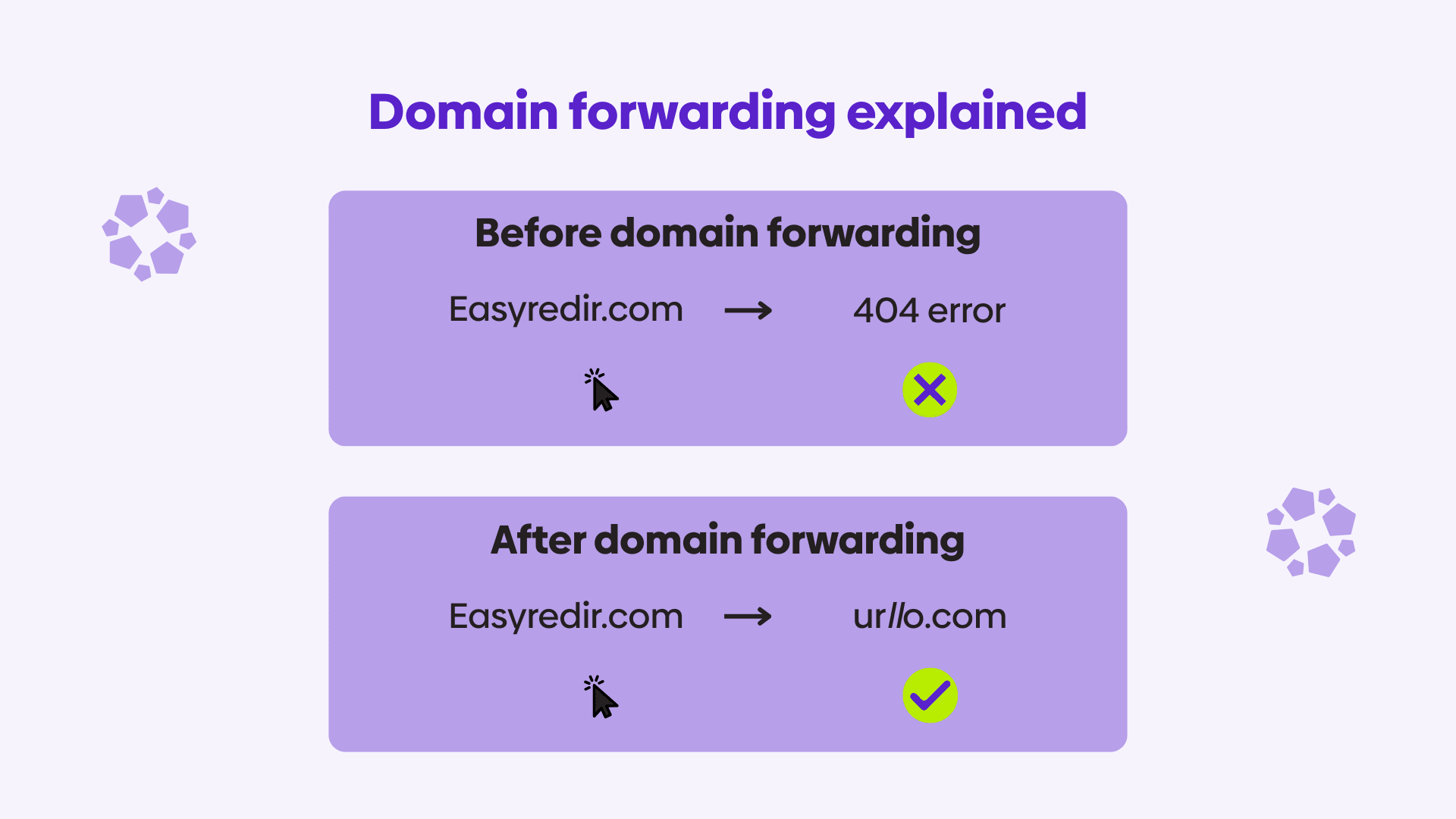
Domain forwarding works at the domain level. You forward every path from one domain to a single destination on a different domain.
This is commonly used for:
- Catching misspellings (e.g., yourbran.com → yourbrand.com).
- Forwarding alternate TLDs (yourbrand.net → yourbrand.com).
- Acquired domains.
- Rebrand migrations.
Domain name forwarding is usually handled through your domain registrar or a specialized URL forwarding service.
How domain forwarding works
When you set up domain forwarding:
- A visitor inputs your domain (e.g., example.net).
- The domain registrar directs you to where the DNS records point to.
- It forwards the visitor to your target domain (example.com).
- The browser loads the destination URL.
Search engines follow the redirect accordingly.
What is URL forwarding?
URL forwarding, sometimes called URL forward, forwarding URL or website forwarding, is a method of automatically sending visitors from one web address to another. When someone types or clicks the original URL, they are instantly forwarded to a different, final destination.
Unlike domain forwarding, URL forwarding allows more flexibility and customization when it comes to forwarding. This is because you can control which path goes to which path, as opposed to everything on one domain going to one destination.
Examples:
- Typing oldbrand.com/summer-sale-2024 automatically goes to newbrand.com/summer-sale-2024.
- example.com/blog/post?id=123 forwards you to example.com/blog/seo-url-forwarding
- Visiting promo.yourdomain.com forwards to yourdomain.com/special-offer.
Types of URL forwarding
URL forwarding applies to specific URLs, paths or patterns, not an entire domain by default.
1. 301 permanent redirect (URL-level)
A 301 redirect tells browsers and search engines that a specific URL has moved permanently. This is the most SEO-friendly option for page-level changes.
Use when:
- A page or section has moved permanently.
- You’re cleaning up outdated or duplicate URLs.
- You’re consolidating similar pages.
- The URL structure has changed.
Benefits:
- Passes SEO value (ranking signals).
- Updates search engine indexes.
- Ensures users land on the correct page.
2. 302 temporary redirect (URL-level)
A 302 redirect signals that a specific URL move is temporary and the original URL may return.
Use when:
- Running A/B tests.
- Temporarily updating a page.
- Showing seasonal or promotional content.
- Migrating content in phases.
SEO note: When a 302 redirect is used, search engines keep the original URL indexed, so 302s should not be used for permanent changes.
3. URL forwarding with parameters (tracking & campaigns)
This forwards a specific URL while appending tracking parameters.
Example:
promo.mybrand.com → mybrand.com/sale?utm_source=promo&utm_campaign=winter
Use when:
- Running marketing campaigns.
- Tracking offline ads, QR codes or email links.
- Identifying lead sources.
Tip: Use a redirect manager to keep tracking consistent and editable.
4. HTTP → HTTPS forwarding (URL & protocol level)
HTTPS is the secure version of HTTP that uses SSL/TLS encryption to protect the data submitted and received from the website. Most sites forward HTTP to HTTPS for security and SEO.
Use when:
- Enforcing secure browsing.
- Ensuring all URL variants resolve correctly.
Avoid: Forwarding HTTPS → HTTP, which is discouraged and may trigger browser warnings.
Types of Domain Forwarding
Domain forwarding applies to entire domains or large URL sets, often affecting every page.
1. Domain forwarding (entire domain → new domain)
This sends all traffic from one domain to another, often without preserving individual paths. This usually results in all the traffic from that domain being sent to the homepage of the new site, which is bad for SEO and bad for user experience. Plus, you have limited analytics into which paths are being visited and redirected.
Examples:
- mybrand.com → mybrand.co.
- oldbrand.com → newbrand.com.
Use when:
- Acquiring domains for brand protection (parked domains not hosting content).
- Redirecting old domains after a rebrand.
- Consolidating microsites.
- Forwarding a vanity domain used in marketing materials to the campaign landing page on your site.
SEO consideration: Always use 301 forwarding for permanent domain changes.
2. Path forwarding (domain + preserve URL paths)
This forwards the domain and preserves each URL path. Enabling path forwarding on a domain forward can be simpler than creating and managing a large number of redirects/URL forwards. But this only works if the old domain path structure exactly matches the path structure of the new domain.
Example:
oldsite.com/products/shoes → newsite.com/products/shoes
Use when:
- The site structure of the old site exactly matches the site structure of the new site.
Benefits:
- Preserves deep-link SEO value.
- Prevents users from landing on a homepage unexpectedly, as full domain forwarding would forward users to one chosen page (usually the homepage).
3. Wildcard forwarding (pattern-based redirects)
Wildcard forwarding uses pattern matching to redirect every URL that fits a rule, whether or not the URL actually exists. Instead of relying on individual mappings, a wildcard rule applies broadly across a domain or path structure.
Examples:
- anything.mybrand.com → www.mybrand.com
- oldsite.com/* → newsite.com/*
With this setup, all matching URLs, including deep paths and unexpected variations, are redirected according to the pattern.
Use when:
- Migrating a large site where preserving URL paths is important.
- Redirecting an entire domain while keeping page-to-page continuity.
- Catching mistyped or unknown URLs during a controlled transition.
4. Masked forwarding (domain-level, not recommended)
Masked forwarding loads content from another website while keeping your domain in the browser bar, often using an iframe.
Example:
mybrand.com displays content from partnersite.com, but still shows “mybrand.com” in the address bar.
Problems with masking:
- Breaks SEO (search engines cannot crawl iframed content).
- Can trigger security warnings.
- Confuses users.
- Interferes with analytics, navigation and mobile rendering.
This method is outdated and discouraged by search engines. urllo does not support masked forwarding and instead offers alternatives to URL masking.
Domain forwarding vs URL redirects: what’s the difference?
Many people confuse these terms, but they solve different problems.
| Feature | Domain forwarding | URL forwarding |
|---|---|---|
| Scope | Entire domain | Individual URLs / paths |
| Benefits | Straight-forward setup | Customizable to equivalent pages |
| Downsides |
Links the entire domain to one path No page-level relevance |
Requires setting up 1:1 URL forwarding Harder to manage at scale without a tool |
| Setup location | Registrar or forwarding service | DNS, server, CMS or redirect tool |
In short, domain forwarding is broad. URL redirects are precise.
Most businesses need both at different times.
When should you use domain forwarding?
Domain forwarding is appropriate when everything under a domain should move together and the original domain will no longer host independent content.
1. Forwarding regional or country domains
A business uses multiple country domains but wants one primary site.
Examples:
example.ca → example.com/ca
example.co.uk → example.com/uk
Use case:
- Simplifying regional management.
- Centralizing content under one domain.
- Maintaining geographic targeting via paths.
2. Protecting your brand from confusion or misuse
You purchase similar or misspelled domains.
Examples:
examp1e.com → example.com
exmaple.com → example.com
Use case:
- Preventing user confusion.
- Protecting brand trust.
- Capturing mistyped traffic.
3. Protecting your brand and IP across multiple domains
Organizations often register multiple top-level domains (TLDs) to protect their brand name and intellectual property from misuse, impersonation or user confusion.
Examples:
yourbrand.com → yourbrand.com
yourbrand.org → yourbrand.com
yourbrand.net → yourbrand.com
yourbrand.io → yourbrand.com
Use case:
- Preventing competitors or bad actors from misusing similar domains.
- Ensuring customers always reach the official website.
- Avoiding duplicate or spoofed versions of your brand online.
4. When running marketing campaigns
Short, memorable vanity domains can forward to specific pages.
trybrand.com → brand.com/spring-campaign
All traffic from the vanity domain forwards to a specific campaign landing page, not the homepage.
When should you use URL forwarding?
1. When rebranding
A company rebrands and launches a new website, but wants to preserve SEO value and user intent by forwarding each old URL to its closest equivalent on the new brand’s site.
Examples:
oldbrand.com → newbrand.com
oldbrand.com/pricing → newbrand.com/pricing
oldbrand.com/products → newbrand.com/products
oldbrand.com/blog/how-to-use-product → newbrand.com/blog/how-to-use-product
2. A single page has moved or been renamed
You’ve updated a page URL, but the domain and site structure remain the same.
Example:
example.com/old-feature-page → example.com/new-feature-page
Domain forwarding would incorrectly affect the entire site.
3. Cleaning up outdated or broken URLs
Old URLs still receive traffic or backlinks, but the site has been reorganized.
Example:
example.com/resources/guide-2019 → example.com/resources/guide-2024
Only that URL needs forwarding, not the entire domain.
4. Redirecting a discontinued product or feature
A product page is removed, but there’s a relevant replacement.
Example:
store.com/products/widget-v1 → store.com/products/widget-v2
URL forwarding preserves relevance and SEO value.
5. Preserving deep links during partial migrations
You migrate a section of the site, not everything.
Example:
example.com/blog/* → blog.example.com/*
URL forwarding targets a specific path without affecting the rest of the site.
6. Forwarding a specific page to a new site
Only one page moves to a different site, not the entire domain.
Example:
oldsite.com/partners → newsite.com/partners
Use case:
- Partner content moved to a new brand site.
- Only that page changes ownership.
7. Redirecting a campaign URL to an external platform
You control the source URL but not the destination site.
Example:
example.com/webinar → eventplatform.com/register/123
Use case:
- Webinar or event hosted on a third-party platform.
- You still want a clean, branded entry URL.
Domain forwarding & SEO: what you need to know
Domain forwarding SEO impact depends entirely on how it’s implemented. Since forwarding all paths to a homepage is considered a soft 404 error, it’s important that redirects link to equivalent pages and not all to your homepage. For more detailed information, check out our full guide on 301 redirects.
301 forwarding is SEO-safe when done properly
It:
- Passes link equity.
- Prevents duplicate content.
- Helps consolidate multiple domains.
- Maintains ranking signals.
302 forwarding does not transfer SEO value
A 302 redirect signals a temporary change, so search engines usually keep the original URL indexed and do not pass full SEO value to the destination. While users are redirected successfully, ranking signals like backlinks and historical authority typically stay with the original URL.
302 forwarding is appropriate for short-term situations such as testing, maintenance or temporary campaigns. If a URL change is meant to last, using a temporary redirect can cause indexing confusion and prevent the new page from ranking as expected. For permanent moves, a permanent redirect is the safer SEO choice.
Masked forwarding damages SEO
It causes:
- No indexation.
- No link authority transfer.
- Confused crawl signals.
- “Thin content” issues because the site forwarding doesn’t host content itself.
Proper domain forwarding can improve SEO
Especially when:
- Cleaning up old domains.
- Consolidating link equity.
- Creating a single strong canonical domain.
URL forwarding best practices
Implementing URL forwarding correctly is essential for maintaining SEO value, ensuring a smooth user experience and avoiding technical issues. Whether you're forwarding a single URL or managing dozens of domains, follow these best practices to keep your forwarding structure clean, consistent and reliable.
1. Use 301 forwarding for permanent changes
A 301 permanent redirect is the gold standard for URL forwarding. It tells search engines:
- The old URL has moved permanently.
- All indexing and ranking signals should pass to the new URL.
- Users should always be sent to the new address.
Use a 301 forwarding link when:
- Rebranding to a new domain.
- Merging or consolidating websites.
- Cleaning up duplicate domains or outdated URLs.
- Redirecting pages that no longer exist.
Why it matters:
301 forwarding preserves SEO value, strengthens search rankings and prevents visitors from landing on outdated pages.
2. Avoid redirecting to non-equivalent pages
When forwarding a URL, the destination page should be the closest equivalent to the original. Redirecting users and search engines to unrelated pages, especially a homepage, is one of the most common and damaging forwarding mistakes.
What to avoid:
- Redirecting detailed pages to a generic homepage.
- Collapsing many URLs into a single destination.
- Sending users to content that doesn’t match their original intent.
3. Avoid masking or frame-based forwarding
Masked forwarding, sometimes called framed forwarding or URL masking, keeps the original URL in the browser while loading the destination site inside an iframe.
This causes major issues:
- Search engines cannot crawl iframe content.
- Mobile sites often break or render incorrectly.
- Analytics and conversion tracking fail.
- Users lose trust because the visible URL doesn't match the content.
Best practice: Always use transparent forwarding (301 or 302), never masking.
4. Forward all variants of your domain
To avoid confusing your visitors and search engines, every variant of your domain should forward cleanly to your primary domain.
Set up forwarding for:
- example.com → www.example.com (or the reverse. See apex domains).
- example.net, example.org, example.io, etc. → example.com.
- Common typos (exmaple.com → example.com).
- Regional domains (example.ca → example.com or example.com/ca).
Why it matters:
Consistent forwarding protects your brand, reduces confusion and strengthens your primary domain’s SEO authority.
5. Avoid redirect chains
A redirect chain happens when URL A forwards to URL B, which forwards again to URL C.
Example:
oldsite.com → newsite.com → newsite.com/home
Each hop adds:
- Extra loading time.
- Lost link equity.
- Higher bounce rates.
- Crawl inefficiency.
Best practice:
Forward the original URL directly to the final destination with a single step.
6. Maintain HTTPS forwarding
All forwarding rules should resolve to HTTPS-first destinations. Modern browsers, search engines and users expect secure connections by default.
Why this matters:
If HTTPS is not enforced, visitors may see security warnings, redirects may fail and search engines may treat URL versions as separate or unreliable. Proper HTTPS forwarding ensures secure browsing, clean indexing and consistent SEO signals.
7. Enable path forwarding when appropriate
Path forwarding (also known as forwarding with path) only works if the structure of the new domain exactly matches the structure of the old domain. Path forwarding may be simpler than creating a large number of 1:1 redirects, but requires both domains to have the same structure.
Example:
example.net/products/widget → example.com/products/widget
Without path forwarding:
example.net/products/widget → example.com (homepage)
Best practice:
Use path forwarding when your destination site has an identical URL structure.
8. Test your forwarding URLs regularly
Small changes, DNS updates, platform migrations or expired certificates can break forwarding rules.
Test URLs after:
- Editing DNS settings.
- Changing web hosts.
- Reorganizing site content.
- Launching a new domain.
Use tools like:
- HTTP status code checkers.
- Redirect chain analyzers.
- Site crawlers (Screaming Frog, Sitebulb).
9. Use a URL forwarding service for complex needs
Basic registrar forwarding works for simple cases, but it’s limited. For businesses managing multiple URLs, campaigns, brands or domains, a URL forwarding service provides:
- Centralized redirect management.
- Analytics and click tracking.
- Advanced security settings.
- Bulk redirect imports.
- Flexible routing rules.
- Better reliability than registrar-level forwarding.
Redirect tools like urllo ensure forwarding is transparent, SEO-safe and easy to maintain.
10. Document your forwarding rules
As websites evolve, multiple redirects get added by different team members over time. This can produce confusion and accidental redirect loops.
Maintain documentation for:
- Which domains forward where?
- Which redirect types are used (301/302)?
- Who manages each redirect?
- When were the rules last updated?
This protects you from future errors and makes migration planning much easier.
11. Consider forwarding URLs for marketing & offline campaigns
If you use URL forwarding for:
- Print ads.
- QR codes.
- Podcasts.
- Physical signage.
- Offline campaigns.
Use:
- Short, memorable domains and URLs.
- Forwarding rules that track campaign performance.
- Branded links that users trust.
Look for a URL forwarding service that offers link-level analytics to effectively track your marketing and offline campaigns.
By following these best practices, you ensure your users reach the right pages quickly, your SEO remains intact and your domains stay aligned with your brand’s long-term strategy.
How to execute domain forwarding properly
For domain forwarding to work best on your behalf, make sure your sites have proper SSL certificates so visitors won’t get a security message.
Use a 301 redirect or a permanent redirect to send people who visit your URL to your main website. If you’re doing a temporary marketing campaign, a 302 redirect might be a better solution because 302 redirects tell Google not to update the URL in the search engine result pages, because it is not a permanent page.
Domain forwarding itself can be a straightforward process when used in the correct situation. For parked domains, vanity domains or protecting against typos, it’s an effective forwarding method.
On the other hand, if you’re forwarding a domain with a large number of individual pages or paths during a site migration, rebrand or consolidation, it’s better to do 1:1 URL forwarding.
1:1 URL forwarding allows you to redirect to equivalent pages to ensure a better user experience and SEO-healthy forwarding. It transfers deep link equity from specific pages to equivalent pages. For URL forwarding that works, check out urllo.
Frequently asked questions about domain forwarding
What is domain forwarding?
Domain forwarding is a method of directing traffic from one domain to another. When someone enters or clicks your forwarded domain (e.g., oldbrand.net), they are automatically sent to a destination domain (e.g., newbrand.com). This process requires no hosting on the forwarded domain and is often used for rebrands, consolidations or protecting alternate domain names.
Is domain forwarding the same as URL forwarding?
They’re related but not identical:
- Domain forwarding forwards an entire domain to another domain.
- URL forwarding forwards a specific page or path to another web address.
Examples:
- Domain forwarding: example.net → example.com.
- URL forwarding: example.com/old-page → example.com/new-page.
They can be used together depending on your needs.
Does domain forwarding affect SEO?
Yes, depending on how it’s implemented.
All domain forwards without path forwarding simply send every page to a single homepage. Searching for a specific page and being redirect to a different domain’s homepage provides a bad user experience and it’s harmful for SEO because search engines lose page-level relevance, link context and intent matching.
What works:
- 301 permanent forwarding that maps old URLs to their closest equivalent pages on the new domain.
- Preserving URL paths whenever possible so deep links resolve correctly.
- Sending both users and search engines to the content they expect.
What hurts SEO:
- Redirecting an entire domain to a homepage.
- Using 302 temporary forwarding for permanent domain moves.
- Masked (iframe-based) forwarding, which prevents search engines from crawling content properly.
Blunt domain forwarding collapses hundreds or thousands of URLs into one destination, stripping away ranking signals and often causing traffic loss. Search engines don’t reward consolidation when relevance is destroyed.
Best practice:
When moving domains, always use 301 redirects and forward each URL to its most relevant counterpart, not to a generic homepage. Domain forwarding should preserve meaning, not just move traffic.
Will forwarding multiple domains to one website hurt SEO?
Forwarding multiple domains to one website does not hurt SEO, as long as you use 301 forwarding and the extra domains are simply parked variations (typos, alternate TLDs, shorthand campaign domains, etc.).
Forwarding domains becomes a problem only when:
- You’re forwarding many paths to the homepage of the new site and not to equivalent pages.
- Masked forwarding is used.
- Duplicate hosted websites exist on those domains.
- Redirect chains or loops form.
If done correctly, domain name forwarding actually consolidates domain authority and strengthens your primary site.
What is masked domain forwarding?
Masked domain forwarding loads the destination website inside an iframe while keeping the original domain visible in the browser address bar.
Example:
User visits mybrandpromo.com, but the address bar still shows that domain even though the content is from yourbrand.com.
Masked forwarding should be avoided because:
- Search engines cannot crawl iframe content.
- Analytics break.
- SEO value does not transfer.
- Mobile usability suffers.
- It resembles phishing behavior.
Always use traditional domain forwarding instead.
What’s the difference between a 301 and 302 forward?
- 301 permanent forward: Ideal for rebrands, migrations and consolidations. Transfers SEO value.
- 302 temporary forward: Best for short-term tests or promotions. Does not pass SEO value.
If you're unsure, use a 301; it’s the safest choice.
How long does domain forwarding take to work?
Domain forwarding can take anywhere from:
- Immediate (minutes).
Or
- Up to 24–48 hours due to DNS propagation.
Most providers update quickly, but global propagation may take longer.
Can I forward a domain to a specific page (not just a homepage)?
Yes. You can forward:
- A domain → a specific URL.
- Subdomains → specific pages.
- Paths → matching paths (if path forwarding is enabled).
Example:
promo.example.net → example.com/spring-sale
Why isn’t my domain forwarding working?
Common causes include:
- DNS propagation delay.
- Forwarding is not applied to www/non-www variants.
- SSL/HTTPS misconfiguration.
- Conflicting redirects.
- Masked forwarding breaking page rendering.
- Registrar limitations.
Using a URL forwarding service often fixes these issues by offering cleaner, more reliable rule management.
Is website forwarding good for marketing campaigns?
Yes, if configured correctly.
Marketers commonly use:
- Short, memorable domains.
- Campaign-specific forwarding URLs.
- Branded forwarding links.
- QR code forwarding.
A forwarding link paired with analytics lets you track which offline or online campaigns generate traffic.
Can domain forwarding hide the destination URL?
Technically, yes, if using masked forwarding.
However:
- This is not recommended.
- It hurts SEO.
- It breaks analytics.
- It lowers user trust.
To provide a professional experience, use standard forwarding where the browser shows the true destination URL.
Should I use a URL forwarding service instead of my website registrar?
If your needs are simple, such as a whole domain redirecting to one URL, registrar forwarding may be enough.
Use a URL forwarding service when you need:
- Analytics & click tracking.
- Bulk redirects.
- Path-based forwarding.
- Rules & logic (device-based routing, UTMs, campaigns).
- Cleaner management of multiple domains.
- Faster, more reliable routing.
These services give you more control and transparency than basic registrar forwarding.
Can I forward a domain temporarily while a new website is being built?
Yes. Use a 302 temporary forward if your domain will eventually host content again. Once the new site is ready, remove the forward or switch to a 301 if the move becomes permanent.
Does domain forwarding stop email from working?
No, domain forwarding affects web traffic, not email routing.
Email functions independently through DNS MX records.

By Shannon Young
Customer Success Manager
Shannon is a seasoned professional in the customer success space. She has years of experience in a wide variety of customer-facing roles in various sectors.
Always ready to take on the next challenge, whether it be a new offensive cross stitch pattern or making her dogs sit still for another themed photo, she is prepared for anything.




.png&w=2560&q=88)