
You own a domain at GoDaddy and you need it to send visitors somewhere else. Maybe the real site lives on a different domain, maybe you bought a second name for a campaign, maybe an old domain from a rebrand still gets typed into browsers and you don't want those people hitting a dead end. Domain forwarding, also called redirecting, automatically sends visitors from one domain to another. GoDaddy builds this functionality into your domain settings.
Setup takes a few minutes when everything goes well. But it doesn't always go smoothly. A forwarded domain can save without error and still do nothing, drop the path a visitor typed or dead-end on the www version. This guide walks through the setup, fixes the failures that actually happen, from DNS conflicts to dropped paths and shows where a dedicated redirect tool does the job better.
How to forward a domain on GoDaddy (step by step)
Domain forwarding sends anyone who types your domain (for instance, easyredir.com) to a different address (urllo.com, the updated domain). It’s used when you have a site already somewhere else that you want this other domain to redirect to. GoDaddy builds this into the domain settings, so you don't need hosting or a separate DNS provider to make it work.
One thing worth knowing before you start: forwarding now runs over HTTPS by default. When you set it up, a visitor arriving at the secure version of your domain no longer sees a certificate warning. This was an issue in the past; a lot of older guides still say GoDaddy does not allow HTTPS forwarding.
*Important*
Finally, an important caveat about GoDaddy domain forwarding. Setting up forwarding locks the root A record on your domain. GoDaddy updates it for you and won't let you edit it again until you remove the forwarding. If your domain already points somewhere through an A record, that existing setup gets overwritten.
Set up forwarding on your root domain
1. Sign in to your GoDaddy Domain Portfolio.
2. Select the domain you want to forward to open its Domain Settings.
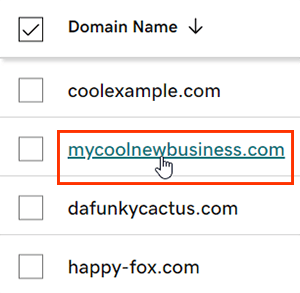
3. Open the DNS tab, then choose Forwarding.
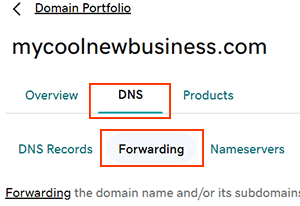
4. Select Add Forwarding, then choose Domain to forward the root.
- Domain: Add forwarding to your root domain, such as mycoolnewbusiness.com.
- Subdomain: Add forwarding to a subdomain, such as shop.mycoolnewbusiness.com.
It’s worth flagging that GoDaddy can forward subdomains, because plenty of write-ups still claim GoDaddy can't do it. Choose Subdomain rather than Domain and enter the prefix you want to forward. The rest of the flow is identical.
5. Pick http:// or https:// for the destination, then enter the full address you want visitors sent to. GoDaddy has a few rules for the destination URL. It has to start and end with a letter or number, underscores aren't allowed, consecutive periods aren't allowed and the whole thing tops out at 1,000 characters. Most destinations clear these without a thought, but a URL with an underscore in the path can trip the save.
6. Choose your forwarding type (see below), then select Continue.
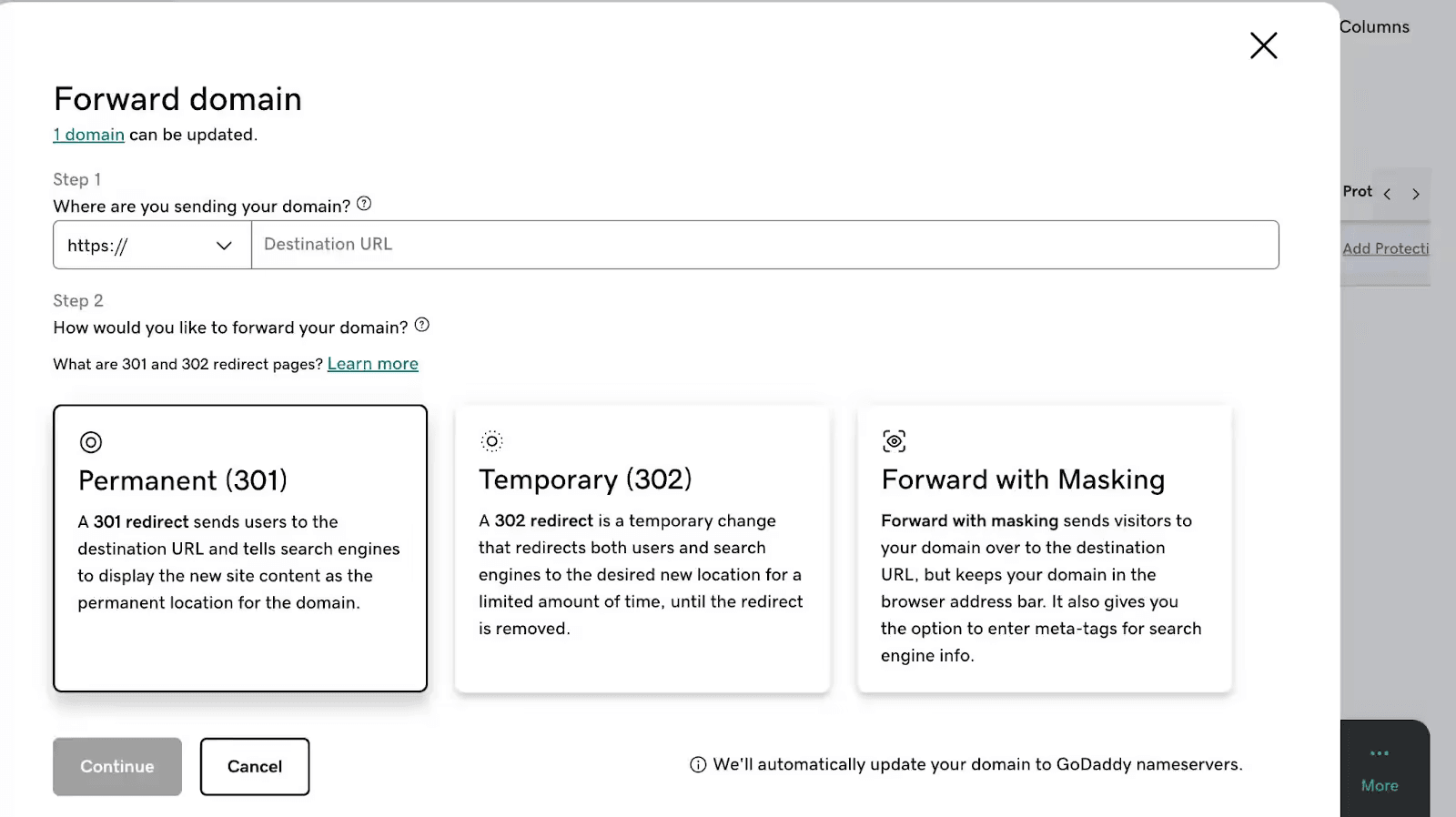
GoDaddy points your domain at its own nameservers if it isn't using them already. The change usually takes hold within an hour, though a full global refresh can run up to 48 hours, so don't judge whether it worked from the first thirty seconds.
Permanent, temporary or masked, which to pick
GoDaddy gives you three forwarding types and the choice has real consequences for search.
A permanent (301) redirect is the one you want for almost everything: consolidating a second domain to your main site, moving to a new domain or retiring an old address. It tells search engines the destination is the domain's new home and passes ranking signals along with the visitor.
A temporary (302) redirect is the best choice when the move really is temporary, a domain parked on a holding page during a build or a seasonal destination you'll change back. Search engines keep the original URL as the canonical version and leave it in their index.
Reaching for 302 out of caution on a permanent move is a common mistake: because the source stays canonical, ranking signals stay attached to it instead of consolidating onto the destination and search engines are slower to recognize the new URL as the real home.
Forward with masking keeps your domain showing in the address bar while the destination loads underneath it and GoDaddy lets you attach a title, description and keywords to the masked page. Skip masking for anything you care about ranking. Masking loads the destination inside a frame, so search engines attribute that content to the destination's own URL, not yours and your domain has no page of its own to rank. If your goal is SEO or a reliable experience on phones, use Forward only and choose 301 or 302.
Get the www version to forward
Forwarding the root (apex) domain doesn't automatically carry the “www” version with it. For “www.coolexample.com” to forward alongside the bare domain, point the "www" CNAME record at "@". Miss this and you get the situation where the domain works, but the www version dead-ends, which is easy to overlook because you rarely type your own www prefix.
GoDaddy domain forwarding not working? Common fixes
Forwarding fails quietly. There's rarely an error message, just a domain that doesn't go where you told it to. Work through these common issues in order.
Nothing is happening.
DNS takes time. GoDaddy says most changes land within an hour, but a full global update can take up to 48 hours. Before you assume it's broken, test in a private browser window or on your phone over mobile data. Your own browser and network cache old DNS answers longer than you'd expect.
A competing DNS record is overriding the forward.
This is the one that sends people in circles. If the same host already has an A, AAAA or CNAME record pointing elsewhere, that record can win and the forward silently does nothing. GoDaddy locks the root A record when you add forwarding for exactly this reason, but records on other hosts or ones added by a previous setup can still conflict. Open the DNS records list and remove or correct any records that conflict with the host you're forwarding to.
The secure version throws an error.
New forwards run over HTTPS automatically. A forward you set up long ago may predate that, so remove the forwarding and add it again to pick up the current HTTPS handling.
A masked domain shows a blank white page.
Not every destination allows itself to be loaded inside a frame and when it refuses, masking renders nothing. GoDaddy's own fix is to switch that forward to Forward only. It's another reason to avoid masking unless you have a specific need for it.
The www version dead-ends.
Covered above and common enough to repeat: the “www” CNAME has to point to “@” or the prefixed version won't follow the root.
The path gets dropped.
Someone types “yourdomain.com/pricing” and lands on the destination's homepage instead of its pricing page. This is where GoDaddy's built-in forwarding starts to show its limits rather than its bugs, which is the subject of the next section.
When GoDaddy forwarding isn't enough
GoDaddy's forwarding is fine for what it is: send one domain to one destination. The trouble starts when the job is bigger than that. Here's where the built-in feature stops, described honestly so you know whether you've actually hit the wall or just need to finish the setup above.
You need the path and its parameters to survive the forward
Built-in forwarding sends the entire domain to a single destination, with no documented option to map the path, URL or query string a visitor typed onto the matching page. In practice, some configurations preserve the path inconsistently; others silently drop it.
yourdomain.com/blog/post lands on the destination's homepage, not the equivalent page, going against redirect SEO best practices.
The query parameters that carry campaign attribution, like your UTM tags, get dropped the same way. For a domain that's only ever typed bare, none of that matters. For a migration, where inbound links and search results point to dozens of specific URLs, dropping the path throws away the exact traffic and ranking equity you're trying to preserve and losing the UTM string breaks the campaign attribution in your analytics on top of it.
You're managing more than a handful of redirects
GoDaddy's forwarding is a one-domain, one-destination screen. A consolidation or rebrand that involves dozens or hundreds of redirects means repeating that screen by hand, with no bulk import and no single place to see what points where.
You need rules, not just a single target
Wildcards, pattern matching and per-path destinations, the logic that maps a whole old URL structure onto a new one, aren't part of built-in forwarding. Each forward is a fixed source-to-destination pair.
You need to see what the redirect is doing
Built-in forwarding gives you no reporting or analytics. You can't see how much traffic a forwarded domain carries or where it's going, which matters when a redirect is quietly load-bearing for a campaign or a migration.
The redirect carries real traffic or SEO weight
When a forward sits in front of meaningful traffic, its speed and reliability stop being background details. GoDaddy’s convenience feature isn't built to be measured or optimized at that level for user experience or SEO performance.
If none of these describe you, the built-in feature does the job and you can stop here. If one or more do, a dedicated redirect service with domain forwarding capabilities handles them without asking you to move your domain.
A better way to redirect a GoDaddy domain
You don't have to transfer your domain away from GoDaddy to get more capable redirects. A dedicated URL redirect service like urllo runs the redirect while your domain stays registered exactly where it is. You can delegate your DNS records to urllo to forward your entire domain or redirect specific URLs using urllo's edge integration while your origin keeps serving everything else.
That setup closes the gaps the built-in feature leaves open:
- Paths and parameters carry through. Path and query forwarding sends yourdomain.com/pricing?utm_source=newsletter to the matching page with its UTM tags intact, so your analytics still credit the campaign instead of losing the attribution at the redirect.
- Redirects at scale. Manage many redirects in one place, with bulk import for the dozens or hundreds that a rebrand or consolidation actually involves, rather than one screen at a time.
- Rules instead of one-offs. Partial path matching, wildcard redirects with "starts with" and "ends with" logic, plus match forwarding. This allows you to map an entire old URL structure onto a new one from a single rule, without hand-building every URL redirect mapping.
- Analytics on every redirect. Up to 12 months of detailed analytics, plus lost-traffic reports that surface the URLs returning 404s, so a load-bearing redirect stops being a blind spot.
- Speed and reliability at the edge. Redirects run from a global edge network of 100+ points of presence, with unlimited traffic on every plan and 99.999% historical uptime.
This upgrade to a URL redirect service is for when a redirect stops being an afterthought. A migration you can't afford to leak traffic from, a rebrand with a long list of URLs to preserve, a redirect you need to measure. Keep your registrar, point your DNS and the redirect service does what forwarding couldn't.
urllo offers a 14-day free trial with no credit card required, so you can set up a redirect and watch how it handles paths and analytics before committing.
Frequently asked questions about GoDaddy domain forwarding
Does GoDaddy domain forwarding support HTTPS?
Yes. GoDaddy applies HTTPS forwarding automatically when you set up a new forward, so visitors reaching the secure version of your domain are forwarded without a certificate error. Older guides that call HTTPS forwarding broken are out of date.
Can I set up a temporary redirect on GoDaddy or only a permanent one?
Both. GoDaddy offers a permanent (301) and a temporary (302) forwarding type. Use 301 for a permanent move so search engines pass ranking signals to the destination and use 302 only when the change is genuinely temporary.
Can I forward a subdomain on GoDaddy?
Yes. At the Add Forwarding step, choose Subdomain and enter the prefix, such as “shop.mycoolnewbusiness.com”. GoDaddy updates or creates the subdomain's DNS as needed. The claim that GoDaddy can't forward subdomains is outdated.
What are alternatives to GoDaddy domain forwarding
urllo is an alternative to GoDaddy domain forwarding. Designed for organizations that need more control than basic registrar forwarding, with automatic HTTPS, bulk redirect management, path-level rules, analytics and centralized oversight across multiple domains. It gives marketing, SEO and IT teams one place to create and manage redirects.
Is domain forwarding the same as a 301 redirect?
A permanent forward is delivered as a 301 redirect, so in that mode they're the same thing to a browser and a search engine. "Forwarding" is GoDaddy's name for the feature; "301" and "302" describe the type of redirect it sends.
Do I have to transfer my domain to use a dedicated redirect tool?
No. Your domain stays registered at GoDaddy. You point your DNS at the redirect service and manage the redirects there, without a domain transfer.

By Shannon Young
Customer Success Manager
Shannon is a seasoned professional in the customer success space. She has years of experience in a wide variety of customer-facing roles in various sectors.
Always ready to take on the next challenge, whether it be a new offensive cross stitch pattern or making her dogs sit still for another themed photo, she is prepared for anything.










.png&w=2560&q=88)