Website migrations can feel overwhelming, especially when you consider the potential impact on your search engine rankings. Proper redirect mapping is your safety net during these transitions. It preserves your SEO value, maintains user experience and prevents the dreaded 404 errors that can damage your site's credibility and decrease rankings.
Redirect mapping is the process of creating a comprehensive plan that matches every old URL to its new counterpart. This strategic approach ensures visitors and search engines can find your content at its new location. Without proper redirect planning, you risk losing years of SEO progress and frustrating your audience with broken links.
What is redirect mapping?
Redirect mapping is a systematic approach to documenting and planning URL changes during website migrations. It involves creating a detailed inventory of all existing URLs and mapping each one to its new destination or appropriate alternative.
Think of redirect mapping as creating a forwarding address system for your website. When someone visits an old URL, the redirect tells their browser exactly where to find the content now. This process maintains the connection between your existing search engine rankings and your new site structure.
The mapping process goes beyond simple URL matching. It requires analyzing content relationships, preserving SEO value and ensuring the user journey remains smooth. A well-executed redirect map considers factors like keyword targeting, page authority and user intent when determining the best destination for each old URL.
Why redirect mapping matters for SEO
Search engines have invested considerable effort in understanding and ranking your existing content. When you change URLs without proper redirects, you essentially tell search engines that your old content no longer exists. This can result in significant ranking losses and reduced organic traffic.
SEO:
301 redirect mapping preserves the link equity that your pages have built over time. When authoritative websites link to your content, they link to specific URLs. Redirects ensure that link value transfers to your new pages rather than disappearing entirely.
Prevent 404 errors:
These occur when a URL no longer resolves to any content and no redirect is in place. During migrations, this is often caused by incomplete redirect mapping. In some cases, teams try to avoid 404s by redirecting all old URLs to a homepage or a single generic page. While this removes the visible error, it creates a different problem.
Search engines interpret these redirects as soft 404s because the destination does not match the original content. As a result, the original page is treated as gone and its ranking signals are not preserved.
User experience:
User experience suffers dramatically when visitors encounter 404 errors. These broken links create frustration and increase bounce rates. Search engines interpret high bounce rates as a signal that your site provides a poor user experience. This can negatively impact your overall search rankings.
Crawl budget:
Website migration redirects also help maintain your site's crawl budget efficiency. Search engines allocate limited resources to crawling your site. Without redirects, crawlers waste resources encountering dead links instead of discovering and indexing your new content.
Ways to map redirects
Redirect mapping is the process of deciding where each old URL should send users and search engines after a page, section or domain change. The goal is not just to avoid 404 errors. A good redirect map preserves intent by sending each source URL to the most relevant destination.
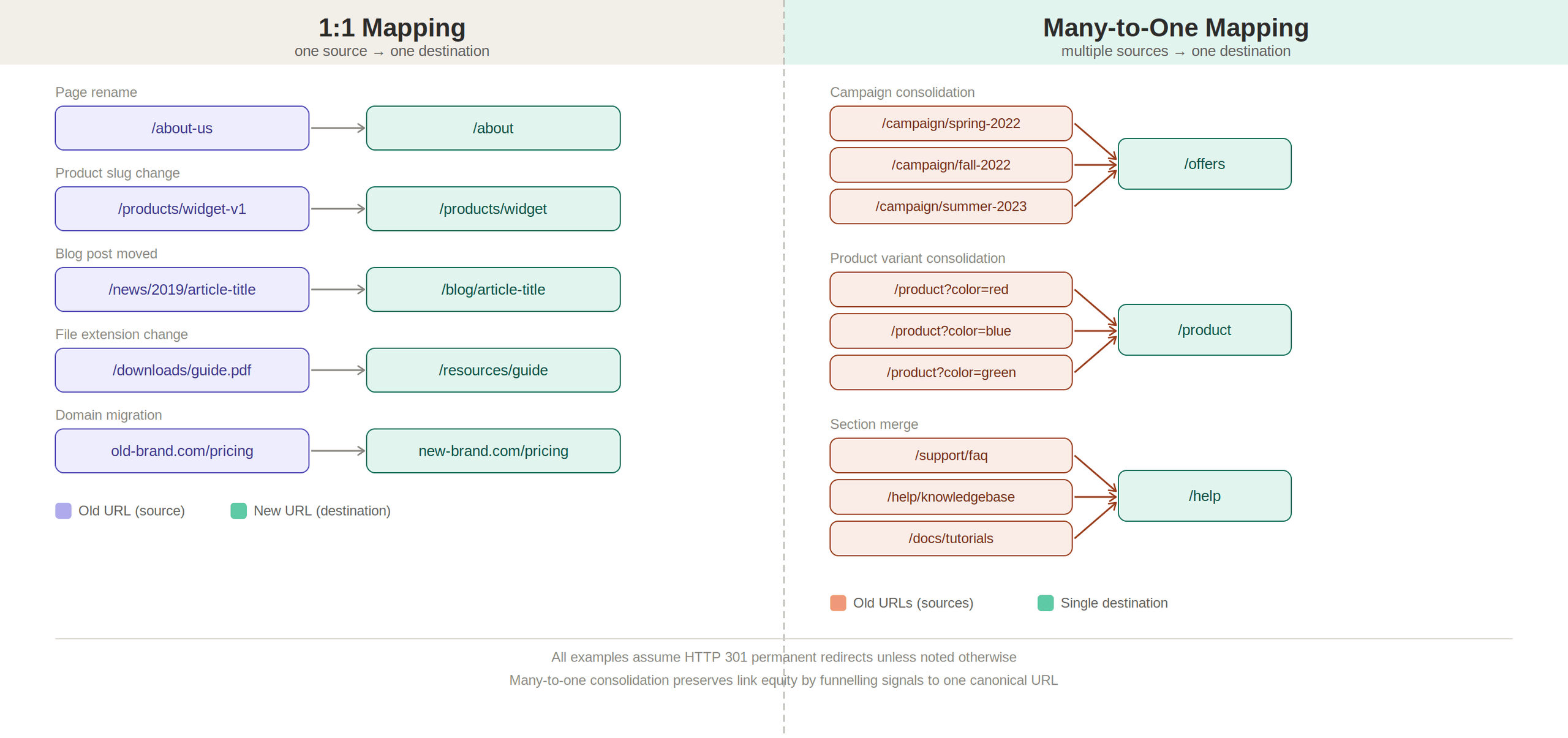
There are a few ways to map redirects depending on the size of the project, the quality of the old content and how closely the new site structure matches the old one. Some redirects should be mapped one-by-one. Others can be grouped when several pages are being consolidated. In larger migrations, pattern-based rules can help manage redirects at scale, but only when the URL structure is predictable.
One to one
One-to-one redirects are the most precise and SEO-friendly approach. Each old URL is mapped directly to its most relevant new equivalent, preserving both user intent and page-level ranking signals.
For example:
example.com/blog/seo-guide → example.com/resources/seo-guide
This method works best when content is being moved or renamed without fundamentally changing its purpose. Because the destination closely matches the original page, search engines can confidently transfer authority, relevance and historical signals.
One-to-one mapping requires more effort, especially on large sites, but it produces the most stable outcomes. It avoids ambiguity, prevents soft 404s and ensures users land on the content they expect. For migrations, rebrands and URL restructures, this should always be the default approach.
Many to one:
Many-to-one redirects are used when multiple pages are combined into a single, stronger destination. This typically happens during content consolidation, where overlapping or outdated pages are merged to improve quality and reduce duplication.
For example:
example.com/blog/seo-tips-2019
example.com/blog/seo-tips-2020
example.com/blog/seo-tips-2021
→ example.com/blog/seo-best-practices
This approach can strengthen SEO performance when done carefully, as it consolidates ranking signals, backlinks and relevance into one authoritative page. However, it only works when the pages being merged share a clear thematic relationship.
Problems arise when too many unrelated pages are redirected to a single destination, such as a homepage or generic category page. In those cases, search engines may interpret the redirect as a soft 404, meaning the original content is effectively treated as gone rather than moved.
Use many-to-one redirects selectively and only when the destination page genuinely satisfies the intent of the original URLs.
Pattern-based
Pattern-based redirects use rules to match and redirect groups of URLs based on consistent structures. Instead of mapping each URL individually, a single rule can handle entire sections of a site.
For example:
example.com/blog/* → example.com/resources/*
This approach is especially useful during large-scale restructures where URL patterns change in predictable ways. It reduces the need to manually map thousands of URLs and can significantly speed up implementation.
However, pattern-based redirects require careful validation. They assume that the structure of the old URLs aligns cleanly with the new structure. If this assumption is incorrect, users may be sent to irrelevant pages and search engines may struggle to interpret the relationship between old and new content.
Pattern-based rules are best used when:
- URL structures are consistent and predictable.
- Content is being moved without major changes in intent.
- Manual one-to-one mapping is impractical at scale.
When used correctly, they provide efficiency without sacrificing accuracy. When used carelessly, they introduce the same risks as oversimplified redirects.
Pre-migration redirect planning and mapping
Successful redirect implementation starts with a clear inventory of your existing URLs and a plan for where each one should go after the migration. The goal is not just to avoid 404 errors. A good redirect map protects important pages, preserves user intent and helps search engines understand where content has moved.
1. Audit your existing URLs
Start with a comprehensive crawl of your current website. Use a tool like Screaming Frog to identify every indexable page, important non-indexed page and existing redirect.
Export this data into a spreadsheet that will become your redirect mapping template. Include details such as:
- Current URL.
- Page title.
- Meta description.
- Page type.
- Organic traffic.
- Conversions.
- Backlinks.
- Internal links.
- Existing redirect status.
- Priority level.
This gives you the context needed to decide which URLs require one-to-one mapping, which can be consolidated and which may no longer need to exist.
2. Prioritize high-value pages
Not every URL carries the same risk. Pages that drive organic traffic, conversions, backlinks, revenue or important user journeys should receive extra attention.
Review SEO and analytics data to identify your highest-value pages before you start mapping. These URLs should usually be redirected to the closest relevant destination, not a generic category page or homepage.
3. Understand content relationships
Document how pages relate to each other before deciding where they should redirect. Some pages may have direct equivalents on the new site, while others may be merged into broader resources.
For example, several older blog posts on the same topic might redirect to one updated guide. A retired product page might redirect to a relevant category page.
The key is to preserve user intent wherever possible.
4. Map old URLs to new destinations
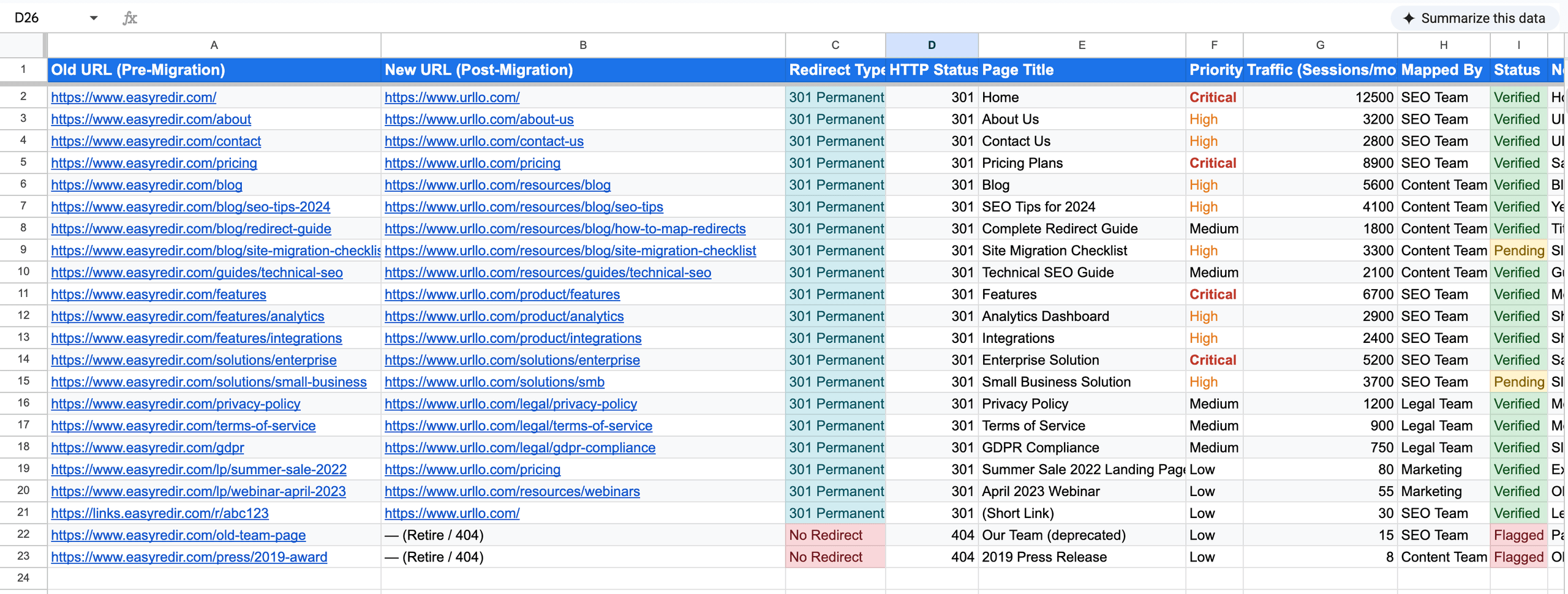
Create clear spreadsheet columns for the old source URL and the new destination URL. Start with your highest-priority pages, then work through the rest of the site inventory.
For each mapping decision, ask:
- Does the destination satisfy the same user intent?
- Is there a direct equivalent on the new site?
- Is the content being consolidated into a broader page?
- Would this redirect feel useful to someone who clicked the old URL?
- Is this better handled as a 404 because no relevant replacement exists?
Avoid redirecting large groups of unrelated URLs to the homepage. That may reduce visible 404s, but it often creates a poor user experience and can weaken SEO signals.
In the example below, you can see how we used redirect mapping for the rebrand from easyredir.com to urllo.com.easyredir.com to
5. Account for existing redirects
Review any redirects that already exist on the current site. If an old URL already redirects somewhere, make sure the migration does not create a chain like:
/old-page → /new-page → /newer-page
Whenever possible, update the original source URL so it points directly to the final destination.
6. Validate redirect accuracy
Before full-scale launch, if possible, test a sample of your redirect map to confirm that source URLs resolve to the correct destinations. Pay special attention to high-value pages, templates, folders, query parameters, trailing slashes, capitalization, apex or www versions and HTTP to HTTPS behavior.
Use a redirect checker to identify:
- Broken destinations.
- Incorrect status codes.
- Redirect chains.
- Redirect loops.
- Unintended homepage redirects.
- Missing high-priority URLs.
7. Document special cases
Some redirects may need custom handling. These can include URLs with query parameters, campaign landing pages, regional pages, product variants, multilingual URLs or sections that no longer have a direct equivalent.
Document these cases clearly so developers, SEO teams and WebOps teams understand why each rule exists and how it should behave.
Common redirect mapping mistakes to avoid
Redirect chains occur when multiple redirects link together in sequence. These chains slow down page load speed and can confuse search engines. Always redirect old URLs directly to their final destinations.
Redirecting unrelated content damages user experience and SEO performance. Ensure redirect destinations provide genuine value to users seeking the original content.
You'll want to remember that forgetting to redirect images, PDFs and other non-HTML resources creates broken links throughout your site. Include all file types in your comprehensive redirect mapping plan.
Not updating internal links after migration creates unnecessary redirect traffic. Update internal links to point directly to new URLs rather than relying on redirects indefinitely.
Implement, test and monitor your redirects
A redirect map is only useful if it is implemented correctly and monitored after launch. Before publishing a migration, make sure your redirects return the right status codes, point to the right destinations and do not create chains, loops or broken paths.
Configure redirects in the right place
Set up redirects where they can be managed reliably and served quickly. Server-side redirects are usually preferred because they give browsers and search engines clear HTTP signals before the page loads.
Avoid relying on JavaScript redirects for migration-critical URLs. They can be slower, less reliable and harder for search engines to interpret than server-side redirects.
Use the right redirect status code
For permanent migrations, use 301 redirects or 308 redirects when preserving the request method matters. These tell search engines that the old URL has permanently moved to the new destination.
Use 302 or 307 redirects only for temporary changes, testing or short-term routing. Temporary redirects are not the best choice for permanent URL changes because they can signal that the original URL should remain preferred.
Review before launch
If possible, review your redirect map before pushing it live.
Check for:
- Correct destination URLs.
- Correct 301 or 308 status codes.
- Broken destinations.
- Redirect chains.
- Redirect loops.
- Unintended homepage redirects.
- HTTP to HTTPS behavior.
- Apex and www behavior.
- Trailing slash and capitalization variations.
Launch in a controlled way
If possible, test them in a staging environment or a subdomain before the full migration. This helps your team catch errors before they affect every user and search engine crawler.
For larger migrations, document launch ownership clearly. Everyone should know who is responsible for redirect deployment, validation, rollback and post-launch monitoring.
Update internal links and sitemaps
Redirects protect old URLs, but your new site should not rely on them for everyday navigation. Update internal links so they point directly to the new destination URLs.
Also, update XML sitemaps to include the new URLs and remove old ones. This helps search engines crawl and index the new structure more efficiently.
Monitor after migration
After launch, monitor redirect performance closely. Use Google Search Console, analytics, server logs and redirect checking tools to identify problems quickly.
Watch for:
- Drops in organic traffic.
- Increases in 404 errors.
- Redirect chains or loops.
- Unexpected destination URLs.
- Crawl errors.
- Slow redirect response times.
- High-value URLs that are still being requested.
- Old URLs that were missed in the redirect map.
Keep redirects maintained
Redirect monitoring should continue after the first few weeks. Pages change, destinations move and old links can continue sending traffic long after a migration.
Review redirect usage regularly and update rules when destinations change. For high-authority pages or URLs with valuable backlinks, keep redirects active long term rather than removing them too quickly.
When redirects go wrong during migrations
Redirects are one of the most important parts of any site migration, rebrand or URL restructuring project. When they are mapped correctly, they help users and search engines understand where old content has moved. When they are missing, temporary, inconsistent or point to the wrong destinations, they can create broken paths, lost traffic, ranking drops and brand confusion.
The examples below show what can happen when migration signals are not fully aligned across redirects, canonicals, sitemaps, metadata, internal links and user expectations.
Real-world migrations and what went wrong
WooCommerce to Woo.com
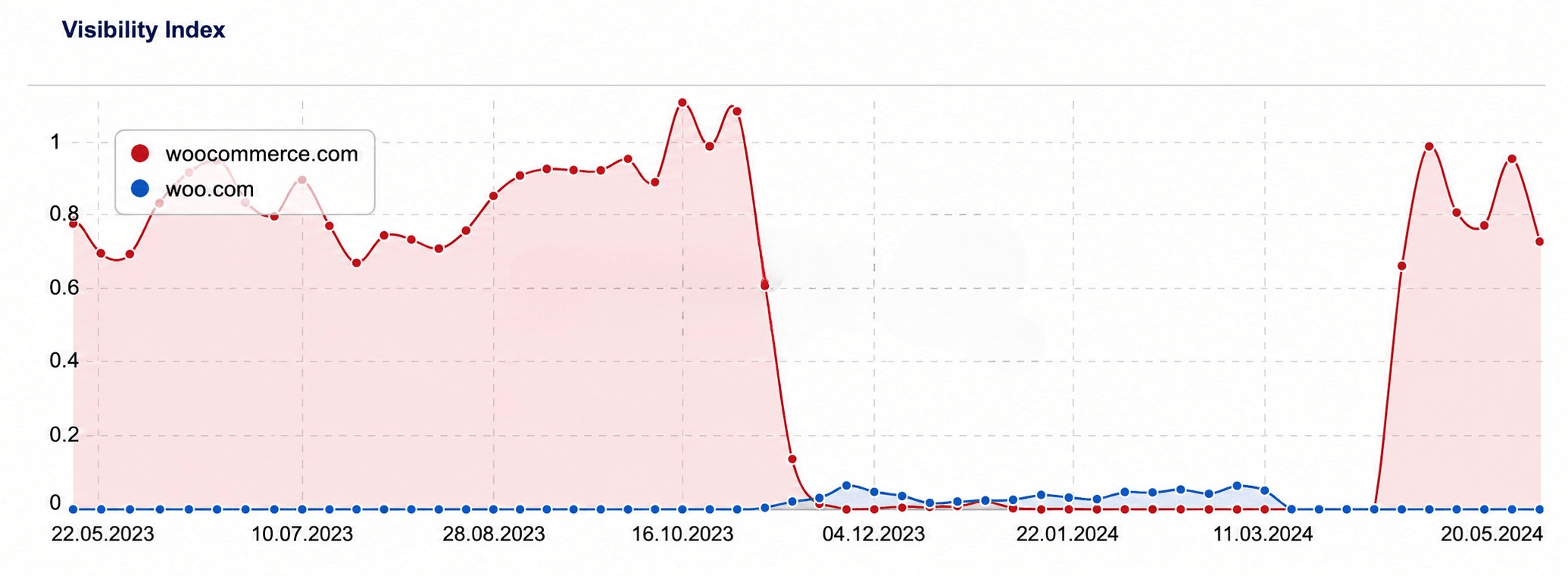
In October 2023, WooCommerce moved from woocommerce.com to woo.com as part of a broader rebrand. Less than six months later, after a major drop in organic visibility, the company reversed course and moved back to woocommerce.com.
The problem was that this was not just a URL change. “WooCommerce” had years of brand recognition, backlinks, product searches and entity signals behind it. “Woo” was shorter, but less specific. Users did not instantly shift their search behavior and search engines had to reconcile a new domain with an old brand identity.
The migration also showed that redirects alone are not enough. Even if page redirects are in place, a domain and brand migration also depends on consistent signals across internal links, structured data, third-party references, assets, sitemaps and branded search behavior.
Some gaps also appeared around non-page assets, such as images that continued resolving on the old domain. That matters because a complete redirect map should account for important files and resources, not just HTML pages.
The lesson is that a rebrand can fail when it is treated like a simple URL swap. For a domain migration to work, redirects need to be paired with a broader entity and signal migration. Search engines, users and third-party sites all need clear, consistent evidence that the old brand and domain have moved to the new one
Twitter to X
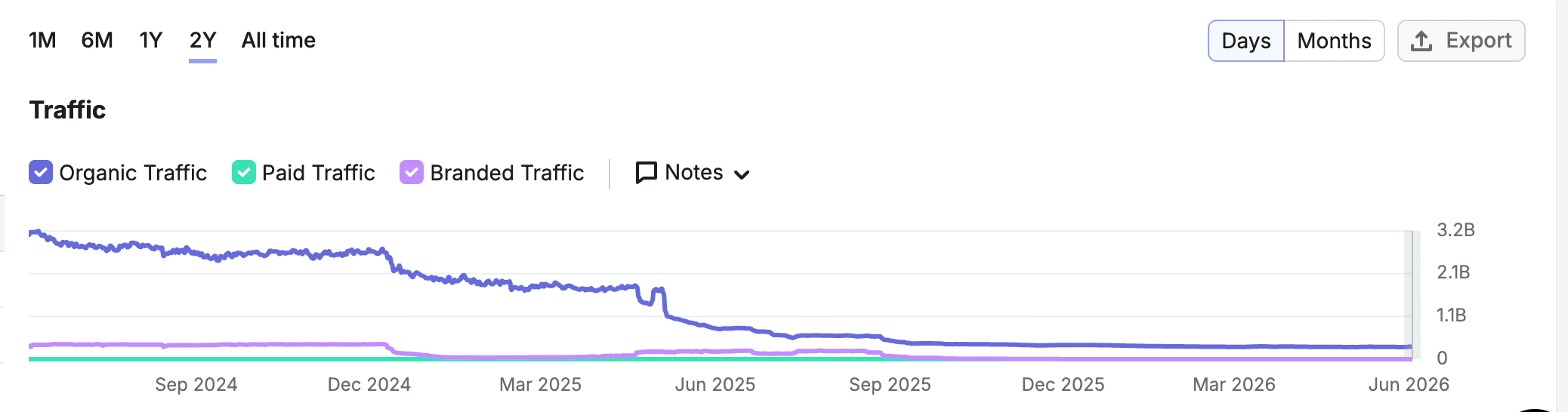
Twitter’s rebrand to X was not just a domain migration. It was a brand, product and trust migration happening at the same time.
The challenge was that “Twitter” had years of accumulated recognition, backlinks, branded searches and user behavior behind it. “X” did not inherit that clarity overnight. It is also a much more ambiguous term, which made the search landscape harder for both users and search engines to interpret.
twitter.com traffic
x.com traffic
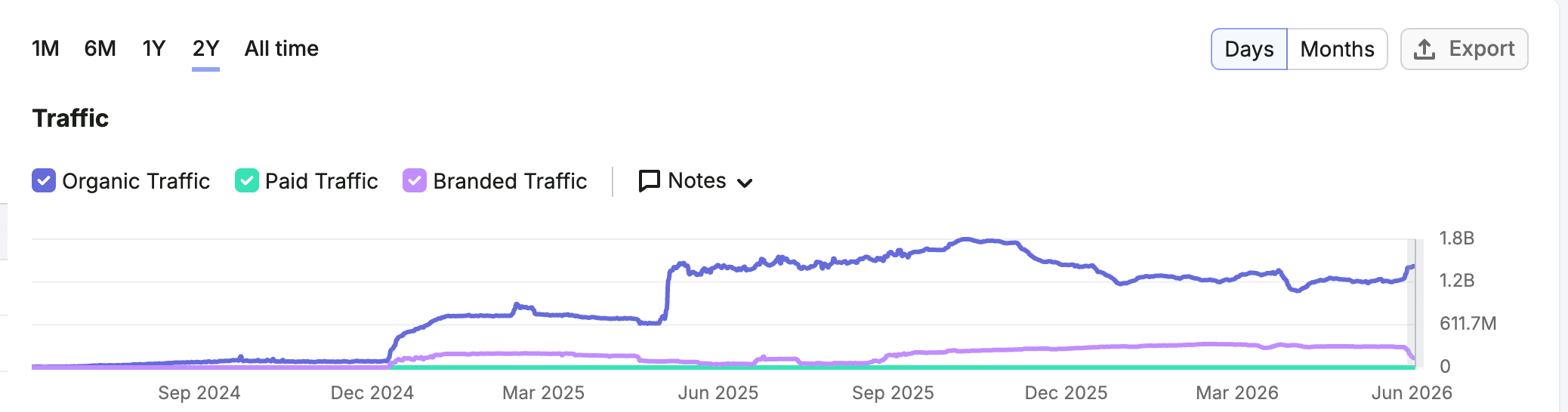
The migration also appeared to send mixed technical signals. Temporary redirects were reportedly used where permanent redirects would have provided a clearer migration signal. Canonicals, metadata, sitemaps, internal links and legacy references also appeared to continue reinforcing twitter.com in some places.
That kind of signal fragmentation makes a migration harder for search engines to process. Redirects may point one way, while canonicals, sitemaps or internal links point another. For a brand and domain change at this scale, every signal needs to reinforce the same destination.
The lesson is clear: a rebrand is not just a naming exercise. It requires aligned redirects, canonicals, metadata, sitemaps, internal links, Search Console settings and brand signals. When those pieces are inconsistent, search engines and users have a harder time understanding what changed and what should carry forward.
EasyRedir to urllo, an example of a successful migration
Easyredir.com needed to evolve beyond its original redirect-focused positioning. As the platform expanded to include redirects, branded links, QR codes and vanity URLs, the brand needed to reflect a broader link management platform. That’s when urllo was born.
The challenge was making sure the move from easyredir.com to urllo.com did not erase the SEO value, backlinks and search visibility already built on the old domain.
To protect that value, we created a complete redirect map before the migration. Every existing Easyredir URL was reviewed and matched to the most relevant destination on urllo. Wherever possible, we used precise one-to-one redirects instead of sending old URLs to the homepage or relying on broad rules.
We also aligned the supporting migration signals. Redirects, canonicals, internal links, metadata and sitemap references were updated to reinforce urllo.com as the new preferred domain.
As shown in the chart below, traffic from Easyredir declined while urllo rose in parallel. After a temporary migration dip, organic traffic recovered within roughly 2 weeks, showing that the redirect strategy helped preserve URL-level relevance and search visibility.
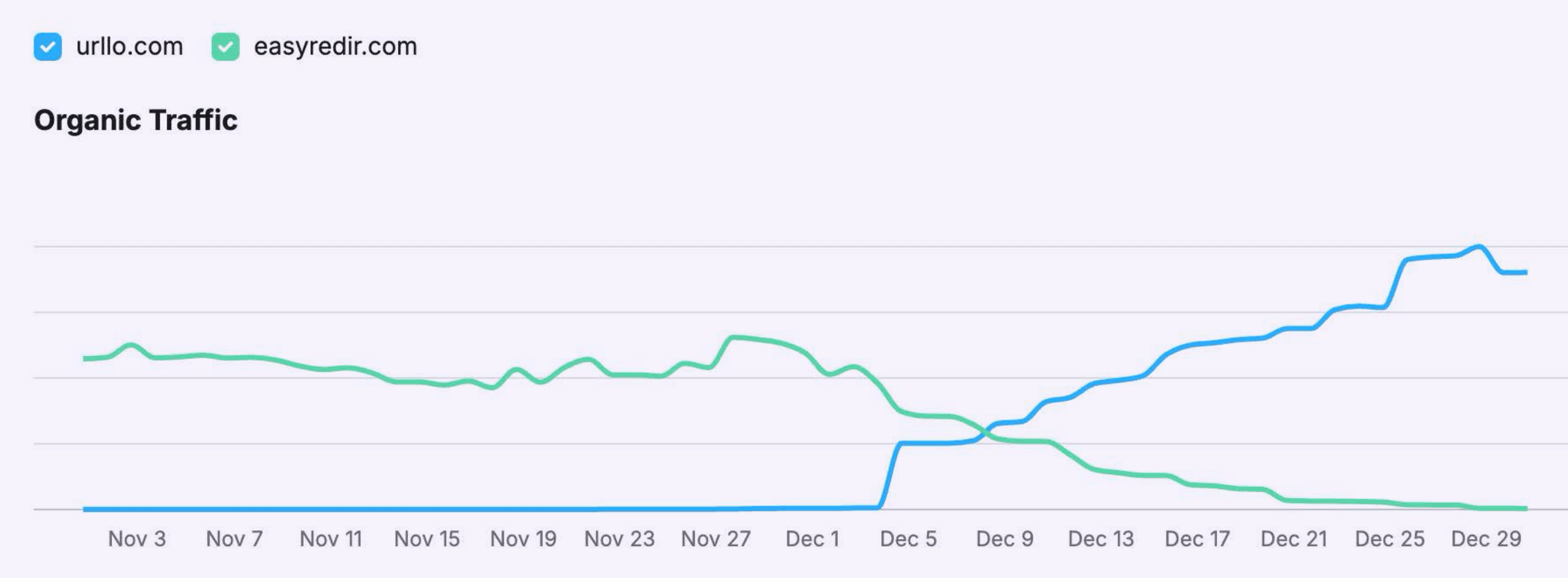
The lesson is that successful migrations are not just about forwarding traffic. They require a clear source-to-destination map, consistent technical signals and post-launch monitoring to confirm that users and search engines are reaching the right pages.
Frequently asked questions about redirect mapping
What is redirect mapping and why is it important for migrations?
Redirect mapping is the process of documenting how old URLs will redirect to new URLs during a website migration. It's crucial because it preserves your SEO rankings and ensures visitors can still find your content at new locations. Without proper redirect mapping, you risk losing search engine rankings and creating frustrating 404 errors for users.
How do you create a redirect mapping spreadsheet?
Start by crawling your existing website to collect all URLs, then create a spreadsheet with columns for old URLs, new URLs, redirect type and priority level. Include additional data like page titles, traffic metrics and notes about special cases. Work systematically through your site, mapping each old URL to its most appropriate new destination based on content relevance and user intent.
What tools can help automate redirect mapping?
Tools like Screaming Frog SEO Spider can crawl your site and export comprehensive URL lists. Google Search Console provides traffic data to help prioritize important pages. Spreadsheet templates help standardize the mapping process across team members.
How do you test redirects after migration?
Test redirects using online tools such as urllo’s redirect checker or command-line tools like cURL. Verify that each redirect returns the correct HTTP status code and reaches the intended destination. Check for redirect chains and monitor server logs for errors. Test both manually and with automated tools to ensure comprehensive coverage.
When should you use 301 vs 302 redirects in migrations?
Use 301 redirects for permanent website migrations as they pass nearly all link equity to new URLs and signal to search engines that content has moved permanently. Use 302 redirects only for temporary situations or testing, as they don't pass full SEO value and may cause search engines to continue showing old URLs in results.
How long should you keep redirects active after migration?
Keep redirects active for at least one year after migration to ensure search engines fully recognize the URL changes and update their indexes. For high-authority pages or sites with many external links, consider maintaining redirects indefinitely. Monitor redirect usage over the latency and only remove redirects that receive minimal traffic and have been fully recognized by search engines.

By Sean Pasemko
SEO & Growth Marketing Specialist
Sean Pasemko is an SEO and growth marketer at urllo, where he works closely with SEO, IT and WebOps teams on redirect management, domain changes and site migrations.
His writing draws on practical experience analyzing redirect behavior, crawl efficiency and long-term site maintenance to help teams avoid common routing and performance issues.






.png&w=2560&q=88)

.png&w=2560&q=88)