



JavaScript redirects introduce delays, create weaker SEO signals and produce a less reliable user experience than server-side redirects. While they can send users from one page to another using browser-side code, they aren’t the best way to do redirects on your websites or domains.
While JavaScript redirects still appear in some app flows and client-side experiences, they should generally be treated as a fallback rather than a first choice. For the best SEO and user experience, server-side redirects such as 301 and 302 responses are faster, clearer for search engines and easier to manage over time.
How JavaScript redirects work
An important distinction is that a server-side redirect happens before the page loads, when the server tells the browser to go to a different URL using an HTTP status code like 301 or 302. A client-side redirect happens after the page starts loading in the browser through code that’s embedded in the HTML of the page.
In practice, there are two common ways JavaScript redirects are triggered. The first is a near-immediate redirect, where a script is placed at the very top of the document, usually as the first script in the <head>. This allows the browser to encounter the redirect command before parsing the rest of the HTML or loading page assets. But it still happens only after the browser has connected to the site and started loading the page.
The second is a delayed or post-load redirect. This happens later in the page lifecycle, for example:
- After the page has loaded
- After a tracking script runs
- After a user's actions, such as clicking “show more” or submitting a form
- After a countdown message such as “Redirecting in 5, 4, 3…”
This type of redirect is sometimes used when sites want to record analytics, display a notice or wait for user interaction before sending the visitor elsewhere.
The most common JavaScript redirect methods use the browser’s window.location object.
For example:
A page might assign a new value to window.location.href or use window.location.assign() or window.location.replace() to send the user to a different URL.
window.location.href = 'https://example.com/new-page';
Whether the redirect happens almost immediately in the <head> or later after the page has loaded, the issue for SEO is the same: the redirect still happens on the client side, after the HTML has already begun loading. Even when it feels immediate, the browser has already done more work than it would with a server-side redirect. That extra work can slow down rendering, delay the user reaching the final page and make the redirect less efficient for crawlers to process.
Why you shouldn’t use JavaScript redirects for SEO
For most websites, JavaScript redirects create more problems than they solve. They may still move users to the right place, but they do so in a way that is slower, less direct and less dependable than a server-side redirect.
They happen too late
The biggest weakness of a JavaScript redirect is latency. Even if the page contains little or no real content and only exists to run the redirect script, the browser still has to request and load the initial HTML before the redirect can happen. That extra step adds unnecessary delay and makes JavaScript redirects slower and less efficient than server-side or HTTP redirects.
A server-side redirect avoids that problem by sending users to the correct destination before the page loads.
They send weaker SEO signals
Search engines handle server-side redirects more clearly because HTTP status codes such as 301 and 302 explicitly signal what happened to the original URL. A 301 tells search engines the page has moved permanently. A 302 tells them the move is temporary.
JavaScript redirects do not provide that same clear signal. Search engines, such as Google and Bing, attempt to render JavaScript, but do so in a separate and delayed indexing process that may fail. Plus, if you have a large number of JavaScript redirects you may waste all of your crawl budget and Google will give up on indexing your site. Other crawlers simply can’t render JavaScript at all. This adds complexity and can make redirect handling less efficient and less predictable.
For SEO-sensitive redirects, such as site migrations, URL changes or retired content, server-side redirects are usually the safer and stronger option.
They reduce AI visibility
JavaScript redirects can reduce AI visibility because they depend on browser-side execution and many AI crawlers are not able to render JavaScript. If the redirect only appears after the page loads and scripts run, AI systems that only scrape HTML will never follow it correctly. This can leave the wrong URL exposed, weaken content discovery and make it harder for AI-driven search and answer engines to surface the intended page.
They are less reliable
Server-side redirects work across browsers, devices and assistive technologies because they rely on the standard HTTP protocol. JavaScript redirects depend on client-side execution, which introduces more ways for things to go wrong.
If JavaScript is blocked, disabled or broken by a script error, the redirect may fail. That makes JavaScript redirects a poor choice for any important redirect path where consistency matters.
They still require you to host
JavaScript redirects are a poor choice for domain forwarding because they require a server or CMS to deliver the initial HTML page that contains the redirect script. There are simpler ways to accomplish domain forwarding without running a full server or CMS. If you already need server infrastructure to serve that page, it’s more efficient and reliable to implement proper HTTP redirects at the server level instead (for example through .htaccess or NGINX).
They can create accessibility issues
Automatic client-side redirects can also be more disruptive for users who rely on screen readers or other assistive tools. Because the page begins loading before the redirect happens, assistive technologies may start reading or interpreting content that disappears moments later.
This can be confusing and make navigation harder to follow. Server-side redirects reduce that problem because users are sent to the intended destination before the original page content is processed.
JavaScript redirect vs server redirect comparison
| Factor | JavaScript redirects | Server-side redirects |
|---|---|---|
| Timing | After page load | Before page load |
| SEO signals | Weaker, less direct | Clear 301/302 signals |
| Reliability | Depends on client-side execution | More consistent |
| User experience | More risk of delay or flicker | Cleaner transition |
What to use instead of JavaScript redirects
If you are handling a standard website redirect or domain forwarding, a server-side redirect is usually the right solution.
Use a 301 redirect for permanent changes
A 301 redirect tells browsers and search engines that a page has moved permanently. This is usually the best choice when content has been moved for good, when URLs are being consolidated or when old pages need to pass their SEO value to a new destination.
Use a 302 redirect for temporary changes
A 302 redirect signals that a move is temporary and that the original page may return. This is a better fit for short-term changes, tests or temporary routing decisions.
In both cases, server-side redirects give browsers and search engines clearer instructions than JavaScript redirects do.
When JavaScript redirects should be a last resort
For most websites, JavaScript redirects should be treated as a last resort as confirmed by Google. If a server-side redirect is available, that is almost always the better option.
There are a few narrow exceptions where JavaScript redirects may still appear.
1. JavaScript redirects can also be used for conditional routing based on factors like a visitor’s geographic location or device type. This allows teams to send users to a region-specific page, a mobile-friendly experience or other tailored content when needed.
However, for SEO it’s usually better to do this via rules in your Edge provider that trigger server-side redirects, rather than JavaScript ones.
2. A delayed JavaScript redirect can improve user experience by giving visitors a moment to understand what’s happening before being moved, such as a “redirecting in 3, 2, 1” countdown. This is useful when confirming an action, providing context or allowing users a chance to cancel, making the transition feel more intentional rather than abrupt.
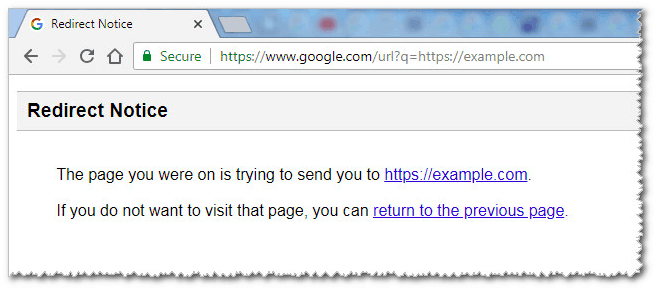
3. JavaScript redirects can also be a practical fallback when a team cannot access server configuration files or does not have the technical ability to implement server-side redirects. In those cases, a client-side redirect may offer a quick way to move users from one page to another without waiting for server-level changes.
4. JavaScript redirects can also be useful as a lightweight bot-filtering mechanism, since many basic crawlers and malicious scripts do not fully execute JavaScript. By conditionally triggering a redirect only after a script runs (or after certain browser behaviors are detected), you can route real users to the intended destination while isolating or slowing down non-human traffic. This approach is sometimes used to protect resources, reduce spam or analyze suspicious activity patterns.
That being said, generally, JavaScript redirects should be treated as an exception, not a standard redirect strategy. They are not a good fit for permanent URL changes, SEO-sensitive redirects or any scenario where consistency across browsers, devices and assistive technologies matters. If you are managing redirects for content changes, migrations, retired pages or SEO preservation, use a proper server-side redirect instead.
If you have to use a JavaScript redirect
If server-side redirects are unavailable and you have no other option, keep the implementation as simple and transparent as possible.
- Explain to users what is happening if there is any visible delay.
- Provide a manual link as a fallback.
- Avoid using JavaScript redirects for important SEO or migration scenarios.
- Test across browsers, devices and assistive technologies.
The goal should be to minimize damage, not to treat JavaScript redirects as an equal alternative to server-side redirects.
Why server-side redirect management still matters
Choosing the right redirect type is only part of the challenge. As websites grow, redirect management becomes harder to handle manually. Site migrations, campaign URLs, retired pages and ongoing content updates can all create complexity over time.
That is one reason server-side redirects are not just technically stronger, but operationally easier to manage when they are handled in a structured way. A clean redirect strategy helps reduce errors, preserve SEO value and keep users moving to the right destination.
This becomes especially important for teams managing larger sites or frequent URL changes. A redirect strategy that works for a handful of pages can quickly become difficult to maintain when you are dealing with content updates across departments, campaign launches, legacy URLs, product changes or full-site migrations. In those situations, the challenge is no longer just choosing between JavaScript and server-side redirects. It is making sure your redirects stay organized, accurate and easy to update over time.
That is where a more centralized approach becomes valuable. Instead of relying on scattered rules, ad hoc fixes or browser-side workarounds, teams can manage redirects in a way that is easier to monitor and maintain. This helps reduce avoidable mistakes, keeps redirect logic cleaner and makes it easier to support long-term SEO and site governance goals.
If your team is handling redirects at scale, urllo offers a more structured way to manage them.
Conclusion
JavaScript redirects can work in limited browser-based scenarios, but they are harmful to SEO and AI visibility. For most websites, a 301 or 302 redirect is the better choice because it is faster, more reliable, clearer for search engines and indexed by AI crawlers and other automated systems.
That is why urllo does not support JavaScript redirects. They depend on the browser to execute, can fail when scripts are blocked or disabled and may not be handled consistently by search engines. By focusing on standards-based HTTP redirects, urllo helps ensure predictable behavior, better performance and more reliable indexing for both users and crawlers.
Frequently asked questions about JavaScript redirects
What is a JavaScript redirect?
A JavaScript redirect sends a user to a new URL using browser-side code such as window.location.href. Unlike a server-side redirect, it happens after the original page has already started loading.
Does urllo support JavaScript redirects?
No, urllo only supports server-side redirects. JavaScript redirects depend on the browser to execute, can fail when scripts are blocked or disabled and may not be handled consistently by search engines. Server-side redirects are more reliable for users, crawlers and SEO.
What is the difference between JavaScript redirects and server-side redirects?
Server-side redirects happen before the page loads and use HTTP status codes such as 301 or 302. JavaScript redirects happen in the browser after the page has already started loading, which makes them slower and generally weaker for SEO and reliability.
Do JavaScript redirects hurt SEO?
Yes. Search engines usually handle server-side redirects more clearly because the redirect is communicated directly through the HTTP response. JavaScript redirects require additional processing and are generally not the preferred choice for SEO-sensitive redirects.
Do JavaScript redirects affect AI visibility?
Yes, AI crawlers do not execute JavaScript, which means they miss or ignore JavaScript-based redirects. This can prevent content from being discovered, indexed or attributed correctly. Using HTTP redirects instead ensures that both AI systems and traditional search engines can consistently follow and understand your redirects.
When should you avoid JavaScript redirects?
Avoid JavaScript redirects for permanent URL changes, site migrations, retired content, canonical URL management and other redirects where SEO, reliability and consistency matter.
What should you use instead of a JavaScript redirect?
For most website redirects and domain forwarding, use a server-side redirect instead. A 301 redirect is usually best for permanent changes and a 302 redirect is usually better for temporary ones.

By Sean Pasemko
SEO & Growth Marketing Specialist
Sean Pasemko is an SEO and growth marketer at urllo, where he works closely with SEO, IT and WebOps teams on redirect management, domain changes and site migrations.
His writing draws on practical experience analyzing redirect behavior, crawl efficiency and long-term site maintenance to help teams avoid common routing and performance issues.






.png&w=2560&q=88)

.png&w=2560&q=88)



.png&w=2560&q=88)
