Redirects are a normal part of managing a website. URLs change, content moves and site structures evolve over time. When that happens, teams need a reliable way to understand existing redirect behaviour, test individual URLs and control where traffic goes next without breaking the user experience or losing search visibility.
That is where redirect tools come in. Some tools are built to crawl websites and uncover redirect paths, chains, loops and status code issues at scale. Others are designed to test specific URLs and show exactly how they resolve. And some are made to create, manage and monitor redirects directly. Together, these tools help teams audit redirect behaviour, troubleshoot problems and manage URL changes more confidently during migrations, restructures and ongoing site updates.
The three main types of URL redirection tools
Not all redirect tools do the same job. Some tools show what is already happening on a site, others create and manage redirects at scale and others test and troubleshoot redirect behaviour. Understanding which type you are working with helps you choose the right tool for the task and avoid relying on a tool that was never built for what you need.
1. Tools to find and crawl websites for redirects
Not every redirect-related tool is designed to create redirects. Some are built to help you discover what is already happening across a website.
Tools that find and crawl websites for redirects are used to scan URLs, follow redirect paths and surface issues that are easy to miss when checking pages manually. Instead of setting up new rules, these tools help you understand how existing redirects behave across a site or domain.
This is especially useful during migrations, audits and site cleanups, when teams need to answer questions like:
- Which URLs are redirecting?
- Where those redirects ultimately lead.
- Whether any pages are returning unexpected status codes.
- Whether redirect chains or loops already exist.
- Whether old URLs are still resolving the way they should.
These tools are useful because redirect issues often build up over time. A site may have older rules at the server level, newer rules in a CMS plugin and additional rules at the CDN level. Without crawling and auditing the site, it can be difficult to see how those layers interact or where problems have started to form.
For example, a crawler might show that an old blog URL redirects to an outdated section path before finally reaching the new destination. It might also reveal that a group of URLs is still returning temporary redirects when they should now be permanent or that a loop has been introduced by conflicting HTTPS and domain rules.
In short, tools in this category help teams inspect redirect behaviour across a website before making changes or while troubleshooting existing ones. They are most useful when you need visibility into how redirects are behaving at scale, not just how a single URL behaves in isolation.
What these tools are best for
- Crawling a website to discover existing redirects.
- Auditing redirect behaviour before or after a migration.
- Checking how old URLs resolve across a site.
- Finding redirect chains, loops and unexpected destinations.
- Validating status codes and final landing pages at scale.
What they do not usually do
These tools usually do not create or manage redirects themselves. Their job is to help you inspect, verify and troubleshoot redirect behaviour, so you can understand what is happening before you update anything.
Examples of a redirect crawling tool:
Screaming Frog SEO Spider is a desktop website crawler for Windows, macOS and Linux, widely used by SEOs and technical teams to audit redirect behaviour across a site. It crawls all URLs it can discover and reports on permanent and temporary redirects, redirect chains, redirect loops and meta refreshes, making it straightforward to identify where redirects are compounding or resolving incorrectly.
Because it mirrors the way a search engine bot would follow links and redirects, it is particularly useful during pre- and post-migration audits when you need to verify that old URLs are resolving correctly at scale.
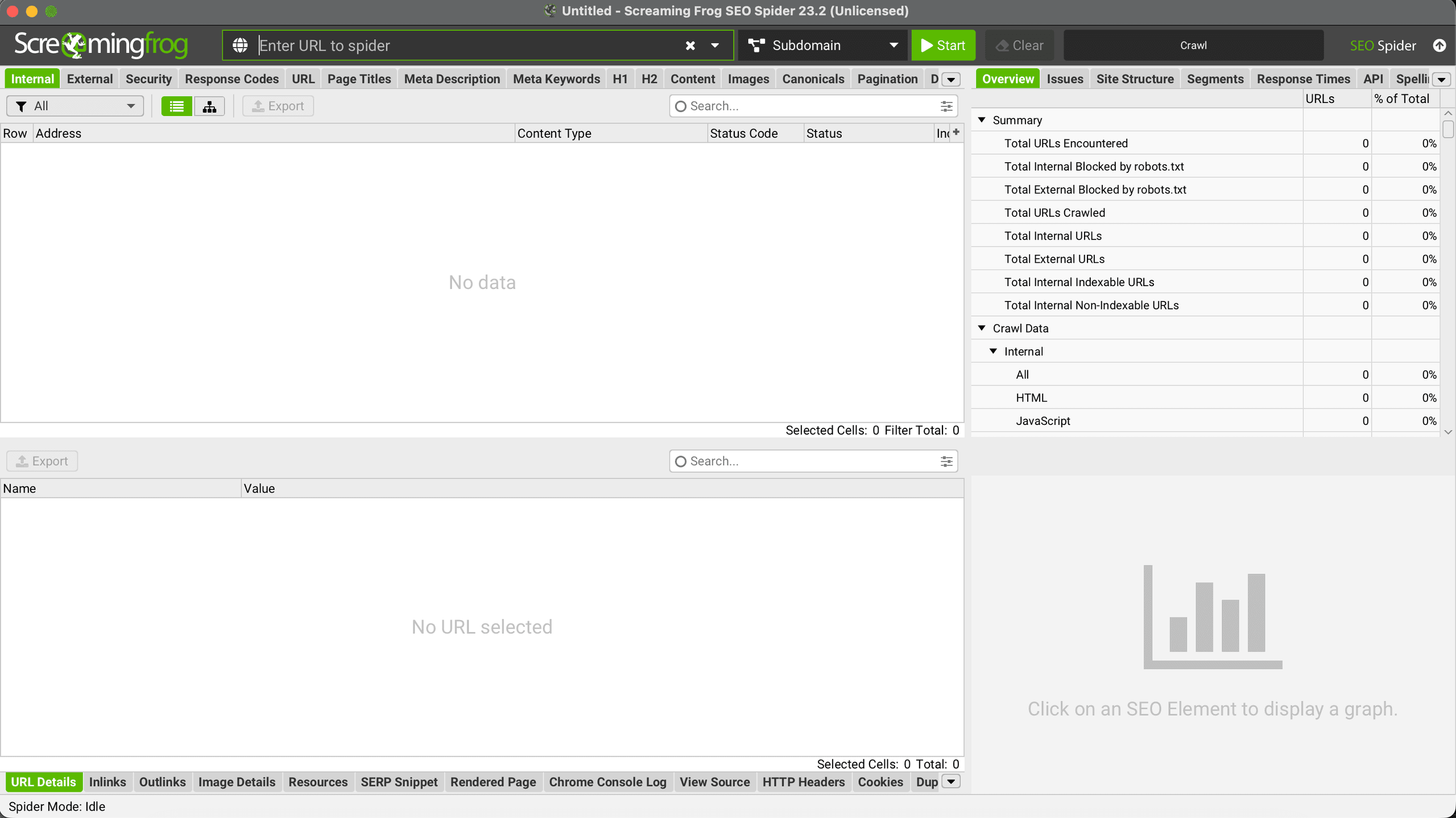
Screenshots of the dashboard:
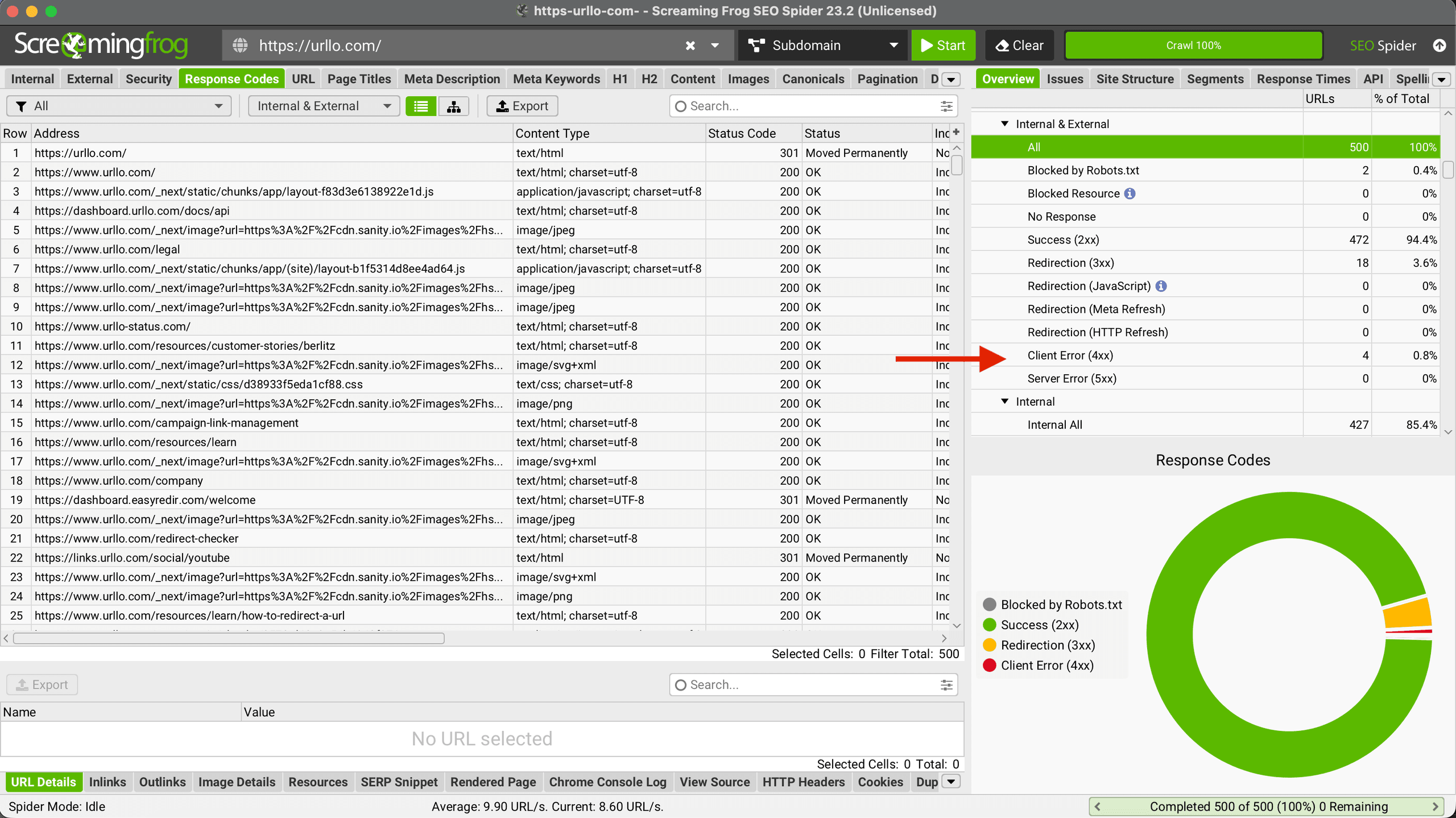
Here, the filter is set to Internal & External, giving you a complete picture of all URLs across your site. The right-hand panel breaks down response codes at a glance; in this case, the crawl has flagged four Client Error (4xx) responses out of 500 total URLs. You can click directly on that row to isolate only those problematic URLs and investigate where they originate. To narrow your focus further, you can switch the filter to Internal only, as shown in the next screenshot.
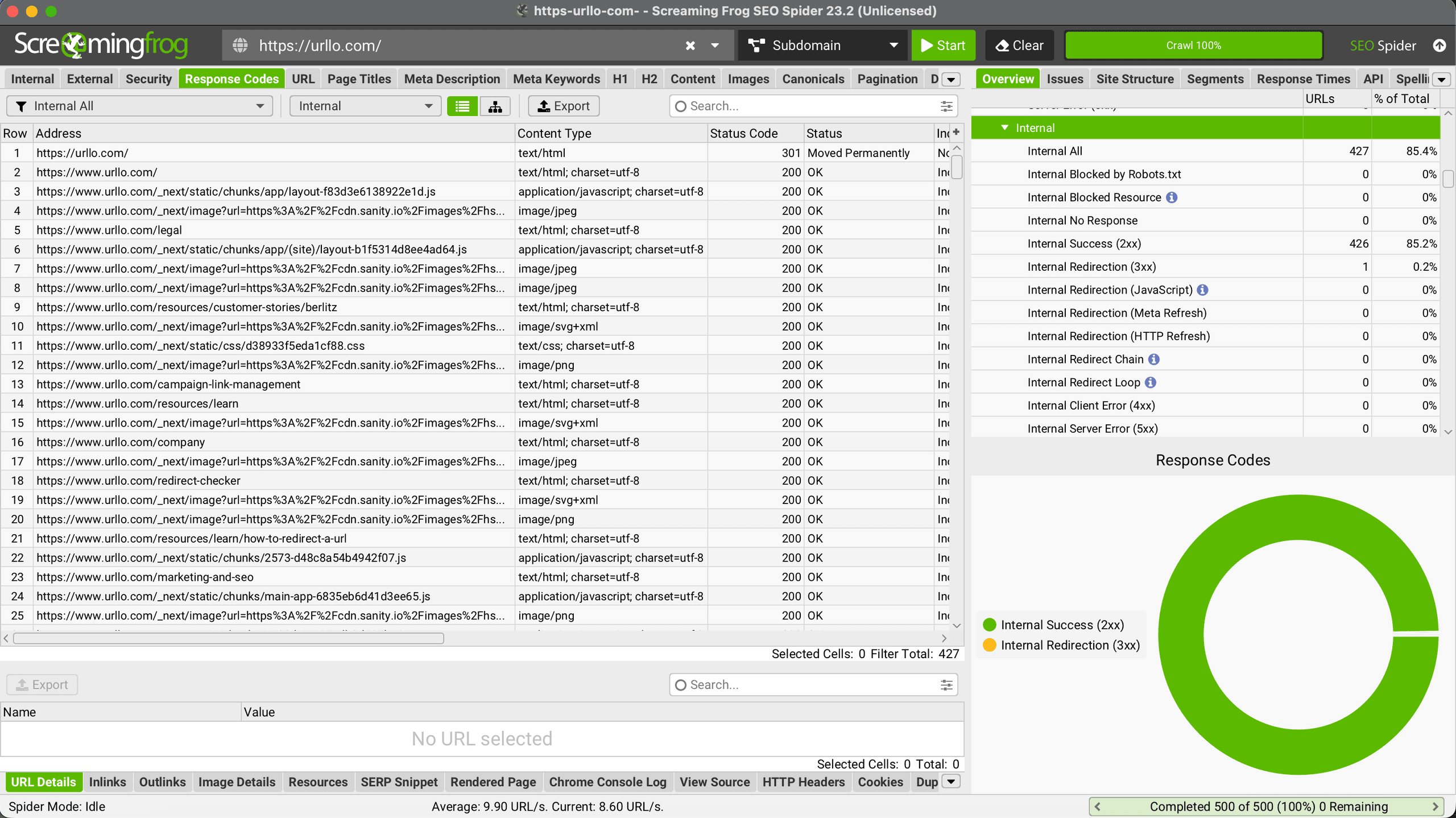
In the above screenshot, we set the filter to internal only, checking for any errors inside our website’s own ecosystem.
2. Tools to create and manage redirects
Redirects can be set up through several types of tools, sometimes called URL redirectors or website redirectors, each suited to different levels of technical access and scale. The right choice depends on how many redirects you need to manage, where you need to implement them and who on your team will be handling them.
Redirect tool
A redirect tool is designed to create, manage and monitor redirects at scale. It helps teams control how traffic moves from one URL to another, usually through features like bulk uploads, rule-based matching, monitoring and reporting. This is the category most useful when redirects need to be managed across a large site, migrations or multiple websites.
Redirect plugin
A redirection plugin is usually tied to a specific CMS, most commonly WordPress. It can be a good option for simple site-level redirect management, especially when changes are limited and the team wants to work inside the CMS. But plugins are often narrower in scope than full redirect tools, especially when redirects need to be managed across multiple domains, platforms or teams.
Server-level redirect setup
Server-level redirects are typically handled through web server configuration or hosting settings. This can work well for simple redirect setups, especially when only a small number of redirects are needed. But as redirect rules grow over time, these setups can become harder to update and monitor consistently while also costing technical resources to manage. That is where a dedicated redirect tool often becomes more useful than managing everything manually in config files or platform settings.
Client-side redirects
You can also create and manage client-side redirects, such as JavaScript redirects and HTML meta refresh redirects. We do not recommend using these types of redirects because they happen after the page begins loading, resulting in weaker SEO signals, less reliability and reduced AI visibility.
Core functionality of redirect management services
Redirect software operates by intercepting incoming requests to specific URLs and automatically forwarding them to designated target destinations or target URLs. The process happens transparently to users, who experience seamless navigation from old URLs to new content locations without manual intervention or awareness of the underlying redirection.
Most redirect solutions integrate directly with content management systems, at the server level or directly at the CDN level. This integration allows them to monitor incoming traffic patterns, identify requests for outdated URLs and execute predefined redirect rules based on administrative configurations. The redirection software maintains databases of redirect mappings that can be updated, modified or removed as website structures evolve.
Advanced redirect management tools also provide analytics and monitoring capabilities, tracking redirect performance and identifying potential issues before they impact user experience. These insights help administrators understand traffic patterns, measure the effectiveness of redirect strategies and optimize their implementation for better performance outcomes.
Essential features to look for in redirect tool solutions
The best redirect solutions do more than send one URL to another. They help you manage change cleanly, keep traffic moving to the right place and stay in control as your setup evolves. When comparing tools, these are the features worth prioritizing.
A good redirect solution should support the redirect types you actually need, specifically 301 redirects for permanent moves and 302 redirects for temporary changes. This gives you the flexibility to handle everything from long-term URL changes to short-term campaigns and testing.
Reliability and uptime
A redirect tool is not just a convenience layer; it sits directly in the path between your URLs and your visitors. If the tool goes down, so do your redirects and that means your website effectively goes down with it. Broken redirects lead to 404 errors, lost traffic, damaged SEO and a poor user experience. When evaluating any redirect solution, look for a provider that offers a strong uptime track record and infrastructure built for availability. The tool you choose should treat reliability as a core feature, not an afterthought, because any outage is your outage too.
HTTP to HTTPS security
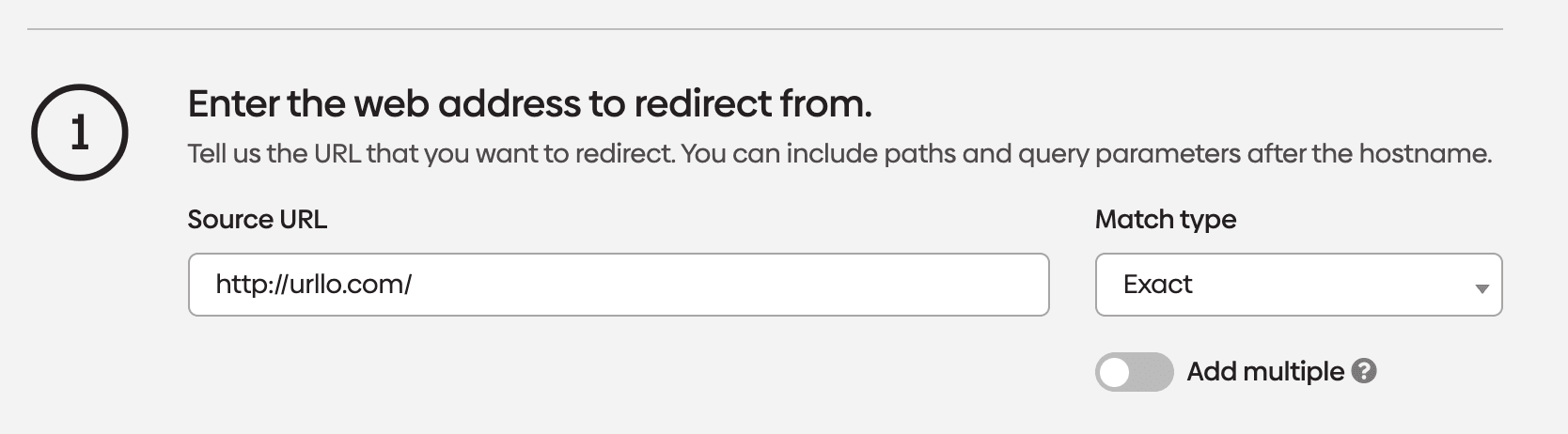
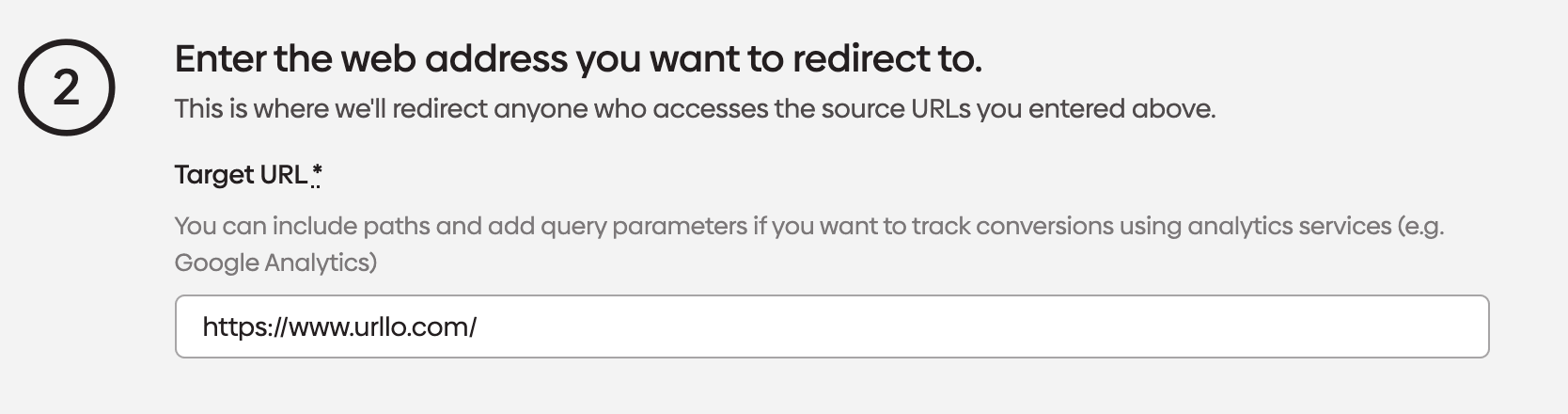
A good redirect tool should make it easy to forward all HTTP traffic to HTTPS and manage SSL/TLS certificates. This helps keep visitors on the secure version of your site, preserves the full URL path and avoids traffic being split between HTTP and HTTPS versions.
Example:
http://urllo.com → https://urllo.com
http://urllo.com/contact → https://urllo.com/contact
This is especially useful when you need to keep redirect behaviour consistent across domains or during infrastructure changes.
urllo makes HTTP to HTTPS redirects simple, just select your unsecured domain and enter the secured version.
Bulk redirect management
Bulk redirect capability is essential if you are working on a migration, restructuring a site or managing large batches of URL changes. Instead of creating redirects one by one, you should be able to upload a file or import a list of source and destination URLs in one go. urllo offers this feature to help our customers save time, reduce manual errors and make large-scale changes much easier to manage.
Pattern and rule-based redirects
For sites with repeatable URL structures, pattern-based redirects are a major advantage. Features like partial path matching and rule-based matching let you manage groups of similar URLs with a single rule instead of building every redirect manually.
For example, if all blog content is moving from /blog/ to /resources/, a partial path matching rule could redirect:
- /blog/seo-redirects → /resources/seo-redirects
- /blog/http-to-https-guide → /resources/http-to-https-guide
- /blog/redirect-chains → /resources/redirect-chains
This is especially useful during migrations, section moves or URL structure changes, where large groups of pages follow the same pattern. It reduces manual work, helps keep rules consistent and lowers the risk of missing individual URLs.
Clear, usable management interface
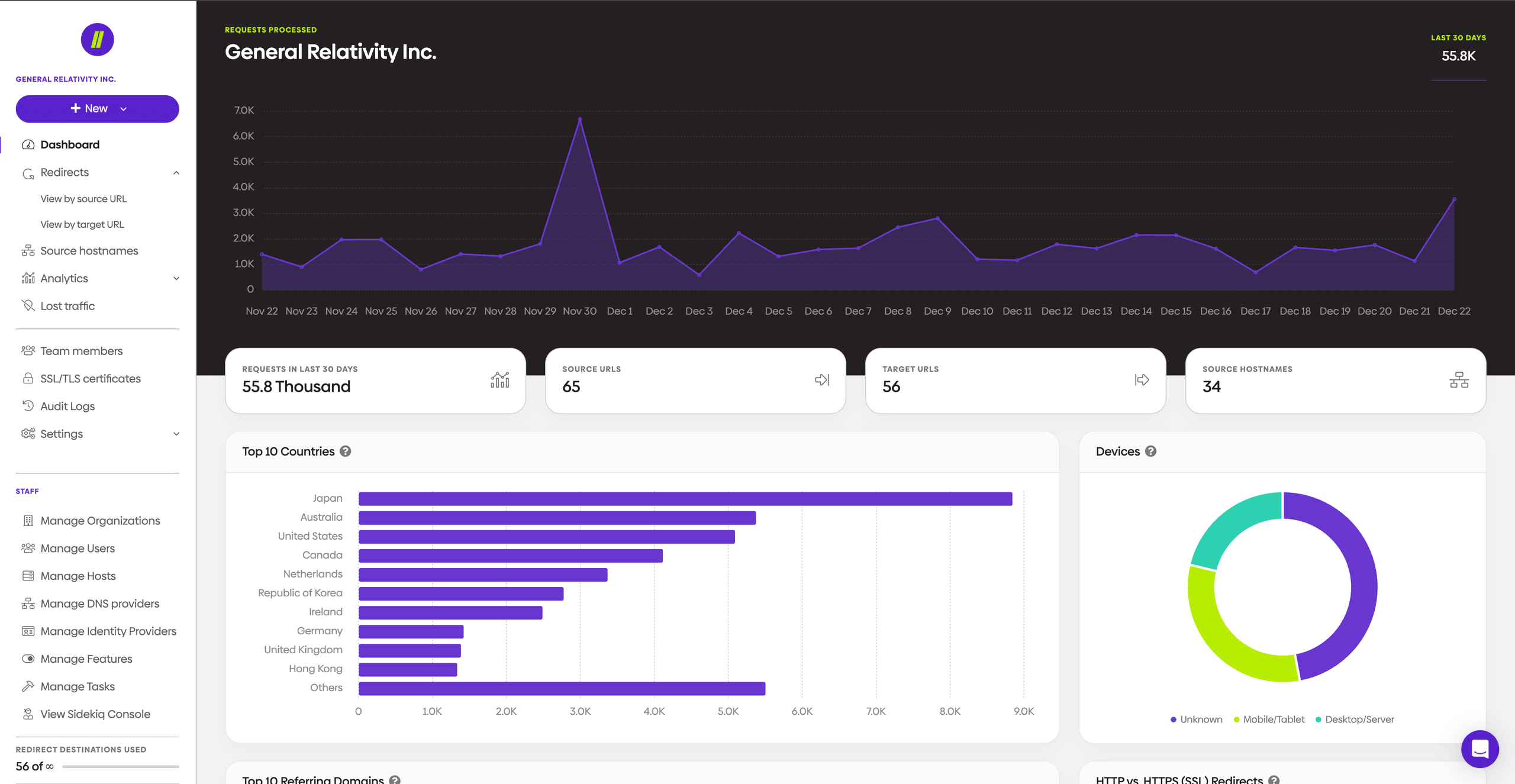
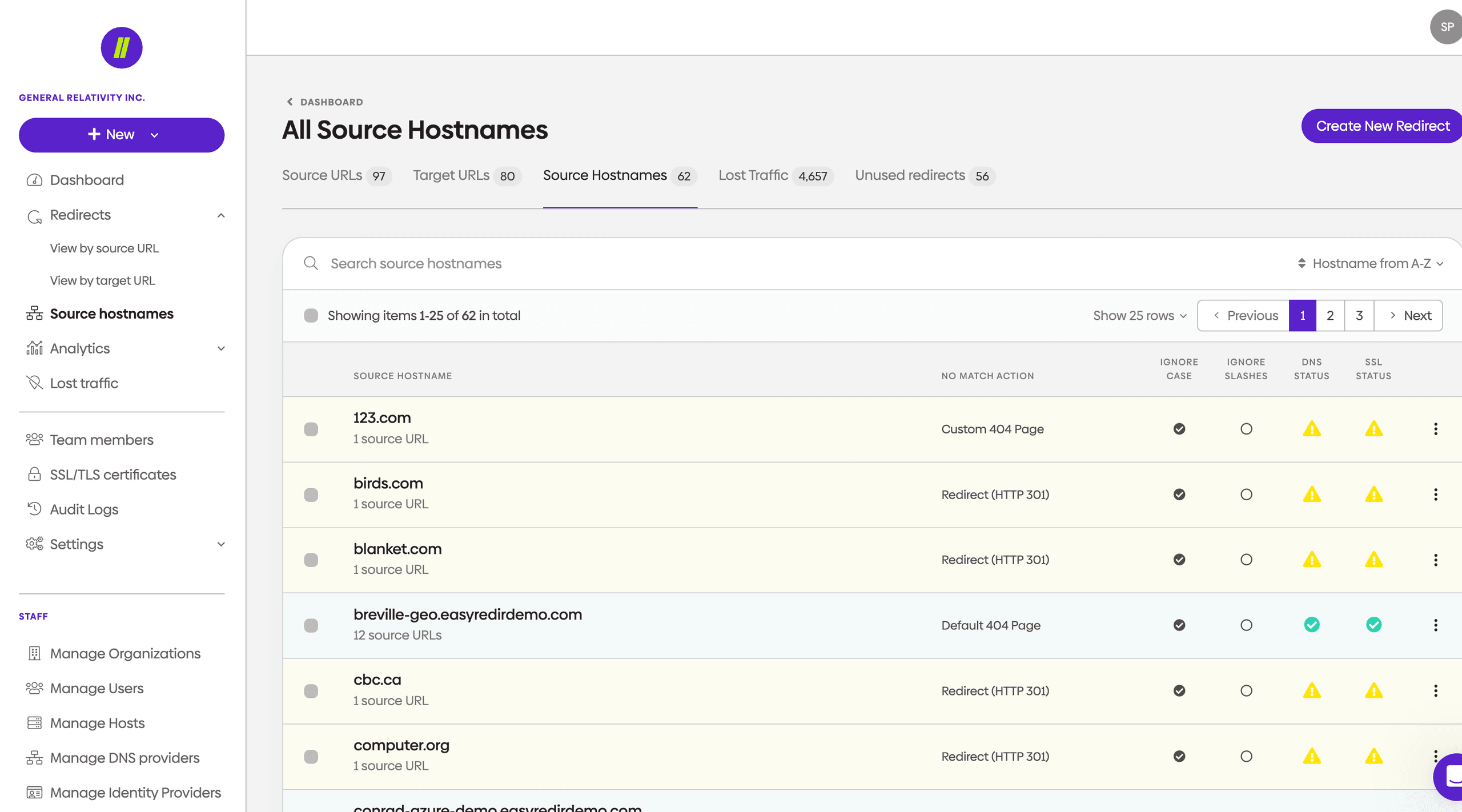
Even powerful redirect logic becomes harder to manage if the interface is clunky. A strong solution should give you a clear dashboard where you can review, edit and organise redirect rules without unnecessary complexity. Search, filtering and sorting tools are especially important once your redirect list starts growing.
urllo’s dashboard provides a detailed overview of your total redirects, analytics and more.
Easily view all your source hostnames, URLs and lost traffic.
Monitoring and troubleshooting tools
Redirects are not something you set once and forget. The right solution should help you spot issues early by showing broken chains, loops, latency problems or other redirect errors. Monitoring and reporting make it easier to maintain performance, protect SEO and keep the user journey smooth over time.
Control at scale
As redirect needs grow, consistency matters just as much as functionality. The best solutions help you manage redirect behaviour across domains, teams and infrastructure changes without losing oversight. That means less manual cleanup, fewer conflicting rules and more confidence that people will keep getting to the right place without interruption.
What matters when redirects get harder to manage
Basic redirect creation is only part of the job. The bigger challenge is keeping redirect behaviour consistent as websites, domains and teams change over time.
That is why it is worth looking beyond a simple redirect setup and asking how a tool helps you stay in control. Can it handle bulk changes? Can it support HTTP to HTTPS forwarding? Can it help you create, manage and analyse redirects in one place? Can multiple team members work in it confidently? Can it help you reduce the operational mess that builds up when redirect rules are spread across different systems?
These questions matter even more during migrations, rebrands, domain consolidation work or other infrastructure changes. In those situations, the best tool is not just the one that can create a redirect. It is the one that helps you manage change without losing visibility, consistency or trust in where traffic is going.
Choosing the right redirect tool for your needs
The right redirection tool depends on how complex your website is, how often URLs change and who needs to manage those changes. Smaller websites with occasional updates may only need a simple solution that is easy to use and maintain. Larger sites, migration projects and frequent structural changes usually need something more robust, with support for bulk updates, monitoring and consistent control across a growing number of redirects.
It is also important to think about who will be working with the tool. If redirects are managed by marketers, content teams or general website admins, the interface needs to be straightforward and easy to review. If redirects are handled by a more technical team, deeper control and more flexible rule management may be more important. Ease of use still matters, but so does the ability to handle more complex redirect scenarios without creating confusion.
You should also consider how often redirect needs change over time. If redirects are mostly one-off fixes, a lightweight option may be enough. But if your team regularly deals with migrations, content consolidation, temporary campaign URLs or ongoing site changes, it makes more sense to choose a manager that can scale with that work. In those situations, the goal is not just to create redirects. It is to stay in control as URLs, teams and website structure evolve.
Finally, think about ongoing management, not just initial setup. A redirect tool should still feel usable when the number of rules grows, when more than one person needs access and when redirects need to be reviewed, updated or cleaned up over time. Features like monitoring, troubleshooting and clear organisation become much more valuable once redirect management becomes part of regular website operations rather than a one-time task.
3. Tools to test and troubleshoot redirects
Redirect testing tool
A redirect testing tool does not usually create redirects. Instead, it checks whether existing redirects are working correctly. Our customers use these tools for verifying status codes, identifying redirect chains or loops and confirming where a URL ultimately leads. Ultimately, a testing tool tells you what is happening, while a redirect tool helps you control what should happen.
Example: using urllo’s redirect checker
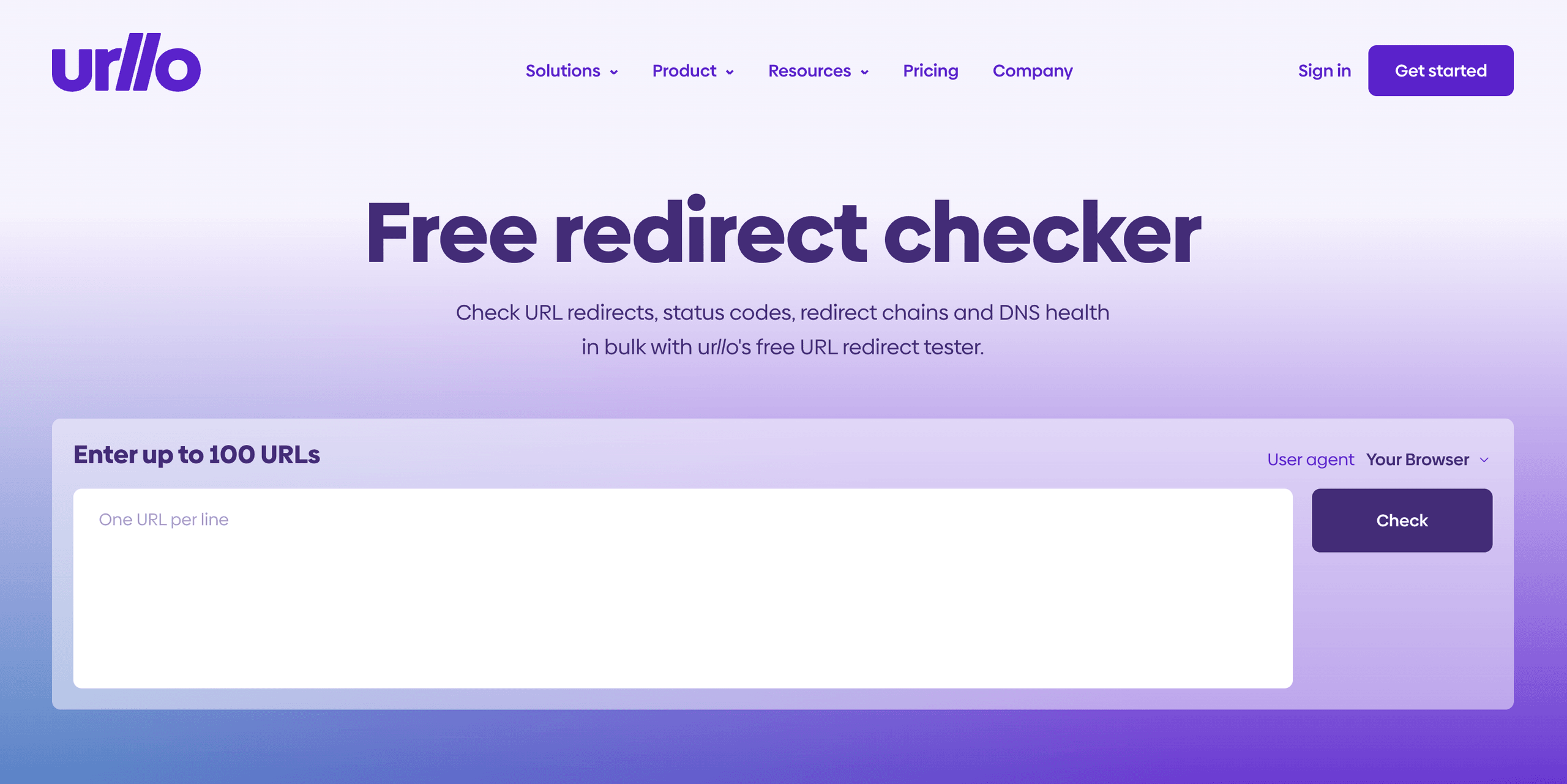
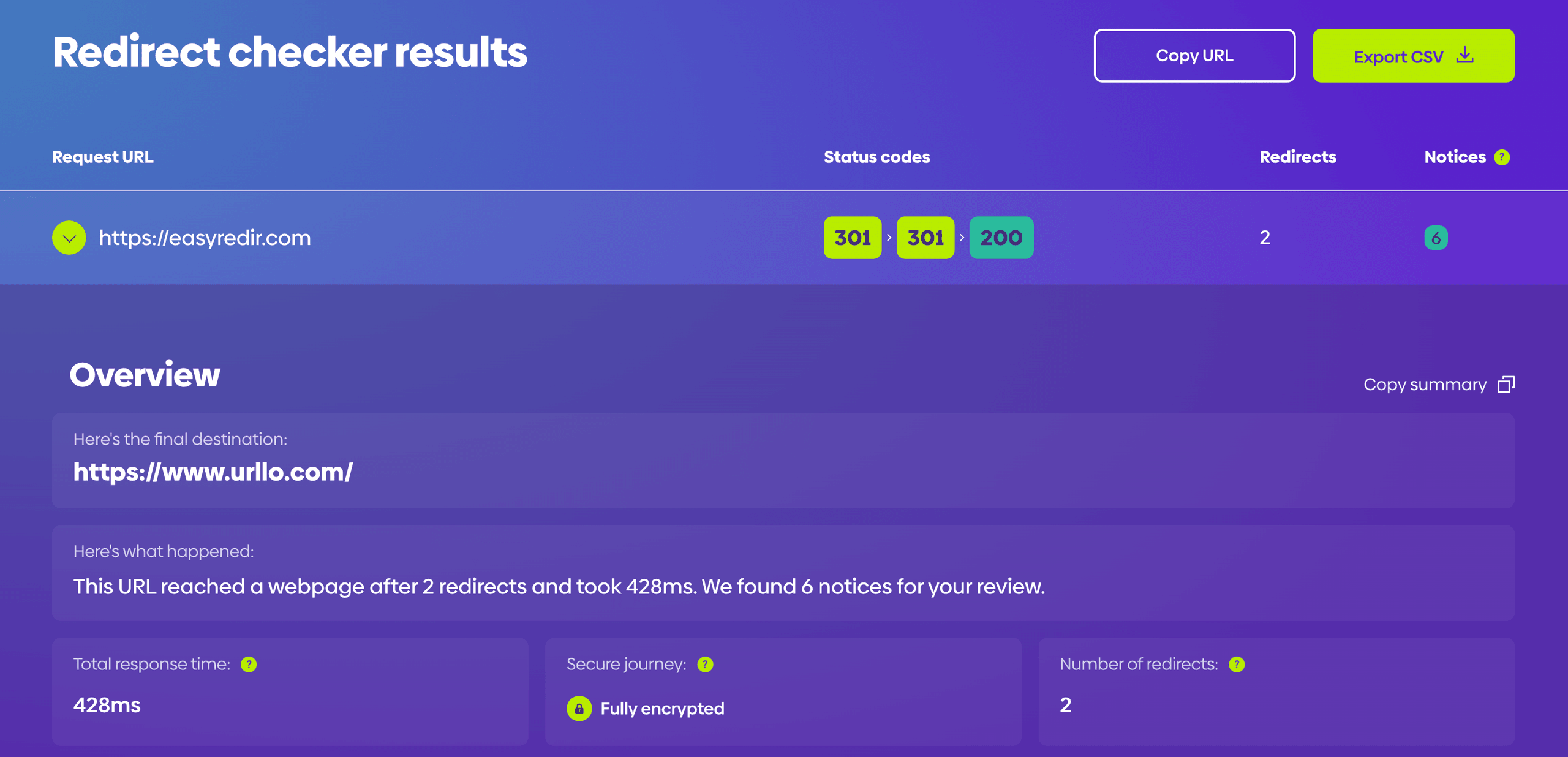
urllo’s redirect checker helps you test redirect behaviour quickly at scale. You can enter up to 100 URLs at once and get a detailed breakdown of how each one resolves.
For each URL, the checker shows key details such as the number of redirects, total response time, status codes, requests and headers. That makes it easier to see where a URL ends up, identify unnecessary hops and spot issues like redirect chains, loops or unexpected destinations before they affect users or search performance.


How redirect tools can create chains and loops when misconfigured
Redirect tools are powerful, but incorrect configuration is one of the most common sources of SEO damage and broken user experiences. Two of the most problematic issues that arise from misconfigured redirects are redirect chains and redirect loops, both of which can go undetected for weeks unless you’re manually checking and cause a negative impact on your website’s SEO.
Redirect chains
A redirect chain occurs when a URL does not point directly to its final destination but instead passes through one or more intermediate redirects before arriving.
A very common real-world cause is a site migration done in stages.
Example:
- A page originally lived at example.com/blog/old-post.
- During a content reorg, it was redirected to example.com/resources/old-post.
- Later, during a rebrand or URL cleanup, that page was redirected again to example.com/learn/old-post.
So the result becomes:
/blog/old-post → /resources/old-post → /learn/old-post
Each additional hop in the chain adds latency, forcing browsers and search engine crawlers to make multiple requests before reaching the destination.
Redirect tools can inadvertently create chains in several ways. The most common cause is layering new redirects on top of old ones without auditing what already exists. During a site migration, for instance, a team might redirect old URLs to a staging structure, then redirect those to the final live URLs, leaving a chain in place after launch.
Similarly, editing a redirect rule without removing the original destination can extend an existing chain without any obvious warning in the tool’s interface.
The SEO impact of redirect chains is significant. Search engines like Google follow redirect chains but may stop following long chains if total response time becomes excessive. Page load speed also suffers, as each additional redirect requires a separate HTTP request and response cycle. For users on slower connections or mobile devices, each additional redirect can produce a noticeable delay.
Redirect loops
A redirect loop is a more severe misconfiguration in which two or more URLs redirect to each other in a cycle, creating an infinite loop with no final destination.
A real-world redirect loop often happens when two redirect rules conflict.
Example:
- One rule forces HTTP to HTTPS http://example.com → https://example.com
- Another rule, plugin or proxy setting accidentally sends traffic back to HTTP https://example.com → http://example.com
So the result becomes:
http://example.com → https://example.com → http://example.com → https://example.com
That is a redirect loop.
Other common real-world causes:
- A www to non-www rule conflicts with a non-www to www rule.
- Cloudflare, the server and a plugin are all trying to manage redirects differently.
- A CMS plugin redirects a page to a new URL, but the server redirects it back.
- Login or geo/device rules keep bouncing users between two versions of a page.
Browsers detect this state and display an error such as “ERR_TOO_MANY_REDIRECTS” while search engine crawlers will abandon the URL entirely and remove it from their index over time. That makes it essential to choose a redirect tool that helps prevent loops.
Best practices for redirect tool implementation
Proper planning before implementing redirect solutions helps ensure successful outcomes and prevents common implementation problems. Document existing URL structures, identify all pages requiring redirection and establish clear redirect strategies before configuring any redirect rules within your chosen tool.
Testing redirect implementations thoroughly prevents user experience issues and ensures search engines can properly follow redirect chains. Verify that redirects work correctly across different browsers and devices, check that redirect chains don't create loops and confirm that target URLs load properly and contain appropriate content.
Documentation of redirect rules and rationale helps with long-term website management, particularly when team members change or responsibilities shift. Maintain records of why specific redirects were implemented, when they were created and any relevant context that might inform future decisions about those redirects.
Common use cases for website redirect tools
Website migrations represent one of the most common applications for redirect solutions. When businesses change domains, restructure site architectures or move to new content management systems, redirect tools ensure that existing search engine rankings and bookmarked URLs continue functioning properly throughout the transition process.
Content consolidation projects often require extensive redirect implementation when organizations merge multiple websites, eliminate duplicate content or reorganize information architecture. Redirect management tools streamline these processes by enabling bulk redirect creation and providing systematic approaches to URL mapping.
E-commerce platforms frequently use redirect solutions to manage product catalog changes, seasonal promotions and inventory updates. When products are discontinued, categories are reorganized or promotional campaigns end, redirect tools help maintain customer navigation paths and prevent lost sales from broken links.
Marketing campaigns that use temporary landing pages or promotional URLs benefit from redirect tools that can easily modify destinations based on campaign performance or changing business priorities. These tools enable marketers to adapt quickly to campaign results without requiring technical support for individual URL modifications.
Security considerations when using redirect tools
Redirect tools control where your website sends visitors and search engines, which makes them a meaningful part of your site’s security surface. A misconfigured or compromised redirect tool is not just an SEO problem; it can expose users to phishing, enable abuse of your domain’s reputation and create legal liability. Understanding the key security risks and how well-designed tools mitigate them is an important part of the selection process.
Open redirects
An open redirect is a vulnerability that allows an attacker to use your domain’s redirect infrastructure to send users to any external destination they choose. This typically occurs when a redirect rule accepts user-supplied or URL-parameter-driven destinations without validation. The result is that a malicious actor can craft a link that appears to originate from your trusted domain, such as yoursite.com/go?url=malicioussite.com — but ultimately delivers the visitor to a phishing page or malware download.
Open redirects are listed by OWASP as a well-known web security risk and are frequently exploited in phishing campaigns because they allow attackers to borrow the credibility of legitimate domains. Quality redirect tools prevent this by only allowing redirects to destinations that are explicitly defined and managed within the platform, rather than accepting destination URLs as dynamic input. If you are evaluating a redirect tool, confirm that it does not expose any mechanism for arbitrary destination injection.
Access controls and audit logging
Because a redirect tool has the ability to send all traffic from a URL to an arbitrary destination, controlling who can create, edit and delete redirect rules is essential. In team environments, a single careless or malicious rule change can redirect a high-traffic page to an incorrect or harmful destination without any immediate visible sign on the site itself. Role-based access controls allow organisations to limit rule-writing permissions to authorised users while giving others read-only visibility, reducing the blast radius of accidental or deliberate misuse.
Audit logging complements access controls by maintaining a timestamped record of every rule change, including who made it and what was modified. This is particularly important during incident response; if traffic is suddenly behaving unexpectedly, an audit log allows teams to quickly identify whether a redirect change was the cause and exactly when it was made. For organisations subject to compliance requirements, audit trails also provide documented evidence that redirect configurations are managed and reviewed appropriately.
Protecting against tool compromise
If a redirect tool’s account credentials are compromised, an attacker gains the ability to silently reroute your website’s traffic to any destination they choose, with no change to your site’s files or hosting configuration. This makes the redirect tool account itself a high-value target. When evaluating tools, look for support for multi-factor authentication, SSO integration with your organisation’s identity provider and the ability to receive alerts when new redirect rules are created or modified. Treating your redirect tool account with the same security posture as your CMS or DNS management console is a sensible baseline.
Conclusion
Redirect tools provide essential functionality for modern website management, offering systematic solutions for maintaining user experience and search engine visibility during website changes. The right redirect management tool combines essential features like bulk redirect capabilities, comprehensive redirect type support and monitoring tools with user-friendly interfaces that make complex redirect scenarios manageable.
Successful redirect tool selection depends on understanding your website's specific requirements, technical constraints and long-term management needs. By evaluating solutions based on functionality, integration capabilities and organizational requirements, you can choose redirect software that enhances your website management capabilities while supporting your broader digital marketing and user experience objectives.
Choose urllo if you need a redirect solution that does more than handle one-off URL changes. urllo helps you manage redirects at scale, keep behaviour consistent across domains and infrastructure changes and reduce the manual overhead that builds up over time. With bulk management, monitoring and support for HTTP to HTTPS forwarding, we give teams a cleaner, more reliable way to protect traffic and keep people getting to the right place.
Frequently asked questions about redirect tools
What is the difference between a redirect tool and a redirect testing tool?
Redirect tools create and manage actual URL redirects on your website, while redirect testing tools check whether existing redirects work correctly. Redirect management software implements the redirects that guide users from old URLs to new destinations. Testing tools verify that these redirects function properly and don't create issues like redirect chains or loops.
Do I need a redirect tool for my WordPress site?
WordPress sites benefit significantly from redirect tools, especially during theme changes, permalink structure modifications or content reorganization. While WordPress has basic redirect capabilities, dedicated redirect plugins provide better management interfaces, bulk redirect features and monitoring capabilities. Small WordPress sites with minimal URL changes might manage without specialized tools, but most sites benefit from redirect plugin functionality.
Can redirect tools handle bulk URL redirects?
Yes, quality redirect solutions offer bulk redirect capabilities that allow you to upload CSV files or import large datasets of URL mappings. This feature is essential for website migrations, domain changes or large-scale content reorganization projects. Bulk redirect functionality saves significant time compared to creating individual redirects manually and reduces the likelihood of errors during large implementation projects.
What happens if my redirect tool stops working?
If your redirect tool fails, previously working redirects may stop functioning, potentially causing users to encounter 404 error pages when accessing old URLs. The specific impact depends on how the redirect tool integrates with your website. Server-level redirect tools might continue working even if management interfaces fail, while plugin-based solutions could stop all redirects if the plugin becomes inactive.
How do redirect tools affect SEO performance?
Properly configured redirect tools preserve SEO value by maintaining link equity when URLs change, preventing 404 errors that harm user experience and helping search engines understand website structure changes. However, poorly managed redirects can create redirect chains that slow page load speed or redirect loops that confuse search engines. Quality redirect tools provide monitoring features that help maintain optimal SEO performance.
Are redirect tools necessary for small websites?
Small websites with stable URL structures might not require dedicated redirect tools initially. However, even small sites benefit from redirect solutions when making structural changes, updating content organization or fixing broken links. The investment in redirect software often pays off by preventing lost traffic and maintaining search engine rankings during website evolution, regardless of site size.

By Sean Pasemko
SEO & Growth Marketing Specialist
Sean Pasemko is an SEO and growth marketer at urllo, where he works closely with SEO, IT and WebOps teams on redirect management, domain changes and site migrations.
His writing draws on practical experience analyzing redirect behavior, crawl efficiency and long-term site maintenance to help teams avoid common routing and performance issues.


.png&w=2560&q=88)

.png&w=2560&q=88)



.png&w=2560&q=88)