A subdomain is a prefix added to your main domain name that creates a separate section or branch of your website. Think of it as a room in your house. While it's part of the same property, it serves a distinct purpose and can function independently. For example, if your main domain is "urllo.com," a subdomain would look like "blog.urllo.com" or "shop.urllo.com."
Understanding subdomains becomes crucial when you want to organize your website content, create specialized sections or establish separate areas for different purposes. Subdomains offer flexibility in website structure while maintaining the connection to your primary brand identity.
Understanding subdomains
At its core, a subdomain refers to a domain that sits beneath your primary domain in the hierarchical Domain Name System (DNS) structure. The DNS organizes Internet addresses like a filing system. Subdomains represent specific folders within your main domain folder.
When you look at a web address like "support.company.com," you can break it down into three parts. The "support" portion is the subdomain. The "company" part represents the second-level domain. The ".com" extension is the top-level domain.
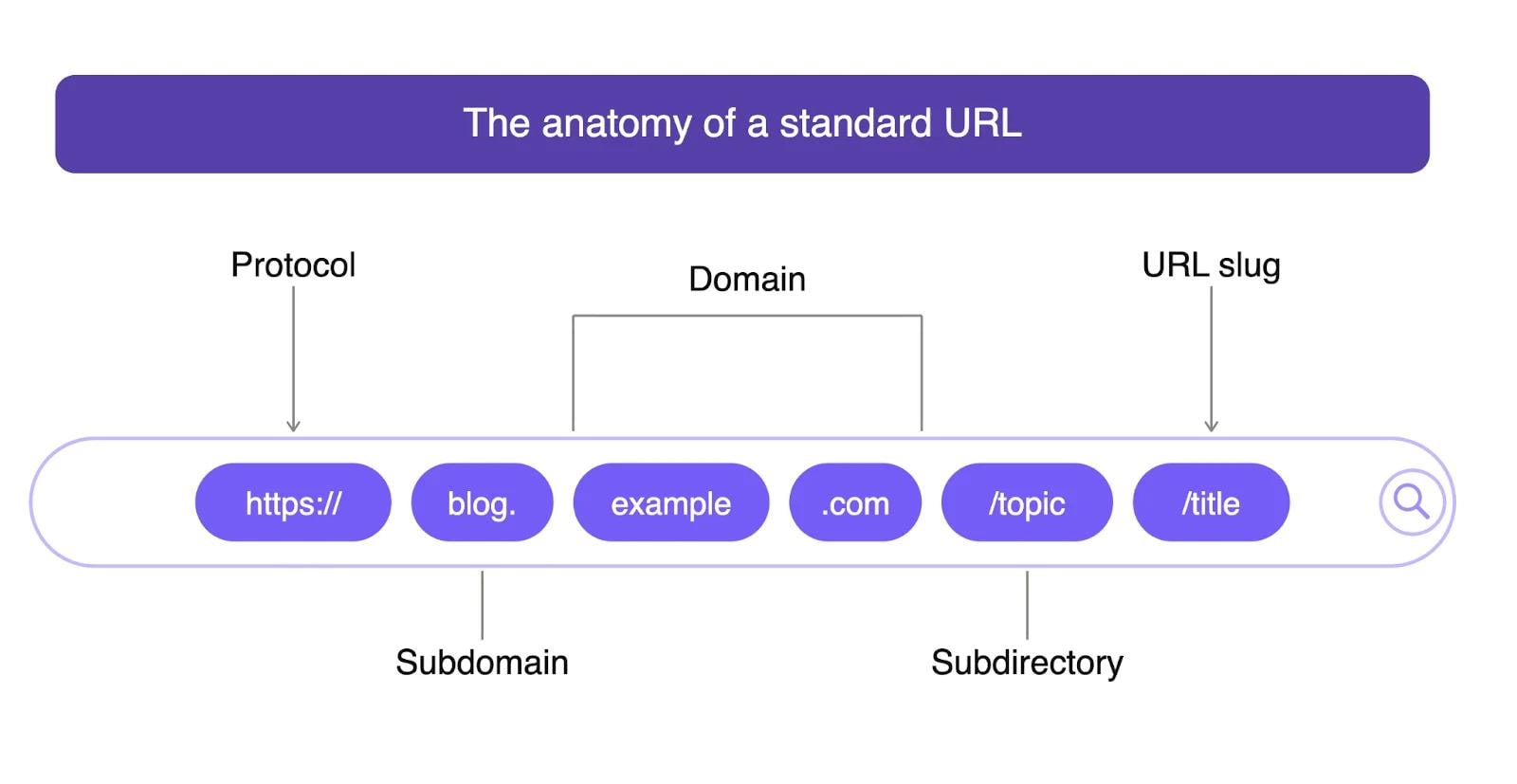
Subdomains function as separate entities from a technical standpoint. They can point to different servers and have unique IP addresses. They operate independently from your main website. This separation allows for greater flexibility in how you structure and manage your online presence.
How subdomains work
Subdomains work by creating additional DNS records that point to specific IP addresses or server locations. When someone types a subdomain into their browser, the DNS system looks up where that particular subdomain should direct the user.
The process begins when a user enters a subdomain URL. Their browser contacts a DNS resolver to find the correct IP address. The DNS system checks the subdomain's specific records, which may differ from the main domain's records. Once the correct server is located, the browser establishes a connection and loads the requested content.
This system allows subdomains to host completely different websites, applications or content types while maintaining the connection to your primary domain. You might have your main website on one server while your subdomain points to a different server entirely.
Subdomain vs domain comparison
The difference between a domain and a subdomain lies in their position within the DNS hierarchy and their functional independence. Your main domain represents your primary web presence and brand identity. Subdomains act as extensions that can serve specialized purposes.
From a technical perspective, domains and subdomains can operate on separate servers with different configurations. Your main domain might run on a WordPress installation while your subdomain uses a completely different platform or technology stack.
Search engines treat subdomains as separate websites. This separation means subdomains don't automatically inherit the SEO authority of your main domain. However, this independence can be beneficial when you want to target different audiences or create distinct user experiences.
Ownership and control represent another key difference. While you control both your domain and subdomains, you can grant different levels of access to team members for specific subdomains without affecting your main site’s security.
When you create, change or retire a subdomain, redirects help keep users and search engines moving to the correct destination. For example, if you move content from blog.company.com to company.com/blog, a redirect helps visitors who use the old subdomain land on the new page instead of hitting a broken link.
This is where a centralized URL redirect service can make subdomain changes easier to manage. Instead of placing redirects across your CMS, CDN, DNS provider or server configuration, urllo gives teams one place to manage redirect rules across domains and subdomains. That helps reduce 404 errors, preserve traffic and keep URL changes easier to maintain as your website evolves.
When to use subdomains
Subdomains are useful when a section of your website needs its own structure, technology, team ownership or user experience. They work best when there is a clear reason to separate part of your web presence from the main domain, rather than creating a subdomain just for convenience.
E-commerce or product catalogs
E-commerce sites often use shop.company.com or store.company.com to separate product catalogs from informational content on the main website.
This can make sense when the shopping experience uses a different platform, checkout flow, design system or team workflow than the main site. It also helps users understand that they are entering a dedicated transaction-focused area.
Support and help centers
Support teams often use subdomains like support.company.com or help.company.com for documentation, troubleshooting guides and customer service resources.
A support subdomain can be useful when the help center runs on a separate platform or needs its own content management process. It also gives customers a clear place to find answers without mixing support content into the main marketing site.
Blogs and content hubs
Blog subdomains, such as blog.company.com, can separate content marketing from the main website.
This structure can work well when the blog uses a separate CMS, has a different editorial workflow or needs a distinct design. However, if the blog is a core SEO channel, consider whether a subdirectory like company.com/blog would be easier to manage under the main site’s authority and reporting structure.
Regional or country-specific websites
Geographic subdomains help businesses serve different locations with customized content. For example, a global company might use us.company.com for United States content and uk.company.com for United Kingdom visitors.
This approach can support localized pricing, language, regulations and user experiences while keeping each regional site connected to the main brand.
Apps, portals and technical platforms
Subdomains are often useful when part of your web presence requires a different technology stack, hosting environment or application framework.
For example, your main site might run on one CMS while app.company.com, login.company.com or portal.company.com runs on a separate application platform. This separation gives technical teams more flexibility without affecting the main website.
Testing and staging environments
Development teams often use subdomains for staging, testing or preview environments, such as staging.company.com or preview.company.com.
These environments let teams test updates, review new pages or validate functionality before changes go live on the main website.
Team or department ownership
Subdomains can also help when different teams need independent control over different parts of the web presence.
For example, marketing might manage a blog or campaign subdomain, customer support might manage a help center and engineering might manage an app subdomain. This separation can reduce accidental changes, clarify ownership and support different workflows.
Before creating a subdomain, consider:
- Who will own and maintain it?
- Will it use the same CMS, hosting and analytics setup?
- Does it need its own SSL certificate or a wildcard certificate?
- Should search engines index it?
- Will it need redirects from existing pages?
- How will internal links connect it to the main site?
- Does it support the long-term site structure or is it just a short-term workaround?
Subdomain benefits for website owners
Subdomains are more useful than they might first appear, especially once your online presence grows beyond a single purpose.
The most obvious win is organizational clarity. When someone lands on blog.company.com versus shop.company.com, they already know what they're in for. No guessing, no digging through menus. That kind of intuitive structure reduces friction for visitors and makes internal management a lot cleaner, too.
Technical flexibility is where subdomains really shine. Each subdomain can run on completely different infrastructure — separate hosting providers, different CMS platforms, different tech stacks entirely. Your main site might be on WordPress while your app subdomain runs on something purpose-built for that function. This is especially common with dedicated landing page tools, which are almost always hosted on your own subdomain. You're not locked into one set of tools or platform just because they work for one part of your site.
There's also a performance angle worth considering. Spreading content across subdomains means different servers can handle different loads, which matters a lot for high-traffic sites or anything with resource-heavy features. No single server carries everything.
Team management gets simpler as well. Marketing can own the blog subdomain, sales can manage the product catalog and each team works in their lane without touching anything they shouldn't. The access boundaries practically enforce themselves, which cuts down on the kind of accidental changes that cause headaches in production.
Finally, subdomains are genuinely useful for testing. Staging environments, experimental features and beta rollouts can all live on a subdomain completely separate from your main site. Your dev team gets room to work without anyone worrying about breaking something live.
Subdomain SEO considerations
Subdomains can be useful for site organization, but they need to be planned carefully from an SEO perspective. Search engines can crawl and rank subdomains, but they may not treat them exactly the same as content housed in a subdirectory on your main domain.
That means blog.company.com and company.com/blog can perform differently depending on how they are structured, linked, maintained and promoted.
Authority and ranking signals
One of the biggest SEO considerations is authority. A subdomain does not always benefit from the main domain’s authority in the same direct way that a subdirectory might.
If you launch a new subdomain, expect to build its visibility through strong content, internal linking, technical SEO and backlinks. Brand recognition can help, but a subdomain still needs its own SEO foundation.
When a subdomain makes sense
Subdomains can work well when the content has a distinct purpose. For example, a support center, app portal or regional site may need its own structure, platform or user experience.
In those cases, the SEO tradeoff may be worth it. But if the content is part of the same marketing or organic search strategy as your main website, a subdirectory may be simpler to manage and easier to consolidate under one domain structure.
Internal linking between domains and subdomains
Internal linking becomes especially important when using subdomains. Your main site should link clearly to important subdomain pages and the subdomain should link back to relevant pages on the main site.
This helps users move between sections and gives search engines clearer signals about how the properties relate to each other.
Analytics and attribution
Analytics and tracking also require extra attention. Because subdomains can behave like separate properties in some reporting setups, you may need to configure analytics, consent tools, conversion tracking and attribution rules across each subdomain.
Without that setup, user journeys can look fragmented, especially when visitors move from a marketing site to a store, help center, app or login portal.
Redirect planning
Redirect planning is another important part of subdomain SEO. If you move content from a subdomain to the main domain or from the main domain to a subdomain, map old URLs to the most relevant new URLs.
Avoid sending every old URL to the homepage. Page-to-page redirects give users a better experience and help search engines understand where the content now lives.
Before choosing a subdomain, ask:
- Does this section need a separate platform, CMS or hosting setup?
- Will this content support the same SEO strategy as the main website?
- How will the main site and subdomain link to each other?
- Will analytics and conversion tracking work across both properties?
- Are redirects needed from existing URLs?
- Who will own long-term maintenance?
Subdomains work best when there is a clear technical, regional, product or team-based reason for separation. If the goal is mainly to publish related content and grow organic traffic under one brand, a subdirectory may be the cleaner long-term choice.
Setting up subdomains
Most hosting providers manage subdomains through a control panel tool called the Domains manager. The steps below walk through how to create a subdomain in cPanel, one of the most widely used hosting control panels.
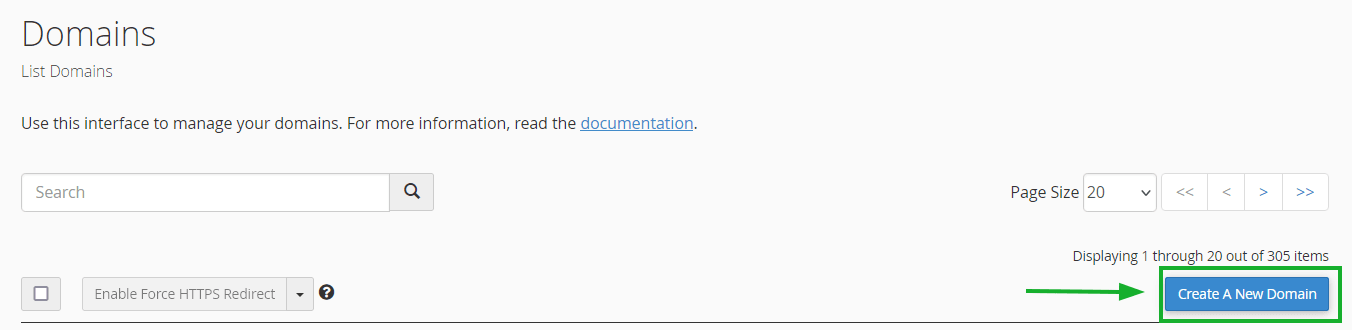
In the Domains tool, you’ll see a list of your existing domains. To add a subdomain, click the “Create A New Domain" button in the upper right corner of the page.
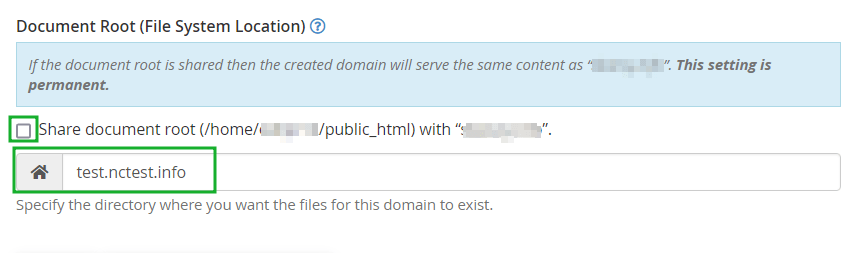
On the “Create a New Domain” form, enter your desired subdomain in the Domain field, for example, “test.nctest.info” to create a subdomain called “test” under the parent domain. cPanel will automatically populate the Document Root directory path based on the subdomain name you enter. Once you’ve confirmed the details, click the “Submit” button to create the subdomain.
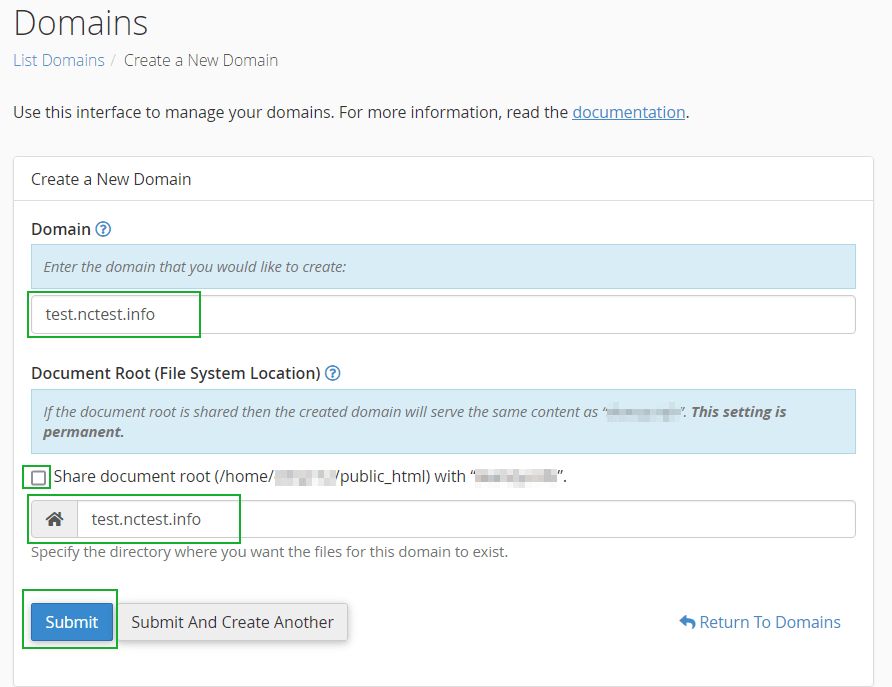
Once submitted, the subdomain changes usually propagate within a few hours, though complete global propagation can take up to 24-48 hours in some cases.
DNS configuration requires creating appropriate records for your subdomain to function properly. An A record points the subdomain to a specific IP address, while a CNAME record can point it to another domain or subdomain. The choice depends on your hosting setup and requirements. Understanding these record types helps ensure proper configuration and troubleshooting capabilities.
SSL certificates need consideration for subdomains to ensure secure connections across your entire web presence. You'll need valid certificates for each subdomain to ensure secure connections and maintain user trust. Many hosting providers offer wildcard certificates that cover all subdomains under your main domain. This approach simplifies certificate management while providing comprehensive security coverage.
Subdomains: the bottom line
Subdomains aren't the right tool for every website, but for complex, multi-purpose operations, they're hard to beat. Technical flexibility, cleaner organization, specialized functionality, brand consistency: when you need all of that at once, subdomains deliver.
The decision really comes down to your situation. A few questions worth asking before you commit:
- Do you have genuinely different types of content or services that deserve their own space?
- Are different teams responsible for different parts of your site?
- Do you have SEO goals that require careful separation or consolidation?
- Are you running into technical limitations with your current single-domain setup?
If you answered yes to most of those, subdomains are probably worth the setup. If your site is relatively straightforward, a well-organized single domain might serve you just as well.
Done right, subdomains give your site room to grow without turning into a mess. Done wrong, they add complexity without much payoff. The difference is usually planning, knowing why you're creating a subdomain before you create it.
Frequently asked questions about subdomains
What is the difference between a domain and a subdomain?
A domain is your main website address, like "company.com," while a subdomain is a prefix added to create separate sections, like "blog.company.com." Domains represent your primary web presence. Subdomains function as independent extensions that can serve specialized purposes. Search engines typically treat subdomains as separate websites that don't automatically inherit the main domain's SEO authority.
How do I create a subdomain for my website?
You can create subdomains through your hosting provider's control panel or DNS management interface. Simply choose a prefix name and configure where the subdomain should point. Set up the appropriate DNS records. Most hosting providers offer user-friendly tools for subdomain creation. Changes typically take effect within a few hours.
Do subdomains affect SEO rankings?
Subdomains are generally treated as separate websites by search engines. They don't automatically inherit SEO authority from your main domain. You'll need to build SEO value for each subdomain independently through quality content and optimization efforts. However, subdomains can benefit from brand recognition and allow more focused keyword targeting for specific content types.
What are common examples of subdomains?
Popular subdomain examples include "blog.company.com" for content marketing, "shop.company.com" for e-commerce, "support.company.com" for customer service and geographic subdomains like "us.company.com" for regional content. Many businesses also use subdomains for mobile versions, testing environments or specialized applications that require different functionality from their main website.
Can I have multiple subdomains on one domain?
Yes, you can create unlimited subdomains under your main domain, though your hosting provider may impose practical limits. Each subdomain functions independently and can point to different servers. They can use different technologies or serve completely different purposes. This flexibility allows complex website structures that meet diverse business needs.
Are subdomains free to create?
Creating subdomains is typically free if you own the main domain and have a hosting service. Most hosting providers include subdomain creation in their standard packages without additional charges. However, you may need separate hosting resources, SSL certificates or specialized services for each subdomain. These could involve additional costs depending on your requirements.

By Sean Pasemko
SEO & Growth Marketing Specialist
Sean Pasemko is an SEO and growth marketer at urllo, where he works closely with SEO, IT and WebOps teams on redirect management, domain changes and site migrations.
His writing draws on practical experience analyzing redirect behavior, crawl efficiency and long-term site maintenance to help teams avoid common routing and performance issues.


.png&w=2560&q=88)

.png&w=2560&q=88)


.png&w=2560&q=88)