Whether you're migrating your website, restructuring your site architecture or fixing broken links, a redirect tool simplifies the process of creating and managing URL redirects. These tools help preserve your SEO rankings while ensuring visitors reach the right pages when URLs change.
A redirect tool simplifies the complex process of setting up redirects without requiring technical server configuration knowledge. You can create, monitor and manage multiple redirects from a single dashboard and, with the right service, allow different teams to collaborate. This saves time and reduces the risk of errors that could hurt your search rankings.
What is a redirect tool?
A redirect tool is software used to create and manage URL redirects without manual server configuration. It allows you to define how old URLs resolve to new destinations and helps maintain consistency across your site.
These tools are commonly used during migrations, URL changes and ongoing site maintenance, making it easier to manage redirects at scale and reduce the risk of errors.
Main types of redirects you can create
Understanding different redirect types helps you choose the right option for your specific needs. Each type serves different purposes and sends different signals to search engines. The choice between redirect types affects how search engines interpret your content changes and user experience.
301 redirects are permanent and should be used when a page or domain has moved for good. They signal to search engines to transfer ranking signals and update their indexes to the new URL, making them the default choice for migrations and long-term changes.
302 redirects are temporary and indicate that the original URL will return. Search engines typically keep the original URL indexed and do not transfer SEO value, so they should only be used for short-term scenarios like testing or marketing campaigns.
How to set up redirects using a redirect tool
Setting up redirects through a tool follows a straightforward process. Most tools share similar workflows, though specific interfaces may vary. The process generally involves selecting your tool, configuring it properly and implementing your redirect strategy.
Choose your redirect tool
Select a redirect tool that matches your technical skill level and website platform. WordPress users might prefer plugins like Simple 301 Redirects, while technical users may want server-level redirects. Those with larger sites, multiple domains or non-technical users might prefer standalone tools such as urllo’s URL redirect service.
Consider factors like ease of use, bulk import features, multiple permission levels, audit logs, uptime and security. Many tools offer advanced features such as fallback rules, query forwarding, partial path matching and automatic HTTPS enforcement. Evaluate your specific needs against each tool's capabilities to make the best choice for your situation.

Install and configure the tool
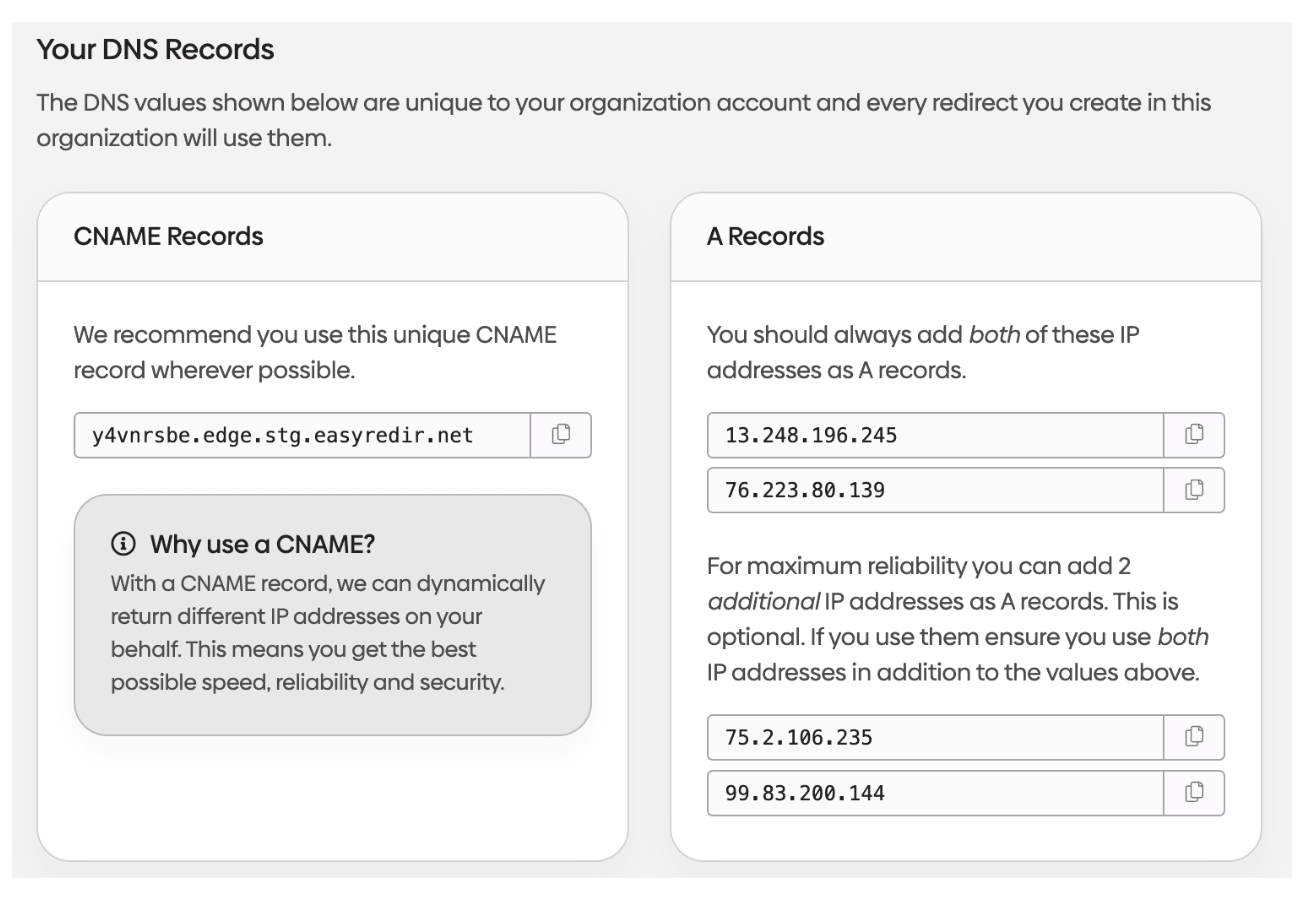
Follow the tool's installation instructions for your platform. WordPress plugins typically install through the admin dashboard. Standalone tools will require DNS configuration.
Take time to understand the tool's interface and available options before creating your first redirect. This preparation prevents mistakes that could affect your website's functionality.
urllo requires you to point your DNS records to us so we can redirect your website.
Create your first redirect
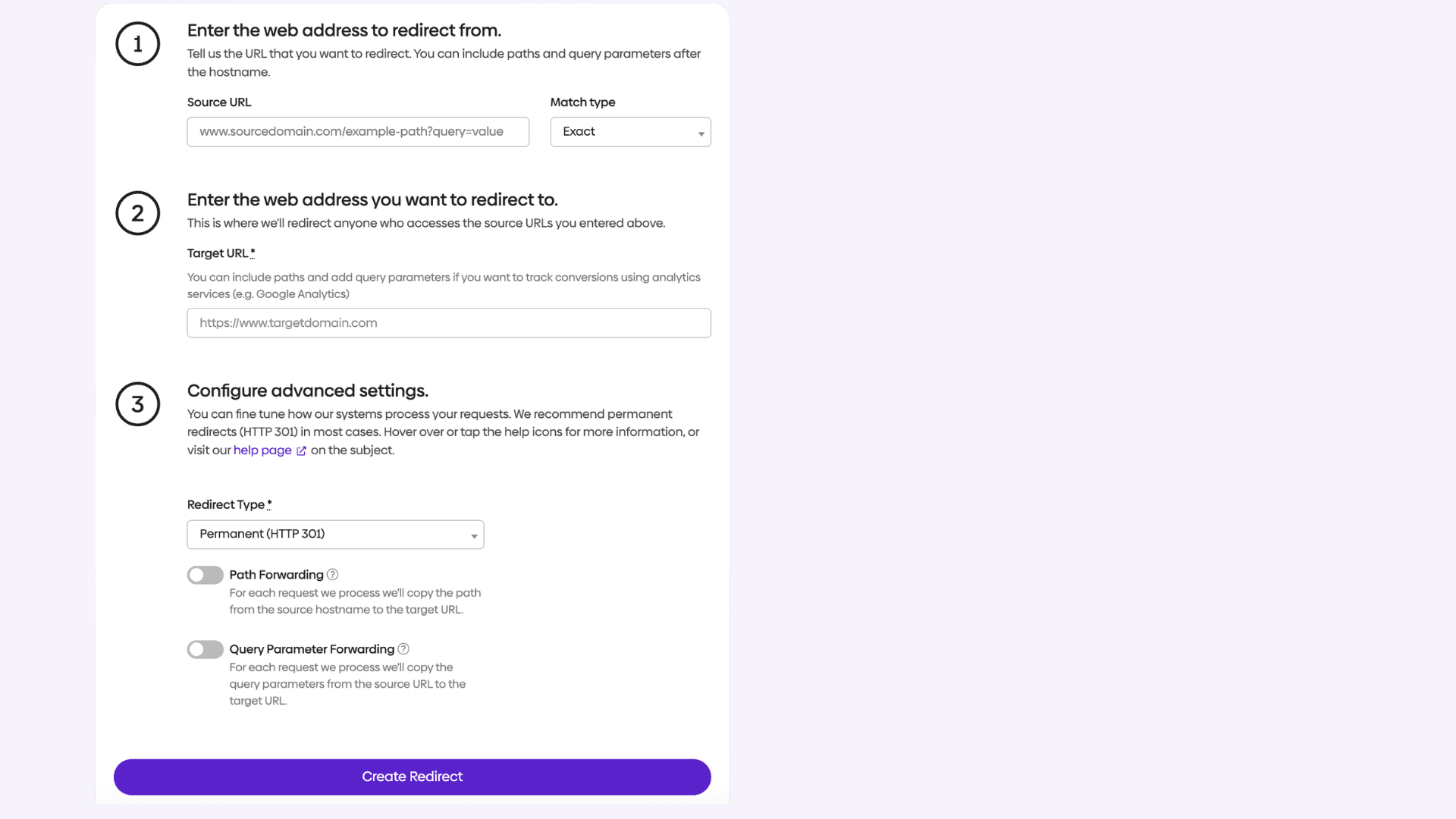
Start with a single redirect to test the tool's functionality. Enter the old URL you want to redirect and specify the new destination URL. Choose the appropriate redirect type (usually 301 for permanent moves).
Most tools allow you to enter URLs in several formats. You can typically use absolute URLs, relative paths or even partial path matching. Double-check your entries for typos that could create broken redirects. Consider starting with a less critical page to minimize potential impact while you learn the tool's interface and behavior.
Test the redirect
Before implementing redirects across multiple domains, test one (preferably a subdomain) to ensure it works correctly. Visit the old URL in a browser to confirm it redirects to the new location. Use browser developer tools to verify the correct HTTP status code is returned.
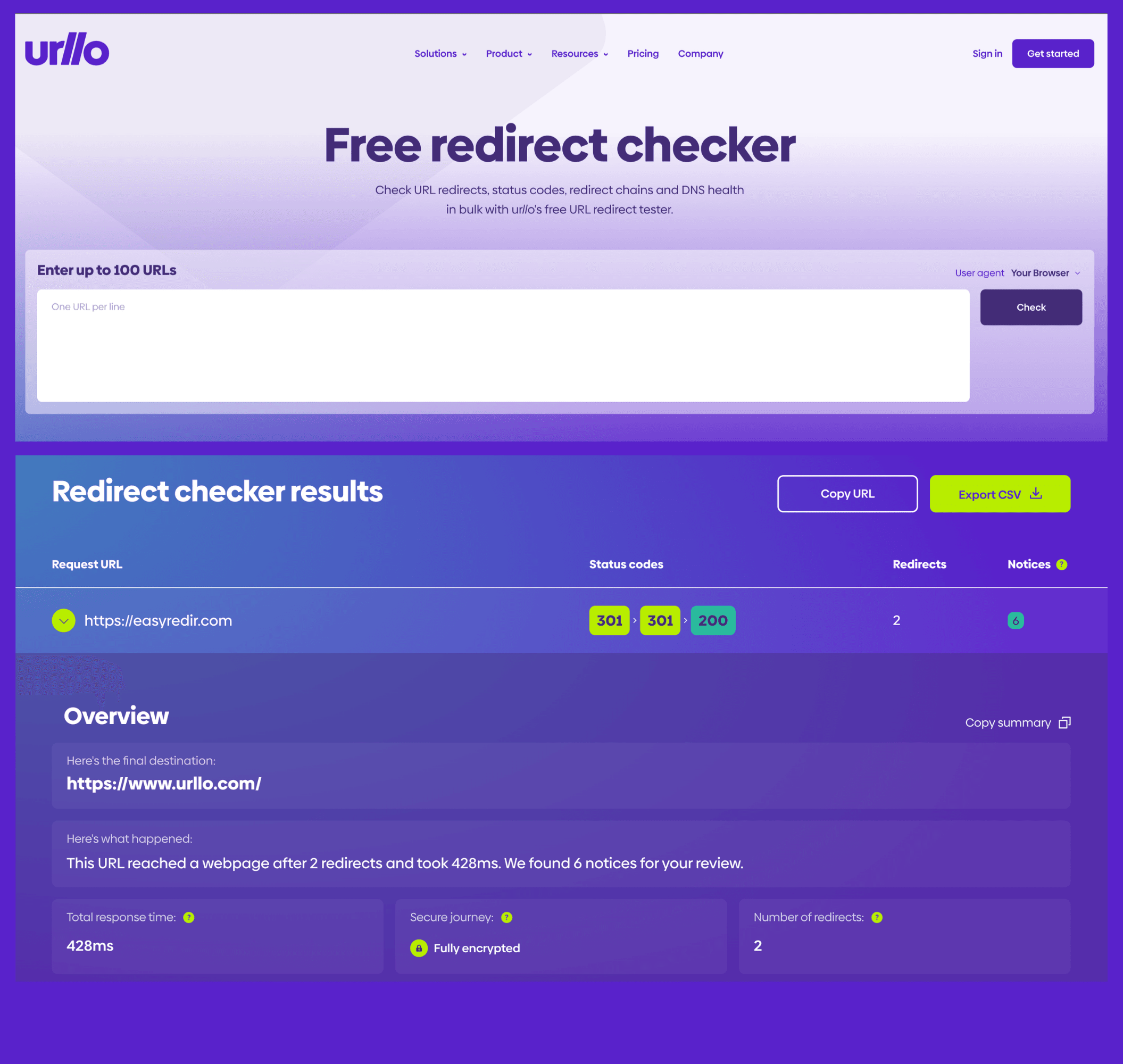
There are free online redirect checker tools that have testing features that check redirect paths, HTTP status codes and total response time. These tests can identify issues like redirect loops, broken destination URLs or incorrect status codes. Thorough testing at this stage prevents widespread issues when you scale up your redirect implementation.
Scale up with bulk operations
Once you've confirmed the tool works properly, you can redirect multiple domains efficiently. Most tools support bulk import through CSV files or allow you to create multiple redirects through their interface.
For large-scale migrations, prepare a spreadsheet mapping old URLs to new ones. This helps you organize your redirect strategy and ensures you don't miss important pages during the migration process. Plan your redirects systematically, grouping similar URL patterns together for easier management and troubleshooting.

Best practices for redirect management
Following redirect best practices ensures your redirects support SEO goals while providing good user experiences. These guidelines help you avoid common mistakes that can hurt your search rankings. Proper redirect management requires ongoing attention and systematic approaches to implementation and maintenance.
Keep redirect chains short
Avoid creating redirect chains where one redirect leads to another redirect. Each additional redirect in a chain slows down page load speed and may cause search engines to stop following the chain.
When possible, redirect old URLs directly to their final destinations. If you must create temporary redirect chains, monitor them closely and consolidate them as soon as possible. Multiple redirects in sequence create latency issues that affect user experience and may signal poor site management to search engines.
Monitor redirect performance
Regularly check that your redirects continue working correctly. URLs can change, pages can be deleted and server configurations can be modified. Ongoing monitoring helps identify broken redirects, redirect chains and unexpected routing behavior before they impact users or search visibility.
Many redirect tools include monitoring dashboards that track redirect usage, identify broken redirects and measure redirect performance. Review these reports monthly to maintain redirect health. Active monitoring helps you catch issues before they significantly impact user experience or search engine crawling.
Update internal links
While redirects handle external links and bookmarks, you should update internal links to point directly to new URLs. This eliminates unnecessary redirects for your regular visitors and reduces server load.
Use your redirect tool's reporting features to identify which redirects handle the most traffic. Prioritize updating internal links for these high-traffic redirects first. Direct internal linking improves page load speed and creates a cleaner site architecture for both users and search engines.
Document your redirect strategy
Maintain records of why each redirect was created and when it can be removed. Some redirects may be temporary solutions that should be cleaned up later. Others may be permanent parts of your site structure.
Good documentation helps team members understand your redirect strategy and makes future maintenance easier. Include information about redirect purposes, creation dates and planned removal dates where applicable. This documentation becomes invaluable during site updates, team changes or platform migrations.
Common redirect creation mistakes to avoid
Understanding common mistakes helps you use redirect tools more effectively and avoid issues that could harm your website's performance or SEO rankings. These mistakes often result from rushing implementation or misunderstanding how different redirect types function in practice.
Using the wrong redirect type
Mixing up 301 and 302 redirects is a frequent error that can confuse search engines. Using 302 redirects for permanent moves tells search engines the original page might return. This prevents search engines from transferring SEO value to the new URL.
Always use 301 redirects for permanent moves like site migrations, URL structure changes or content consolidation. Reserve 302 redirects for genuinely temporary situations like maintenance pages or promotional campaigns. Understanding the long-term implications of each redirect type helps you make better decisions for your site's SEO health.
Creating redirect loops
Redirect loops occur when redirect A points to redirect B, which points back to redirect A. This creates an infinite loop that breaks the user experience and can crash browsers. Most modern redirect tools detect loops automatically and warn you during setup.
Before implementing redirects, map out your redirect logic to identify potential loops. Pay special attention when redirecting between different versions of similar URLs or when implementing complex redirect patterns. Document your redirect relationships to prevent accidentally creating loops during future updates.
Ignoring redirect maintenance
Redirects require ongoing maintenance to remain effective. Destination URLs can change, pages can be deleted and redirect needs can evolve over time. Neglecting redirect maintenance leads to broken redirects that hurt user experience and SEO.
Schedule regular redirect audits to identify and fix broken redirects. Remove redirects that are no longer needed and update redirects whose destinations have changed. Treat redirect maintenance as an ongoing responsibility rather than a one-time setup task
Assuming trailing slashes and capitalization do not matter
Small URL differences can create redirect problems if they are not handled intentionally. For example, /pricing, /pricing/ and /Pricing may look similar to users, but servers and redirect tools may treat them as different paths. Assuming trailing slashes or capitalization do not matter can lead to missed redirects, duplicate pages or unexpected 404 errors.
Before creating redirects, confirm how your website handles trailing slashes and case sensitivity. Decide which URL format should be canonical, then redirect alternate versions to the preferred version when needed. This helps keep redirect behavior consistent and prevents small URL variations from creating larger SEO or user experience issues.
Redirecting to irrelevant pages
Every redirect should send users to relevant, helpful content. Redirecting broken product pages to your homepage might reduce 404 errors, but it creates a poor user experience. Users expect redirects to lead to content related to what they were originally seeking.
When possible, redirect to the most relevant alternative page. If no relevant alternative exists, consider letting the page return a 404 error rather than redirecting to unrelated content. Quality user experience should guide your redirect decisions more than simply avoiding 404 errors.
Testing and monitoring your redirects
Proper testing and monitoring ensure your redirects work correctly and continue supporting your website goals over time. Systematic testing prevents issues that could affect user experience or search engine optimization. Regular monitoring catches problems before they become significant issues.
Manual testing methods
Test redirects manually by visiting old URLs and confirming they redirect to the correct destinations. Check that the redirect happens quickly and that the destination page loads properly. Use different browsers and devices to ensure redirects work consistently across platforms.
Browser developer tools help you verify redirect behavior or use an online tool like urllo’s redirect checker. Check the Network tab to see HTTP status codes and redirect chains. Look for 301 or 302 status codes followed by successful 200 status codes for the final destination. This manual verification process helps you understand how redirects actually function in practice.
Automated testing tools
External tools like Screaming Frog SEO Spider can crawl your site and identify issues. Google Search Console also reports crawl errors that might indicate redirect problems. Automated testing scales better than manual testing for large numbers of redirects and can catch issues you might miss during spot checks.
Monitoring redirect performance
Track how redirects affect your website's performance metrics. Monitor page load speed for redirected URLs to ensure redirects don't significantly slow down user experiences. Watch for increases in bounce rate that might indicate redirect problems.
Analytics tools can show you how much traffic flows through redirects. This data helps you understand redirect effectiveness and identify optimization opportunities. Regular performance monitoring ensures your redirects continue supporting rather than hindering your website goals.
Get started creating redirects
A website redirector tool streamlines the process of creating and managing website redirects while reducing the risk of technical errors. These tools help you preserve SEO value during site changes and ensure visitors always reach relevant content.
Success with redirect tools comes from understanding different redirect types, following best practices and maintaining your redirects over time. Regular testing and monitoring keep your redirects working effectively as your website evolves.
Remember to choose the right redirect type for each situation, avoid redirect chains and update internal links when possible. With proper implementation and maintenance, redirect tools become valuable assets for managing your website's URL structure and user experience.
Frequently asked questions
What is the best redirect tool for websites?
The best redirect tool depends on your platform and needs. WordPress users often prefer plugins like Redirectly or Simple 301 Redirects for their ease of use. For other platforms, standalone tools like urllo or server-level solutions might work better. Choose based on your technical expertise, scale and required features.
How do I create a 301 redirect using a redirect tool?
Most redirect tools follow a similar process: install the tool, enter your old URL and new destination URL, select "301" as the redirect type and save the redirect. Test the redirect by visiting the old URL to confirm it redirects properly to the new location.
Can redirect tools hurt my SEO rankings?
When used correctly, redirect tools help preserve SEO rankings during URL changes. However, incorrect implementation can hurt SEO. Avoid using 302 redirects for permanent moves, creating redirect chains or redirecting to irrelevant pages. Proper redirect tool usage supports SEO goals.
What's the difference between 301 and 302 redirects?
A 301 redirect indicates a permanent move and transfers most SEO value to the new URL. A 302 redirect indicates a temporary move and keeps SEO value with the original URL. Use 301 for permanent changes like site migrations and 302 for temporary situations like maintenance pages.
How do I test if my redirects are working properly?
Test redirects by visiting the old URLs in a browser to confirm they redirect to the correct destinations. Use browser developer tools to check HTTP status codes. There are also many online redirect checker tools, such as the one from urllo.
Should I use a redirect tool or server-level redirects?
Redirect tools are easier to use and don't require server configuration knowledge, making them ideal for most users. Server-level redirects require technical expertise to implement. Choose redirect tools for simplicity and server-level redirects for high-traffic sites requiring optimal performance.

By Shannon Young
Customer Success Manager
Shannon is a seasoned professional in the customer success space. She has years of experience in a wide variety of customer-facing roles in various sectors.
Always ready to take on the next challenge, whether it be a new offensive cross stitch pattern or making her dogs sit still for another themed photo, she is prepared for anything.







.png&w=2560&q=88)