If you are evaluating URL redirect services, urllo and redirection.io both tend to make the shortlist. On the surface, they do the same job: send one URL or domain to another and keep visitors from landing on broken pages. But when you start digging in, they are built on different foundations, aimed at different teams, with different strengths. This guide covers where they line up, where they diverge and which one suits your team the best.
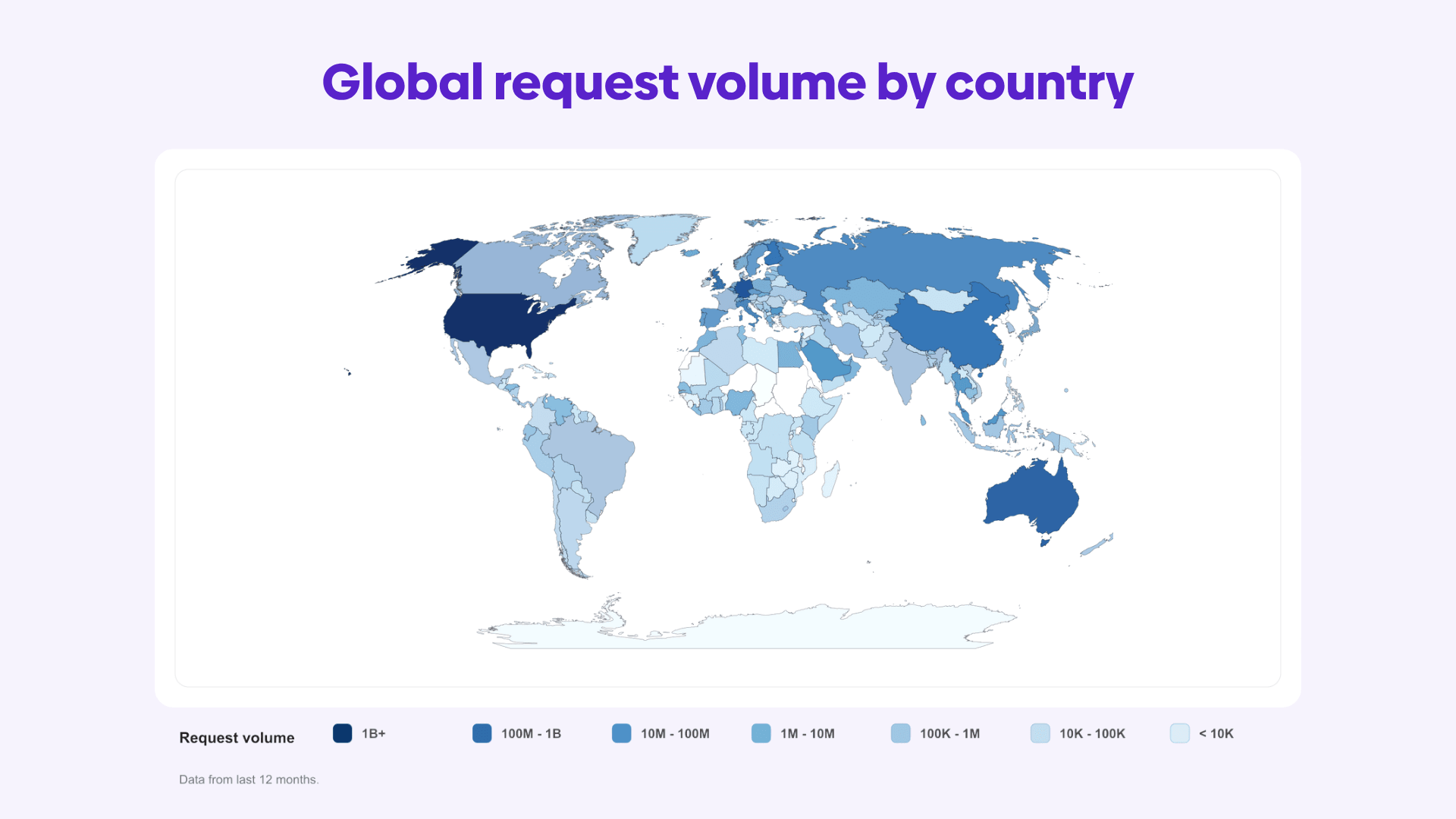
A little background. urllo, previously EasyRedir, has managed redirects since 2014. More than 1,000 companies across 75+ countries rely on it, from small teams through to enterprises. urllo handles over 25 billion requests a year.
redirection.io is a web traffic and redirection manager aimed at developers, SEO agencies and website administrators. Rather than hosting your redirects on its own network, it runs as a proxy that sits in front of your existing site, either installed on your infrastructure or hosted for you as a managed instance.
redirection.io leads with control and breadth: a rules engine that intercepts your live traffic, logs incoming requests and handles redirects alongside meta tags, headers and other technical SEO fixes.
urllo leads with the redirect layer as managed infrastructure: automatic HTTPS, low-latency delivery across a global network, analytics and governance for redirects that revenue, migrations and customer access depend on.
Both create redirects. The real question is how you want them delivered, how much technical resources you want to commit and what you need the tool to do.
What to look for in a redirect service
Start with one question: how important are these redirects to your business?
A few low-traffic URLs or a personal domain is a low bar, meaning the occasional slip costs you nothing. The bar moves the moment redirects sit in front of something real: a paid campaign, a customer login, a live migration or a domain you’ve spent years ranking. Once the stakes are real, four things rise to the top: how the redirects are delivered, how reliably they run, how fast and how much of the work lands on your team. The higher the stakes climb, the more the second of those, reliability, should outweigh the rest. Here are the important factors to consider.
1. Delivery model
This is the first fork in the road and it is easy to skip past. Some services host your redirects entirely: you point DNS or integrate at the edge and the provider runs everything. Others sit inside your own request path as a proxy, which means they can act on traffic before it reaches your backend and see far more than redirect hits alone.
Neither approach is automatically better. A hosted network takes the operational load off your team. A proxy in your own stack gives you deeper control and keeps data on infrastructure you own. What matters is which trade-off fits your team and your compliance needs.
2. Use case fit
Be precise about the job, because “redirects” can mean a few different things:
- A page-level redirect points one URL to another on the same site, for example, exampledomain.com/guide/2025 to exampledomain.com/guide/2026.
- A cross-domain redirect sends a specific URL somewhere else entirely, like oldsite.com/pricing to newsite.com/plans.
- A domain redirect hands a whole domain off to another, sending oldbrand.com straight to newbrand.com.
There is a further split worth naming: redirecting specific URLs while the rest of a live site keeps serving from its origin. That selective, same-site routing is harder than whole-domain forwarding and needs control at the edge or in the request path, not at the DNS layer alone.
3. Reliability and latency
A redirect is one link in the chain between a click and a landing page. Break it and the visitor never arrives, however important the destination is.
For low-stakes forwarding, the odd error or downtime isn’t life or death. For a campaign mid-flight or your brand's domain, reliability is no longer optional.
A redirect that fails on a paid campaign burns the ad spend that pointed at it. One that drops during a login flow locks customers out. One that goes down mid-migration feeds search engines mixed signals and drags rankings down at the moment you most need them to be steady. When redirects sit that close to revenue, reliability stops being a feature to compare and becomes the thing you are actually buying.
How a service stays resilient depends on its design: a hosted network absorbs spikes across many points of presence, while a local proxy keeps working off a compiled ruleset even if the vendor's control plane has a bad day. Both can be reliable; they get there differently.

4. Pricing model
Two tools can both "do redirects" and still be priced on completely different axes, because they are solving different-sized problems. One might meter source URLs; another might meter redirect rules, log volume and bandwidth. Before comparing monthly numbers, get answers to the questions that move the bill:
- Are you paying per hostname, per rule, per domain or per instance?
- Is traffic or log volume metered and what happens when you exceed it?
- Do extra team seats cost more?
- Is analytics in the plan or an add-on?
- Are API access, bulk imports, access controls and SSO gated behind higher tiers?
The plan that looks cheapest at the top can become the pricier one once your real usage maps onto its pricing axis.
5. Features
Spinning up a single redirect is easy. Keeping hundreds of them accurate, safe and simple to change is what separates a tool you trust from one you fight. The capabilities worth checking before you commit:
- Valid HTTPS on every redirect, so visitors never land on a certificate warning or a dead secure URL.
- HTTP-to-HTTPS enforcement so someone arriving on the insecure version of a URL still ends up in the right, secure place.
- Apex and www consistency, with rules that behave the same whether a visitor types the root domain or its www variant.
- Path and query-string forwarding, which carries the original path and campaign parameters through to the destination and keeps attribution intact.
- Pattern matching, where one rule catches a whole group of related URLs instead of forcing a rule per page.
- Bulk import and export, because editing a large redirect set by hand is slow and easy to get wrong.
- Analytics that show which redirects get used, where the traffic comes from and what has quietly stopped working.
- Role-based access, so marketing or SEO can make changes without holding the keys to everything.
- Audit logs of what changed and when, which becomes essential the moment redirects touch SEO, campaigns or high-value pages.
Get these wrong and the failures tend to be quiet. A broken certificate turns visitors away before they read a word. Missed query forwarding and campaign attribution disappear with no error to warn you. Weak matching is what drags a clean migration into weeks of one-off rules, while thin permissions and no change history leave you guessing about what broke and who touched it. The tool that wins here isn't the one that spins up a redirect fastest, it's the one that keeps you in control while your site, campaigns and domains are all moving at once.

What's the difference between urllo and redirection.io?
With those areas in mind, the biggest differences between urllo and redirection.io come down to deployment model, product scope, reliability approach and pricing structure.
1. Deployment and architecture
This is where the two separate most clearly.

redirection.io runs as an agent: a compiled proxy that sits in your request path and forwards traffic to your backend after applying its rules. You can install it on your own infrastructure through a web server or CDN integrations, run it on-premises or in a hybrid setup or hand the hosting to redirection.io as a managed instance. Because it proxies real traffic, it can redirect individual URLs on a live site while every other page keeps serving from the origin and it can act on requests that never involved a redirect at all.
urllo offers two routes. You point your domain through DNS or integrate at the edge and urllo runs the redirect infrastructure on its own network, with nothing to install or maintain. Our edge integration also supports redirecting specific URLs without forwarding the whole domain, so same-site routing is covered on both platforms; the difference is who runs the machinery. With urllo, the provider does. With redirection.io, you can choose to.
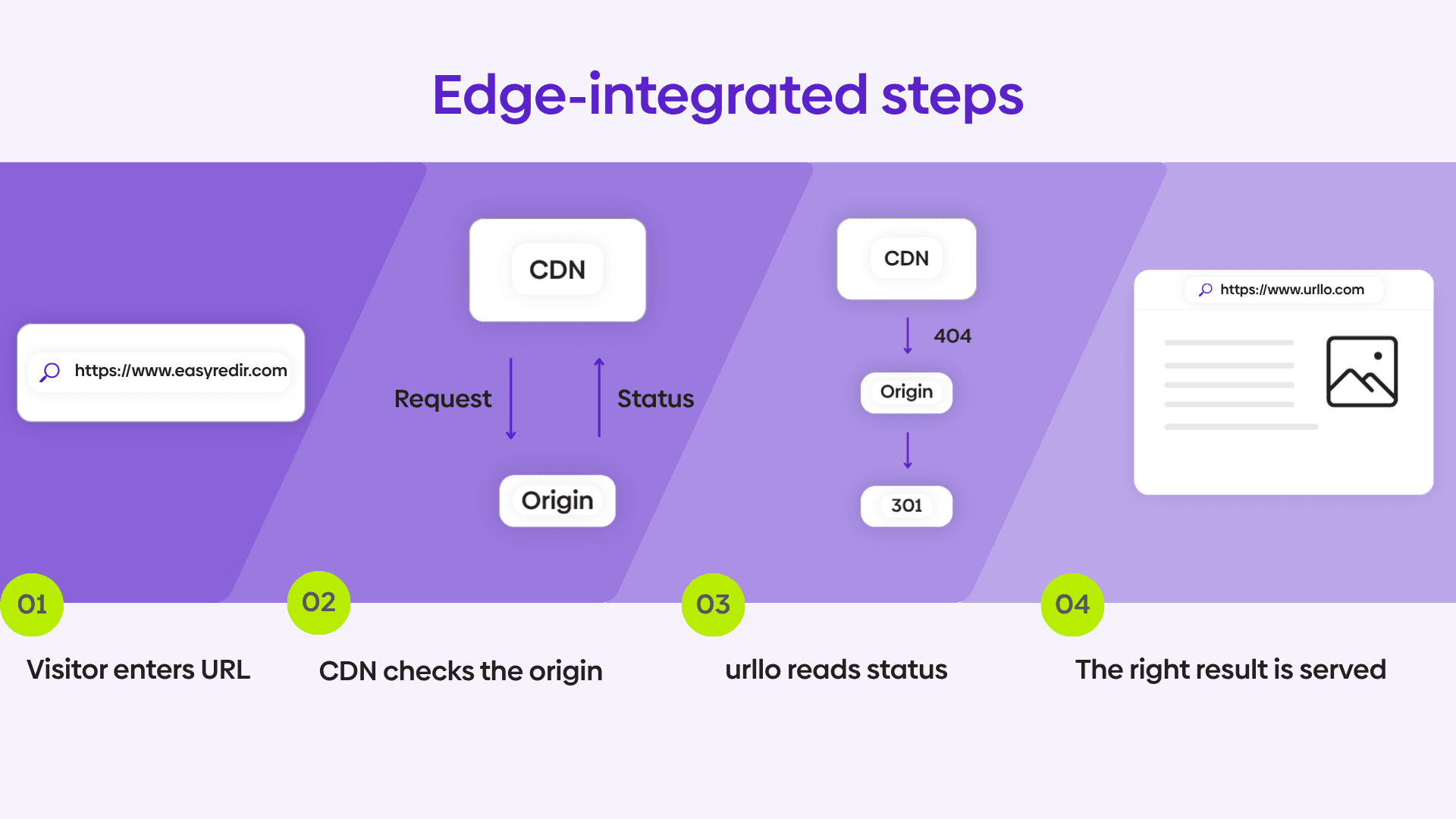
The practical read: redirection.io suits teams that want the redirect layer inside their own stack, with the control and data ownership that brings and have the technical capacity to install and maintain an agent or configure managed instances. urllo suits teams that want redirects handled for them, with no infrastructure to run. Both services have the same use case, offering domain forwarding, URL redirects and website redirects.
2. Product scope
redirection.io is broader than redirects. Its rules engine also manages meta tags, response and security headers, structured data, robots.txt and sitemap.xml and it ships one-click "recipes" for common jobs like blocking AI crawlers. Paid projects add a full website crawler that reports dozens of quality and SEO indicators per page, plus a redirect map generator that proposes rules based on semantic proximity and link hierarchy. It is pitched as a technical SEO and traffic toolkit that happens to do redirects, built to make SEO teams self-sufficient without leaning on developers.
urllo is focused on the redirect and link layer and goes deep there rather than wide. Alongside 301 and 302 redirects, urllo manages branded links, vanity URLs, dynamic QR codes and domain forwarding in one workspace, with automatic SSL, analytics, role-based access and audit controls. urllo does not crawl your site or manage on-page SEO elements like meta tags or robots.txt.
If the redirect and link layer is the problem, urllo covers it end to end; if you want a wider technical SEO cockpit, that is redirection.io's territory.
3. Reliability and latency
Both make strong reliability claims, and their designs get there differently. redirection.io's agent runs locally with a compiled ruleset, so redirects keep firing even if the vendor's control plane goes down, and a single agent handles a very high request rate with sub-millisecond rule processing. urllo leans on managed infrastructure: 99.999% historical uptime, delivery across 100+ points of presence, DDoS protection and a 100% uptime SLA guarantee on enterprise plans.
urllo tracks our own redirect endpoints through third-party monitoring. Here is the most recent full month before publication:
Third-party monitoring monthly report, May 2026
| Provider | Uptime | Downtime | Outages | Response time | Transport |
|---|---|---|---|---|---|
| urllo | 100.00% | 0h 00m 00s | 0 | 295 ms | TLS |
There is no equivalent row for redirection.io, and that comes down to its architecture rather than an oversight. Because it delivers redirects through a proxy in your own request path, an agent on your infrastructure or a managed instance per project, there is no single shared endpoint that represents its reliability the way a hosted service has.
Any figure would reflect the server and network it runs on, usually the customer's own, so two sites could post very different results and neither would say much about redirection.io itself.
On the urllo side, that reliability shows up in how quickly teams get running and how little they have to think about it afterward. As Bob McDuffee, System Engineer at Zero Wait-State, put it:
"urllo delivers on their promises of fast and efficient service. Their outstanding support enabled us to redirect our website in a matter of minutes and the results have been reliable and efficient. Thank you urllo for making my support life easier."
4. Pricing
The two charge on different axes, so a direct number-to-number comparison is misleading.

redirection.io starts free, with a plan capped at a small number of rules and a single day of detailed logs, useful for trying the tool on a personal site.
The self-serve Starter plan is around €20 a month, priced by the number of redirect rules you need, with a 15-day trial and seven-day log retention.
The Pro plan, aimed at businesses, carries a larger rule allowance, longer retention and professional support and is quoted after a call rather than listed as a flat self-serve price. Managed instances, extra domains and bandwidth beyond the included allowance are metered on top.

urllo has no free plan. Essentials is $9 a month for 10 source URLs, one team member and 30 days of basic analytics, with a 14-day free trial and no credit card required. Performance starts at $49 a month, scales from 25 to 50,000 source URLs and adds unlimited team members, bulk imports, 12 months of detailed analytics and API access. Enterprise is custom-quoted. Pricing is based on source URLs.
Compare each against your real numbers: how many source URLs or rules you manage, whether you need a crawler or on-page controls and how much traffic you receive, rather than the entry price alone.
5. Redirect platform capabilities to compare
| Feature | urllo | redirection.io |
|---|---|---|
| Free plan | ✖ | ✔ (10 rules) |
| Free trial | ✔ (14-day) | ✔ (15-day) |
| Fully managed, nothing to install | ✔ | Partial (managed instances) |
| Self-hosted / on-premise option | ✖ | ✔ |
| Same-site redirects without full DNS forwarding | ✔ (edge) | ✔ (agent) |
| 301 / 302 redirects | ✔ | ✔ |
| Path and query forwarding | ✔ | ✔ |
| Automatic SSL/TLS | ✔ (all plans) | ✔ (managed instances) |
| Branded links, vanity URLs, QR codes | ✔ | ✖ |
| Meta tags, headers, robots.txt, sitemap | ✖ | ✔ |
| Website crawler | ✖ | ✔ (paid) |
| Redirect analytics + lost-traffic reports | ✔ | Partial |
| Bulk import/export | ✔ | ✔ |
| API | ✔ | ✔ |
| Global delivery network + POPs | ✔ | ✖ |
| 100% uptime SLA | ✔ (enterprise) | ✖ |
| Role-based access | ✔ | ✔ |
| Single sign-on (SSO) | ✔ (add-on) | ✔ |
| Audit logs | ✔ | ✔ |
| SOC 2 attestation | ✔ | ✖ |
Important consideration: ease-of-use
One final thing to consider is how simple the service is to use. Developers don't want to field a ticket every time a rule needs changing because the marketing team can't safely make the change themselves. Despite a strong focus on SEO from redirection.io, it is, in fact, still a very technically complex product that is difficult to navigate, set up and use. Attached below is a screenshot uploaded by redirection.io itself of their dashboard compared to urllo’s dashboard.
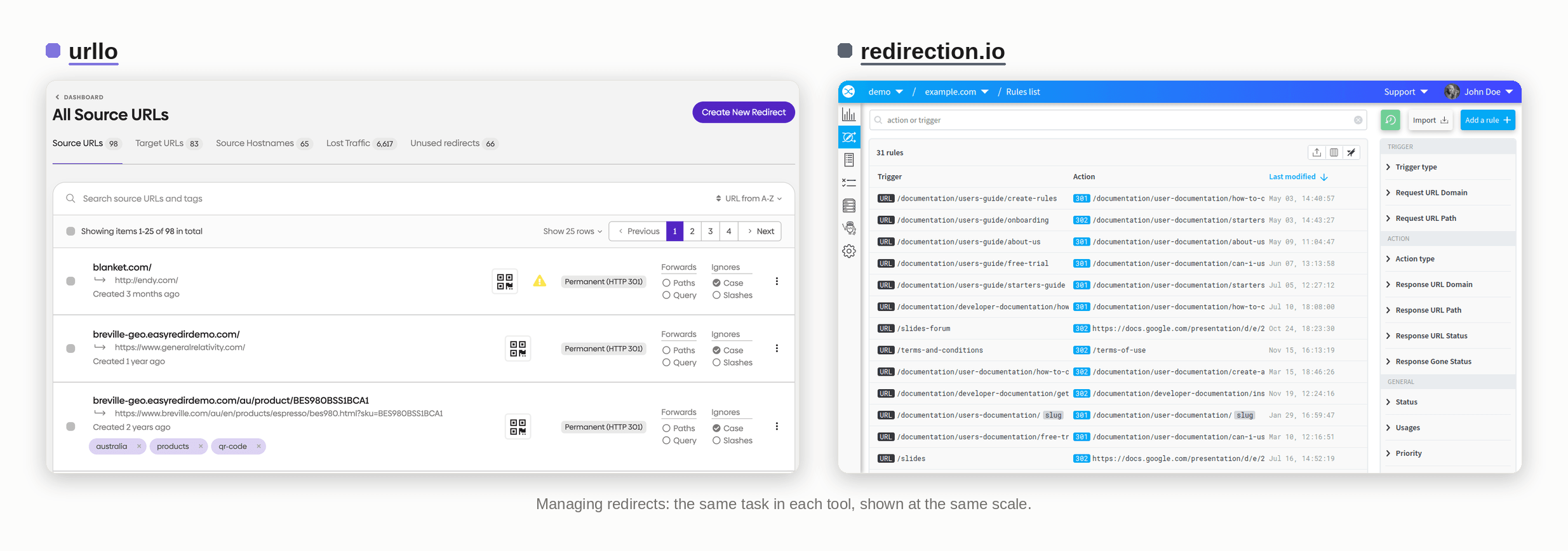
Even the most advanced features aren’t useful if your team doesn’t know how to use them or finds the platform frustrating.
So, who should you choose?
The right answer depends on what your redirects are for and how you want to run them.
Choose redirection.io if you want the redirect layer inside your own stack. If you need whole-site traffic observability from real server logs, on-page technical SEO controls like meta tags and robots.txt, a built-in crawler or self-hosting to keep data on your own infrastructure, that is what it is built for. Its free tier and rule-based pricing also suit developers and SEO agencies who want to start small and scale by rule count, provided the team can install and maintain the agent or manage the hosted instances.
Choose urllo if redirects are infrastructure you would rather not run. If you are handling migrations, rebrands or cross-team redirect management or protecting domains that carry real traffic and SEO value, urllo covers the parts that matter when revenue is on the line: automatic SSL/TLS, low-latency delivery across 100+ points of presence, DDoS protection and governance through role-based access, SSO and audit logs, all managed for you with a branded link and QR code suite in the same workspace.
Not sure which model fits? Talk to our team and we will help you work out whether a self-hosted proxy or fully managed redirect infrastructure is the right call for your setup.
Frequently asked questions about urllo and redirection.io
What's the main difference between urllo and redirection.io?
redirection.io runs as a proxy in your own request path, self-hosted or as a managed instance and pairs redirects with technical SEO tools like traffic logging, a crawler and on-page controls. urllo is a fully managed redirect and link-management platform delivered over its own global network, focused on reliability, HTTPS and governance. Both handle the fundamentals; the difference is whether you want to run the redirect layer yourself and manage a wider SEO toolkit or have redirects handled for you at scale.
Is urllo a redirection.io alternative?
Yes. urllo works as a redirection.io alternative, and it fits both ways teams like to run redirects: hosted, where you point your domain through DNS and urllo handles everything or edge integration, where redirect logic runs alongside your existing site so specific URLs redirect while the rest keep serving from the origin. Either way, it stays fully managed, with no proxy to install or maintain, plus managed uptime, a global delivery network, an SLA and a branded link and QR suite alongside your redirects. If your priority is self-hosting, whole-site log analytics or on-page technical SEO controls, redirection.io may suit those workflows better.
Can I redirect one page without redirecting the whole domain?
On both platforms, yes. redirection.io's agent processes requests in your stack, so it can redirect specific URLs while the rest of the site serves from the origin. urllo's edge integration supports the same selective, same-site routing without forwarding the entire domain. Plain DNS-based forwarding, by contrast, sends the whole domain to one destination and cannot keep the rest of the site live.
Can redirection.io be self-hosted?
Yes. It offers self-hosted and hybrid deployments where the agent runs on your own infrastructure, as well as managed instances hosted by redirection.io. urllo is a managed SaaS with no self-hosted option; you integrate through DNS or the edge and urllo runs the infrastructure.
How do the two price their plans?
redirection.io meters redirect rules, log volume and bandwidth, starting free, then around €20 a month for self-serve Starter, with Pro quoted after a call. urllo prices by source URLs, from $9 a month on Essentials to a custom Enterprise plan, with no free tier.

By Sean Pasemko
SEO & Growth Marketing Specialist
Sean Pasemko is an SEO and growth marketer at urllo, where he works closely with SEO, IT and WebOps teams on redirect management, domain changes and site migrations.
His writing draws on practical experience analyzing redirect behavior, crawl efficiency and long-term site maintenance to help teams avoid common routing and performance issues.









.png&w=2560&q=88)