
By now, you’ve probably heard of both these companies when it comes to URL redirects. You may even be deciding between the two. That is why we created this guide: to give you a clear understanding of where urllo and redirect.pizza are similar, where they differ and which platform is better suited for your redirect needs.
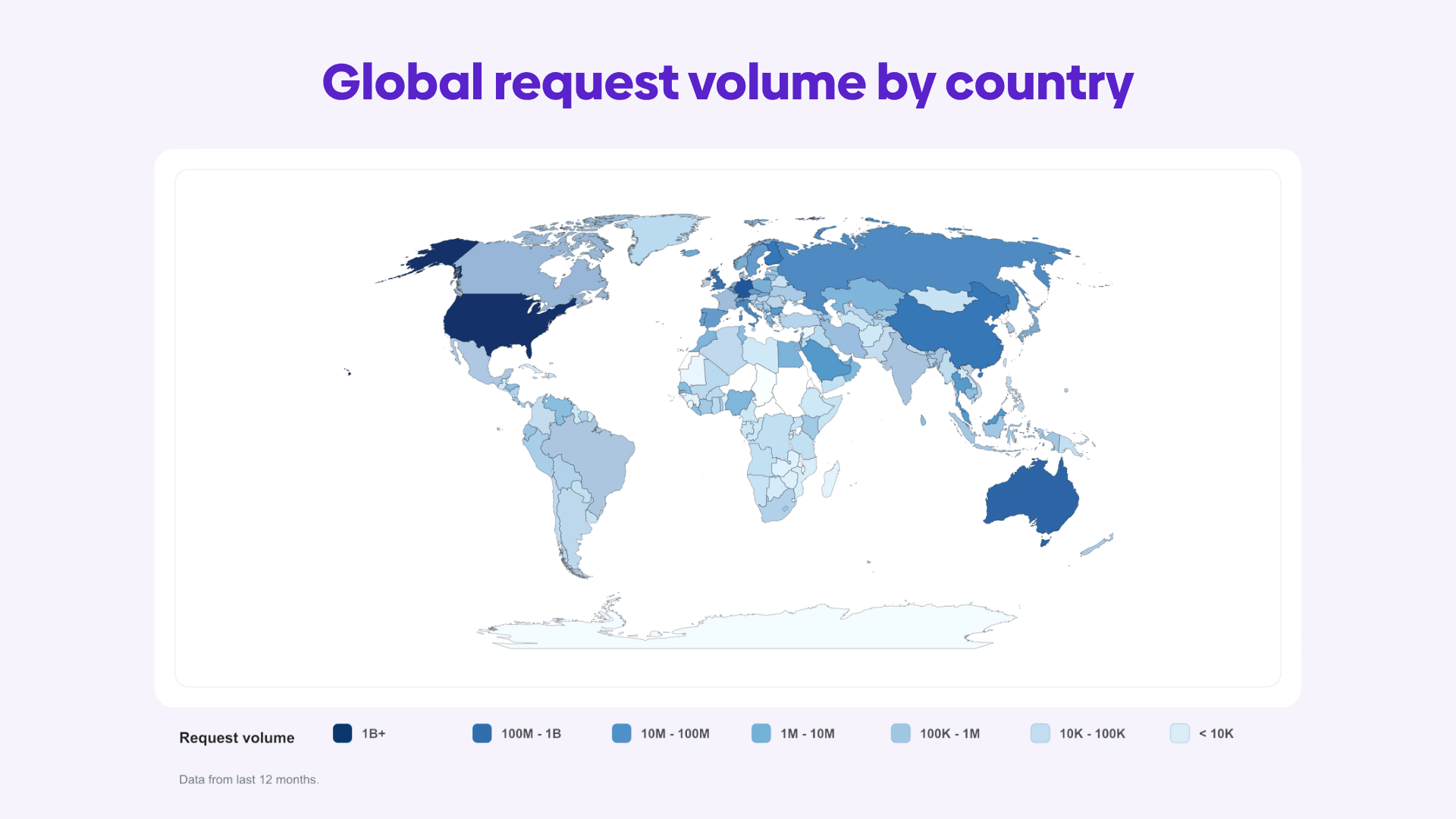
To start, urllo, formerly named EasyRedir, has been around since 2014. Today, urllo is trusted by 1,000+ companies, used by customers in over 200 countries, including numerous organizations with $100+ million yearly revenue and handles more than 25 billion requests per year. redirect.pizza has been around since 2018 and is a side-project by Enflow, a marketing agency based in the Netherlands.
Comparing urllo and redirect.pizza comes down to how much control, performance and reliability you need from your redirect infrastructure. Both platforms support common redirect and link management workflows, so the difference is not simply whether each tool can create redirects. The bigger question is how those redirects are delivered, how reliable they are and whether you can get knowledgeable support when business-critical redirects need attention.
redirect.pizza can be a practical option for straightforward forwarding and lower-cost URL management.
urllo is designed for teams that need reliability, faster latency, direct edge integration and more control over how redirects and hosted content are delivered. We provide expert implementation support during setup, along with recurring account reviews from our customer success managers to help your redirect strategy stay aligned with your business needs.
What features matter when evaluating the two?
The right redirect platform depends on the importance of the URLs your team needs to manage. For low-risk URLs, test links or redirects that do not support critical traffic, a free or lower-cost option may be enough.
But when redirects support revenue, customer access, paid campaigns, migrations, branded links or high-value domains, reliability becomes much more important, as we’ve been told by our Fortune 500 customers. In those cases, reliability, resiliency, latency and support should be key factors when choosing a URL redirect service. When comparing urllo and redirect.pizza, these are the areas to evaluate first.
Use case functionality

Before comparing redirect tools, it helps to understand the main redirect workflows.
A URL redirect sends one specific URL to another URL on the same domain.
Such as:
example.com/blog/qr-codes-guide-2025→example.com/blog/qr-codes-guide-2026
A cross-domain redirect sends one specific URL to a URL on a different domain.
Such as:
example.com/old-page → newsite.com/new-page
A domain redirect, often called domain forwarding, sends an entire domain to another domain.
Such as:
oldbrand.com → newbrand.com
These distinctions matter because full-domain forwarding and page-level redirects are handled differently. DNS-based forwarding is simple when every request should go to a new domain, but it can be limiting when only certain URLs should redirect while the rest of the website continues serving content from the origin. For that type of setup, edge-level redirect control may be needed. Serving redirects from the edge provides customers with the lowest latency request processing and offers teams flexibility in providing content to users.
The key question is not just whether a tool supports redirects. It is whether your team needs full-domain forwarding, individual URL redirects, cross-domain redirects, origin-aware routing, edge-level control or safe redirect management for non-technical teams.
Reliability and latency

Redirects are part of the user journey. If your redirect provider is unavailable, visitors will not reach the destination page, even if the destination itself is working.
For simple or low-risk forwarding, occasional downtime may not be a major concern. But for high-value pages, paid campaigns, website migrations, branded links or business-critical domains, reliability becomes one of the most important comparison points.
DDoS protection adds another layer of resilience by helping keep the redirect infrastructure available during malicious or abnormal traffic spikes. Since all traffic is redirected through redirect infrastructure, it needs to be able to handle huge spikes without going offline.
Pricing model
Pricing matters because redirect tools often scale in different ways. Some platforms price around source URLs, source hostnames, traffic volume, path limits, team members, analytics retention or enterprise controls.
When comparing pricing, look beyond the monthly cost and ask:
- How many source URLs are included?
- Are path-level redirects limited?
- Is traffic capped?
- Are team members included?
- Are analytics included?
- Are API access, imports, access controls or SSO gated by plan?
Redirect management capabilities
The next step is evaluating the features each platform provides for managing redirects accurately and safely.

Important redirect management features to look for include:
- HTTPS handling: Redirects should work reliably over HTTPS, with proper SSL/TLS certificate support so visitors do not see browser warnings or failed redirects.
- HTTP-to-HTTPS redirects: The platform should support secure upgrade behavior when visitors enter or click an HTTP version of a URL.
- Apex and www handling: Teams should be able to manage redirects consistently across root domains and www versions.
- Path and query forwarding: A redirect platform should be able to preserve both the path and query parameters from the original URL when needed.
- Partial path matching: Teams should be able to redirect groups of related URLs without creating a separate rule for every single page.
- Bulk import and export: Larger redirect projects should support spreadsheet-based uploads, exports and updates.
- Analytics and visibility: Teams should be able to see which redirects are being used, where traffic is going and whether any rules need cleanup.
- Team permissions: Redirect management should include role-based access so non-technical teams can make updates safely.
- Audit logs: Changes should be trackable, so that high-velocity teams know what changed and when. This is especially important when redirects affect SEO, campaigns or high-value pages.
These features matter because redirects are rarely just simple URL changes. A broken HTTPS setup can stop visitors before they reach the destination. Missing query forwarding can break campaign attribution. Weak path matching can make migrations harder to manage. Limited permissions or visibility can create risk when multiple teams are involved.
The best redirect platform is not just the one that can create a redirect. It is the one that gives your team enough control to manage redirects accurately, securely and reliably as your website, campaigns and domains change.
What’s the difference between urllo and redirect.pizza?
With those evaluation areas in mind, the biggest differences between urllo and redirect.pizza comes down to use case flexibility, redirect delivery performance, pricing structure and edge-level control.
1. Use case functionality
This is where the two platforms start to separate.
redirect.pizza is a good fit for straightforward redirect and domain forwarding use cases. If you need to forward a domain, preserve paths, pass query strings, handle HTTPS or set up basic redirect rules, it can cover those common workflows.
urllo is designed for more advanced redirect use cases where latency, reliability, flexibility and infrastructure control matter. In addition to standard redirect and forwarding workflows, urllo supports edge-level integration, which allows redirect logic to work alongside an existing website instead of requiring the entire domain to be handed over to a hosted forwarding setup.
That difference matters most when only some URLs need to be redirected.
With redirect.pizza, redirect functionality is generally tied to the domains and rules managed inside its forwarding infrastructure. That can work well when the redirect provider is responsible for handling the domain’s redirect traffic. However, redirect.pizza does not provide the same edge-level integration for selectively redirecting individual URLs while allowing unaffected pages to continue serving from the origin.
urllo is better suited for that type of setup. Teams can use urllo for individual URL redirects, cross-domain page redirects, migration cleanup, broken path repair and origin-aware redirect workflows while keeping healthy pages serving their original content.
2. Reliability & latency:
When comparing response times, we selected May 2026 as the example because this is the most recent full month prior to this publication. This gives us the most recent full-month comparison before publication (to avoid cherry-picking a favorable month).
These results reflect our verified, third-party monitoring for the tested redirect endpoints during May 2026. Performance can vary by region, configuration and network conditions, but the data gives a useful point-in-time comparison of uptime, outages and response time.
Third-party monitoring monthly report May 2026
| Provider | Uptime | Downtime | Outages | Response time | Transport |
|---|---|---|---|---|---|
| redirect.pizza | 99.94% | 0h 25m 00s | 5 | 1059 ms | TLS |
| urllo | 100.00% | 0h 00m 00s | 0 | 295 ms | TLS |
In this monitoring period, urllo’s tested redirect endpoints were roughly 3x faster and recorded no outages.
For IT teams, the value is practical: faster redirects improve user experience and stronger reliability reduces the risk of broken access, middle-of-the-night crises and emergency fixes when business-critical URLs are in use.
3. Pricing:
urllo starts at $9 USD/month with a 14-day free trial. redirect.pizza offers a free plan and paid plans starting at $14.95 USD/month. Because plan limits and pricing units differ, compare each platform based on your redirect volume, domain needs and required features.
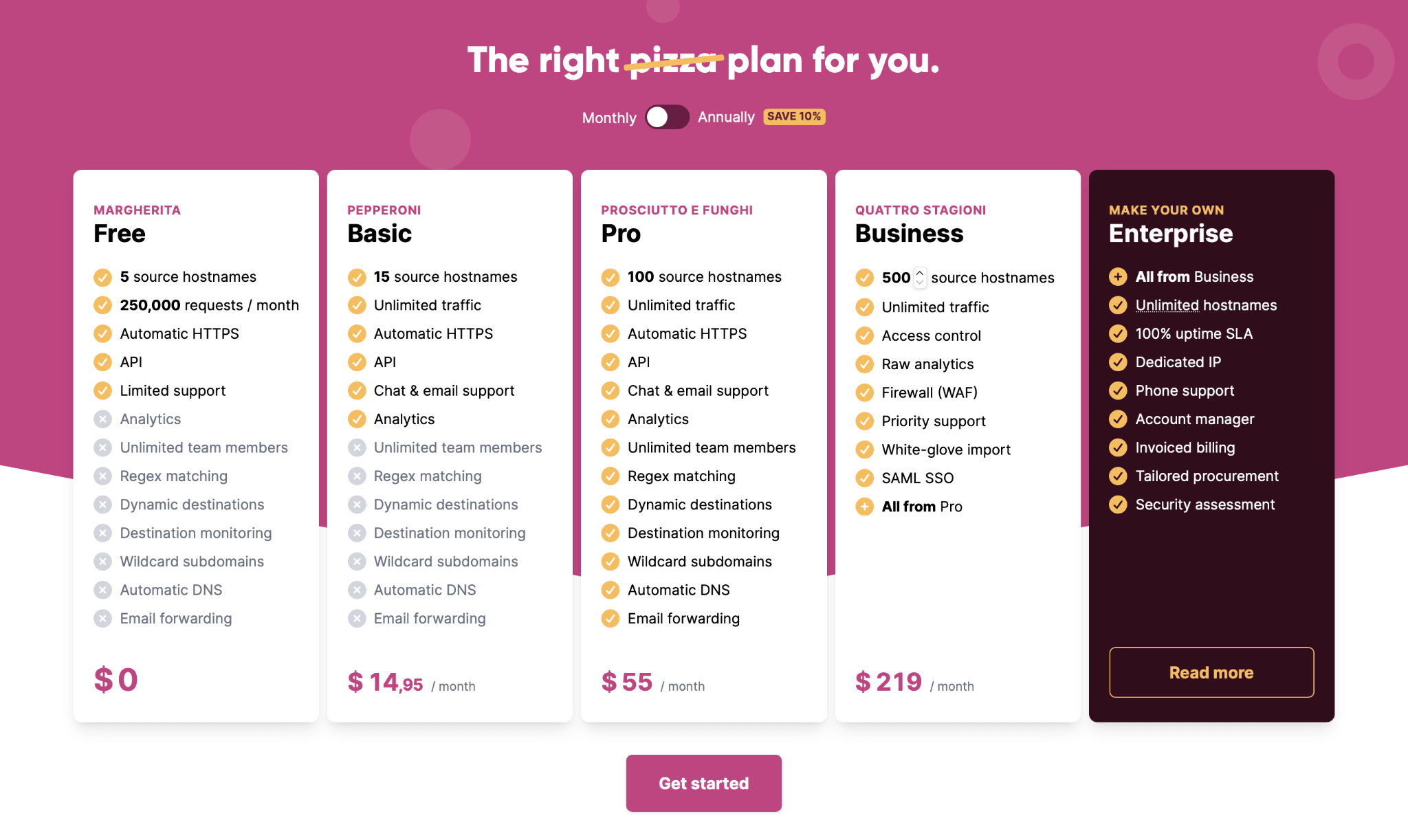
urllo does not offer a free plan, but it does include a 14-day free trial. redirect.pizza offers a free plan, which may make it appealing for smaller or non-commercial redirect needs.
If reliability, latency, edge integration, resilience and security matter more, urllo may be the better fit.
4. Redirect platform capabilities to compare:
Both urllo and redirect.pizza offer additional features either as add-ons or included as plan tiers progress.
| Features | urllo | redirect.pizza |
|---|---|---|
| Free plan | ✖ | ✔ |
| Free trial | ✔ | ✔ |
| Single Sign-On (SSO) | ✔ | ✔ |
| Partial path matching | ✔ | ✔ |
| Automatic HTTPS | ✔ | ✔ |
| Enterprise SLAs | ✔ | ✔ |
| API | ✔ | ✔ |
| Edge integration | ✔ | ✖ |
| DDoS protection | ✔ | ✖ |
| 99.999% historical uptime | ✔ | ✖ |
| 100% uptime SLA | ✔ | ✔ |
| Audit logs | ✔ | ✔ |
| Detailed analytics | ✔ | ✔ |
So who should you choose?
The right choice depends on how important redirects are to your business.
If you only need simple domain forwarding for a small number of hostnames and reliability isn’t a huge concern, redirect.pizza may be enough for your use case, especially if cost is the main factor. It offers the core redirect features many teams expect, including HTTPS handling, path forwarding and query forwarding.
Support coverage is another factor to consider. urllo is based in North America, which can be helpful for North American teams that want support questions and issue resolution handled during their normal business hours. redirect.pizza is based in Europe, which may be more convenient for European teams, but can be challenging for North American customers who need timely support.
Choose redirect.pizza if…
- You want to forward a small number of domains.
- You want a free plan.
- Cost is your primary deciding factor.
Choose urllo if…
- You need edge-level redirect control.
- You manage redirects across teams, campaigns, migrations or multiple domains.
- You need stronger reliability and latency.
- You want more confidence for business-critical URLs.
There’s a reason so many companies with over $100 million in revenue trust us; reliability is a non-negotiable when it comes to business-critical URLs and any website downtime is lost money.
Not sure which setup you need? Talk to our experts and we’ll help you decide whether domain forwarding, edge-level redirects or broader redirect management is the right fit.
Frequently Asked Questions
What are the main differences between urllo and redirect.pizza?
redirect.pizza is a cost-effective option for straightforward redirect and domain forwarding needs. It works well for simpler use cases where reliability and latency aren’t mission-critical.
urllo is built for teams that need more from their redirect infrastructure. It is designed for high performance, maximum reliability, secure delivery and robust redirect management across business-critical URLs, migrations, campaigns, domains and high-traffic environments.
In short, redirect.pizza can be a good fit for basic forwarding. urllo is the better fit when speed, reliability, scalability and operational confidence matter most.
Is urllo a redirect.pizza alternative?
Yes. urllo can be used as a redirect.pizza alternative, especially if your team needs more than basic domain forwarding. It is a good fit for organizations that want to manage redirects alongside branded links, QR codes, vanity URLs and team permissions in one place.
If you only need to forward a small number of domains and cost is the main priority, redirect.pizza may be enough. If you need a more dedicated platform with a focus on reliability and performance, urllo is likely the better fit.
Can both platforms handle HTTPS redirects?
Yes, both platforms are designed to support HTTPS redirect use cases. redirect.pizza publicly lists automatic HTTPS and SSL certificate handling as part of its redirect offering.
urllo also supports secure redirect and domain forwarding workflows, including HTTPS handling for teams managing redirects across domains.
On select plans, urllo also allows customer-managed TLS certificates, which is important for organizations with specific corporate certificate management policies or requirements.
Do both platforms support path and query forwarding?
Yes, both urllo and redirect.pizza support path and query forwarding.
Does urllo only manage redirects?
No. urllo manages redirects, but it also supports broader link management workflows such as branded links, QR codes, vanity URLs and domain forwarding. However, the stronger reason to choose urllo is not simply feature breadth. urllo is better suited for teams that need maximum reliability, faster redirect performance, edge-level integration and more control over business-critical redirect infrastructure.
Can I redirect one page without redirecting the whole domain?
Yes, but it depends on how the redirect is implemented.
If you use a DNS-based domain forwarding setup, the entire domain points to the redirect provider. That works well for forwarding one domain to another, but it is not ideal if your website still needs to serve normal content on other pages.
For example, if you only want:
example.com/old-page → example.com/new-page
While keeping the rest of example.com live, you need a setup that can handle page-level redirects without taking over the whole domain. An edge-level integration is better suited for this because it can process specific redirects before requests reach your origin server, while allowing non-redirected pages to continue loading normally.
Do I need a redirect platform if my CDN already handles redirects?
Not always. If you only have a few simple redirects and your technical team is comfortable managing them in your CDN, that may be enough.
A redirect platform becomes more useful when redirects are managed by multiple teams, change often, require bulk updates, need audit logs or need to be tied to campaigns, migrations, branded links, QR codes and analytics. It can give marketing, SEO, IT and WebOps teams one place to manage redirect rules without digging through CDN settings or relying on developer tickets for every change.
In short, a CDN can handle the redirect execution. A redirect platform helps with the workflow, visibility, governance and long-term management around redirects.

By Sean Pasemko
SEO & Growth Marketing Specialist
Sean Pasemko is an SEO and growth marketer at urllo, where he works closely with SEO, IT and WebOps teams on redirect management, domain changes and site migrations.
His writing draws on practical experience analyzing redirect behavior, crawl efficiency and long-term site maintenance to help teams avoid common routing and performance issues.




.png&w=2560&q=88)

.png&w=2560&q=88)



.png&w=2560&q=88)